
Create: Geological Processing
An addon designed to seamlessly blend new, logical recipes into the Create mod, expanding the automation possibilities for geological resources.
About this Mod
Create: Geological Processing
Create: Geological Processing expands the automation possibilities for geological resources by seamlessly adding new, logical recipes to the Create mod. This addon introduces new methods for generating Tuff, Dripstone, Netherrack, and more, creating a more interconnected and rewarding resource processing loop. It focuses on adding renewable sources for key materials while maintaining balance with the existing Create progression.
🚀 Installation & Recommendation
This addon is now available in two formats:
- 🔨 Forge Mod (Recommended): The simplest way to install. Just drop the
.jarfile into yourmodsfolder. This is the suggested version for all users, as it requires Forge anyway and offers a hassle-free experience. - 📦 Datapack: The original format, which must be placed in your world's
datapacksfolder. This version also requires the Forge mod loader.
We highly recommend using the Forge mod for easier installation and better integration.
🌟 Key Features
Mixing
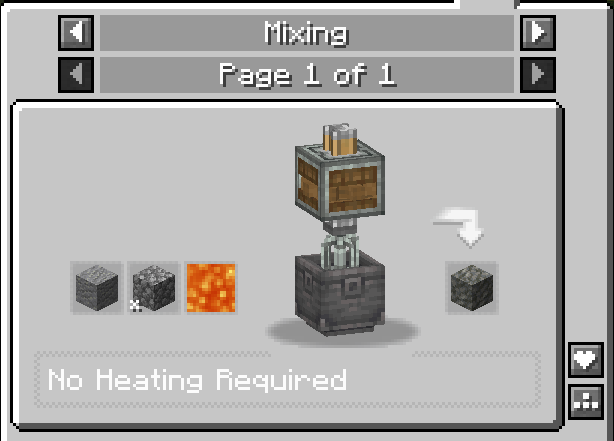
- Tuff: Andesite + Cobblestone + Lava (50mB)
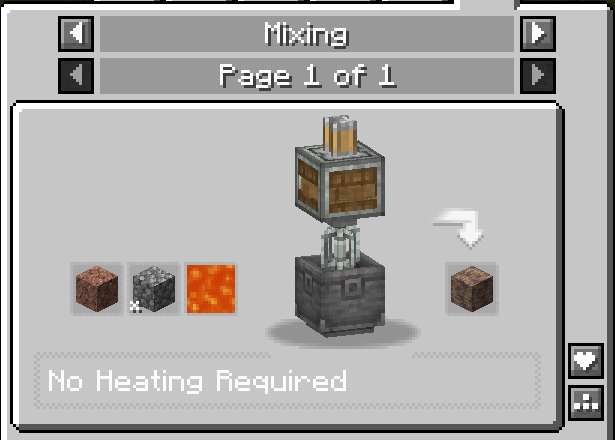
- Dripstone Block: Granite + Cobblestone + Lava (100mB)
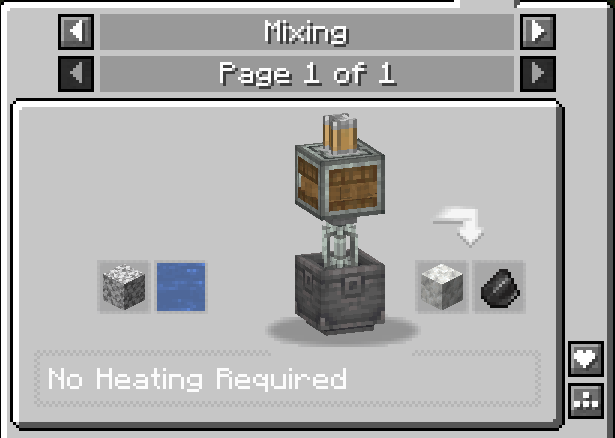
- Calcite: Diorite + Water (500mB) (Produces Flint as a by-product)
Filling
Copper Oxidization
This addon introduces a system for oxidizing copper blocks and their Create mod variants (such as Copper Shingles and Copper Tiles) using the Create mod Spout. You can now automate the weathering of copper blocks by combining them with water in a mechanical process.


How It Works
- Supported Blocks: All vanilla copper blocks (including slabs and stairs) and Create's copper block variants (shingles, tiles, etc.)
- Automation: Use a Create Spout to combine water and the copper block of your choice. The output will be the next weathered state (e.g., Copper → Exposed Copper, Exposed → Weathered, Weathered → Oxidized).
- Water Usage: The amount of water required is based on the block's exposed surface area, not its volume, for a more realistic approach.
Water Calculation by Block Type
- Full Block: 500 mB (base amount, representing 6 faces)
- Slab: 333 mB (2/3 of base, representing 4 faces)
- Stairs: 458 mB (11/12 of base, representing 5.5 faces)
Haunting
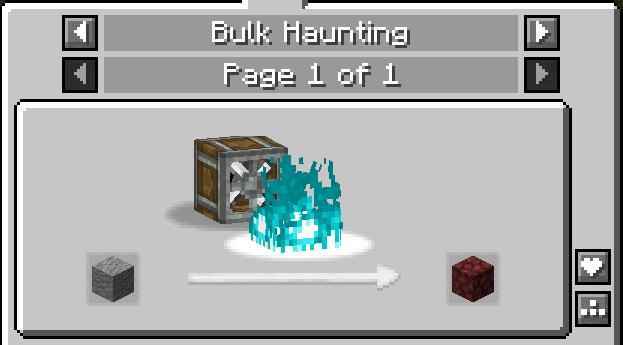
- Netherrack: Andesite can be Haunted
Mechanical Cutting
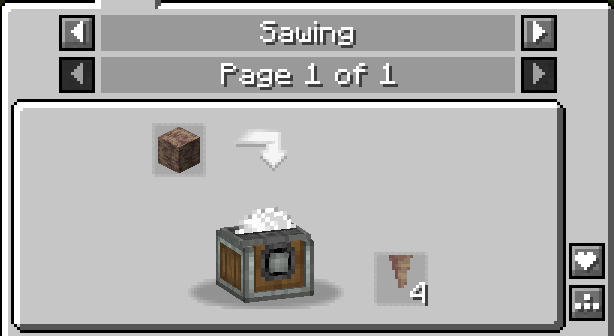
Pointed Dripstone: Dripstone Blocks can be cut into 4x Pointed Dripstone using a Mechanical Saw.
Compacting
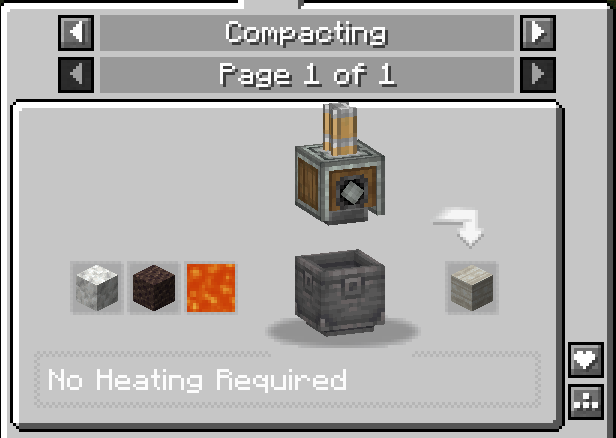
- Limestone: Calcite + Scoria + Lava (100mB)
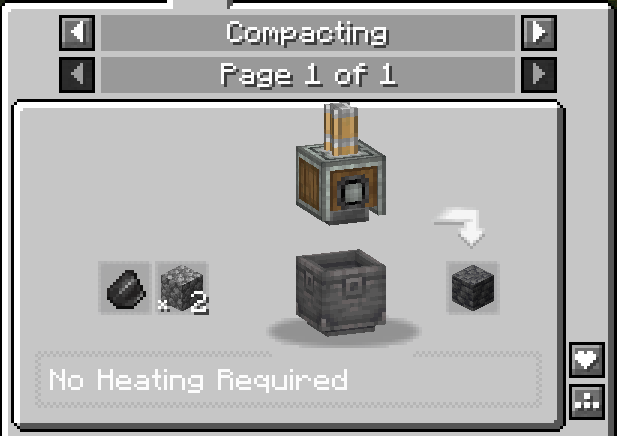
- Deepslate: Flint + 2x Cobblestone
Resource Processing (Crushing & Milling)
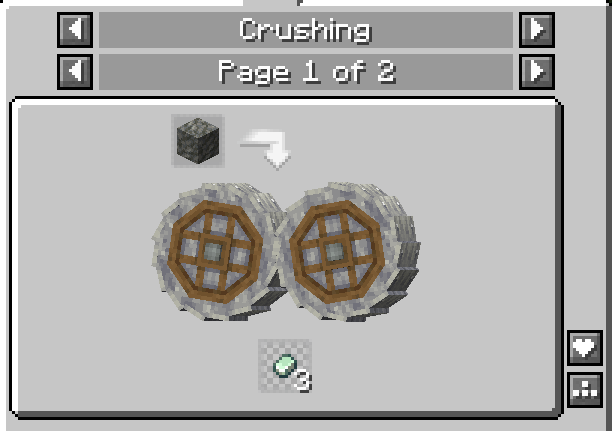
Crushing
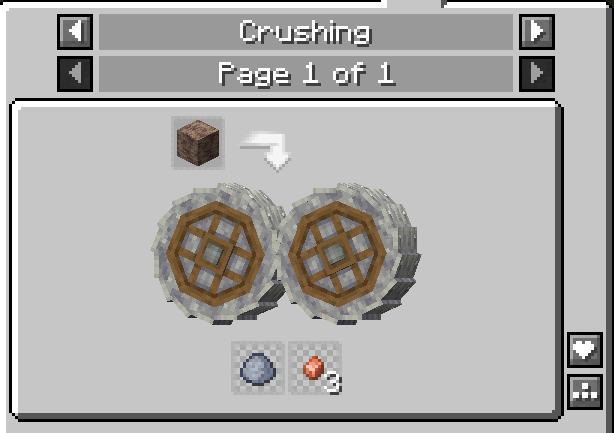
- Dripstone Block:
- 50% chance: Clay Ball
- 25% chance: 3x Copper Nuggets
- Tuff Block:
- 25% chance: 3x Zinc Nuggets (Gold and Iron are already renewable, so Tuff is dedicated to Zinc)
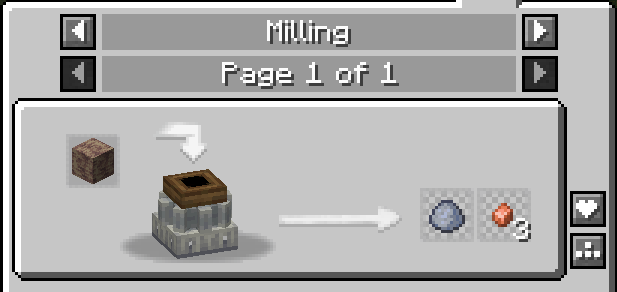
Milling
- Dripstone Block:
- 50% chance: Clay Ball
- 25% chance: 3x Copper Nuggets
🔧 Design Philosophy & Balance
This addon is built with a core principle: make key resources renewable through automation, not free.
- Renewable Metals: While Iron and Gold have existing renewable methods, this pack introduces automation-friendly paths for Copper (via Dripstone) and Zinc (via Tuff).
- Automation-Centric: Every recipe is designed to be automated using Create's machinery, encouraging players to build complex and satisfying factories.
- Logical Progression: Recipes follow a "geological" sense, using heat (Lava), pressure (Compacting), and erosion (Crushing) to transform materials in a way that feels natural within Minecraft's world.
Compatibility
This addon is built for Minecraft version 1.20.1 with Forge. It is a pure recipe addition/modification and should be compatible with any other mod or datapack that does not directly override the same Create recipes. It works perfectly in both single-player and multiplayer.
Full Recipe List
Create Override Recipes
Milling:
- Dripstone Block → Clay Ball (50%), Copper Nuggets (25%)
Crushing:
- Tuff → Zinc Nuggets (25%)
- Tuff (recycling) → Same as above, using
create:stone_types/tufftag
Addon Recipes
Haunting:
- Andesite → Netherrack
- Feather → Phantom Membrane
Mixing:
- Quartz + Blue Dye → Lapis Lazuli
- Dirt + Hanging Roots → Rooted Dirt
- Andesite + Cobblestone + Lava → Tuff
- Granite + Cobblestone + Lava → Dripstone Block
- Diorite + Water → Calcite
Cutting:
- Dripstone Block → 4x Pointed Dripstone
Blasting:
- Prismarine Shard → Blue Dye
Compacting:
- Calcite + Scoria + Lava → Limestone
- Flint + 2x Cobblestone → Deepslate
Filling:
- Copper Block + Water → Exposed Copper
- Exposed Copper + Water → Weathered Copper
- Weathered Copper + Water → Oxidized Copper
- (Same for Cut Copper, Slabs, Stairs, Tiles, Shingles, and all Create copper variants; each stage uses water based on surface area: 500 mB for blocks, 333 mB for slabs, 458 mB for stairs)
Available Versions
How to Install Create: Geological Processing on Your Server
Order Server
Order a Minecraft Java server with at least 4 GB RAM (6 GB recommended).
Set datapack Loader
In the panel under "Egg", select the datapack loader and matching Minecraft version (1.20.1).
Install Mod
Open the mod browser in the dashboard and search for "Create: Geological Processing". Click "Install" – done! Alternatively, upload the .jar via SFTP to the /mods folder.
Compatibility
Mod Loaders
Minecraft Versions
1.20.1
Server-side
✓ RequiredRecommended RAM
6 GB(min. 4 GB)Frequently Asked Questions
Create: Geological Processing server crashes on startup – what to do?
Most common cause: wrong datapack version or insufficient RAM. Check the server log (latest.log) for "OutOfMemoryError" or "Mixin" errors. With Mado Hosting: ensure at least 4 GB RAM is allocated and the loader matches the mod version (1.20.1). You can switch loaders with one click in the panel.
Is Create: Geological Processing compatible with datapack and forge?
Create: Geological Processing officially supports datapack, forge for Minecraft 1.20.1. The Mado dashboard automatically detects incompatible loader combinations.
Server lagging with Create: Geological Processing – how to optimize performance?
Recommended RAM: 6 GB (per 5 players). Use /spark profiler to check if Create: Geological Processing consumes the most tick time. Common fixes: reduce server view-distance to 8-10, install "performant" or "starlight" as supplementary mods on Forge. With Mado Hosting, your server runs on NVMe SSDs with dedicated CPU cores for minimal latency.
Similar Mods




![[ETF] Entity Texture Features](https://cdn.modrinth.com/data/BVzZfTc1/af683d206d50b05258d865b0d6e4aa2f2cee12f2_96.webp)
![[EMF] Entity Model Features](https://cdn.modrinth.com/data/4I1XuqiY/6e5bbd0d06b1741bfdab6c0cfab6de8fdaf0064c_96.webp)
Rent Modded Server
Install Create: Geological Processing with just one click on your server.