
Create: Logic
Safe scripting language for Create automation, instead of redstone.
Screenshots
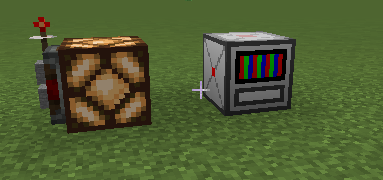
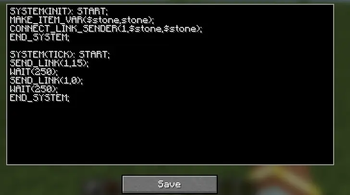
About this Mod
A create automation with using own programming language, naming "Metal".
Place a computer, right click, enter code, press save, shift+right click for toggle run.
Coding:
Declare 2 Systems (System is just like function), "INIT" and "TICK" like that:
SYSTEM(INIT): START;
init code here
END_SYSTEM;
SYSTEM(TICK): START;
tick (loop) code here
END_SYSTEM;
API:
There is some functions to work with Metal.
built-in functions:
MAKE_VAR(VAR_TYPE,$name,start_value); - making a global variable (global variable MUST start with '$', ONLY in INIT)
MAKE_ITEM_VAR($name,item_id); - making a INT variable by minecraft item number id (ONLY in INIT)
SET($name,value); - set new value for variable
ADD/SUB/MUL/DIV($name,value); - operations with variables
WAIT(ms); - delaying script (ONLY in TICK)
CONTINUE(); - return to the current System begin (ONLY in TICK)
RERUN(); - return to the main System of current script (ONLY in TICK)
EXIT_STACK(); - exit entire stack of System calls and returns to the point of stack start
RETURN(); - exit 1 System of stack of System calls
ABORT(); - forcibly terminate current script (Doesn't turn off computer)
CALL_SYSTEM(name, args...); - call System (max stack size is 16), cannot call Systems-EntryPoints (INIT, TICK), args is ONLY in in 0.0.3+ mod version
IF(condition): START; - Base IF operator (closing - "END_IF;")
ELSE(): START; - Base ELSE operator (between IF and END_IF)
BIND_ARGS_TO_SYSTEM(name, args...); ONLY in INIT, args must be like "#var:INT", setting arguments to system call (CALL_SYSTEM), ONLY in 0.0.3+ mod version
MAKE_LOCAL_VAR(VAR_TYPE,#name,start_value); - making a local variable (local variable MUST start with '#') ONLY in 0.0.3+ mod version
ACCEPT_INVOKES(); - allow invoke non-reserved systems by integrations ONLY in INIT, for 0.0.4+ mod version
PRINT(args...); - INFO Output (white) ONLY in 0.0.6+ mod version
WARN(args...); - WARN Output (yellow) ONLY in 0.0.6+ mod version
ERROR(args...); - ERROR Output (red) ONLY in 0.0.6+ mod version
end of built-in functions
Java Functions (registered outside of a Metal):
CONNECT_LINK_SENDER(id,item1,item2); - making a transmitter connection (for two last arguments recommends use MAKE_ITEM_VAR, id is any value, doesn't used before), ONLY in INIT
CONNECT_LINK_RECEIVER(id,item1,item2); - making a receiver connection (use MAKE_ITEM_VAR variables for two last arguments) ONLY in INIT
SEND_LINK(id,power); - send power to Create Redstone Link (use with id, used in CONNECT_LINK_SENDER)
RECEIVE_LINK(id); - receive power from Create Redstone Link (use with id, used in CONNECT_LINK_RECEIVER)
RANDOM(min,max); - returns random INT between min and max
RAND(); - returns random DOUBLE between 0.0 - 1.0
SIN(value); - returns sin of the value (use radians)
COS(value); - returns cos of the value (use radians)
TAN(value); - returns tan of the value (use radians)
SQRT(value); - returns sqrt of the value
DTR(value); - degrees to radians
RTD(value); - radians to degrees
GET_PI(); - returns PI
MIN(args...); - returns MIN of all arguments
MAX(args...); - returns MAX of all arguments
CLAMP(value,min,max); - returns limited value in range
ABS(value); - returns module of value
POW(value,pow); - returns exponentiation of the value
GET_OPS(); - returns completed operations of this script - 0.0.5+
end of Java Functions;
Tips:
ADD,SUB, etc using ONLY in modification of value
for example:
ADD($x,1); = x += 1;
In brackets:
IF($x + 1 > $y): START;
code
END_IF;
And, ": START" is not necessarily, but recommended, you also can use
SYSTEM(INIT);
...
IF(condition);
...
etc.
Current variable types: INT, DOUBLE, POWER, BOOL.
TICK EntryPoint (System) running in the other thread 1000 times per second.
INTEGRATION:
Since 0.0.4 you can call non-reserved systems from Computer Craft mod, its looks like:
Metal:
SYSTEM(INIT): START;
ACCEPT_INVOKES();
BIND_ARGS_TO_SYSTEM(SUM,#first:DOUBLE,#second:DOUBLE);
END_SYSTEM;
SYSTEM(SUM): START;
RETURN(#first + #second);
END_SYSTEM;
SYSTEM(TICK): START;
END_SYSTEM;
CC Lua:
local metal = peripheral.find("metal");
if metal then
print(metal.callSystem("SUM",5,10)); -- output: 15
else
print("Cannot find Metal Computer");
end
Since 0.0.5 you can use
SYSTEM(NAME,args...): START; instead of BIND_ARGS_TO_SYSTEM
example:
SYSTEM(SET_POWER,#f:POWER,#s:POWER): START;
SEND_LINK(1,#f);
SEND_LINK(2,#s);
END_SYSTEM;
"**" instead of "POW(val,pow);"
"%" operator
Since 0.0.6, in output functions you can use literals, just like that:
PRINT(~Hello World);
Hello World
or, with variable:
MAKE_VAR(INT,$test,150);
PRINT(~counter: ,$test);
counter: 150
Available Versions
How to Install Create: Logic on Your Server
Order Server
Order a Minecraft Java server with at least 4 GB RAM (6 GB recommended).
Set neoforge Loader
In the panel under "Egg", select the neoforge loader and matching Minecraft version (1.21.1).
Install Mod
Open the mod browser in the dashboard and search for "Create: Logic". Click "Install" – done! Alternatively, upload the .jar via SFTP to the /mods folder.
Compatibility
Mod Loaders
Minecraft Versions
1.21.1
Server-side
✓ RequiredRecommended RAM
6 GB(min. 4 GB)Frequently Asked Questions
Create: Logic server crashes on startup – what to do?
Most common cause: wrong neoforge version or insufficient RAM. Check the server log (latest.log) for "OutOfMemoryError" or "Mixin" errors. With Mado Hosting: ensure at least 4 GB RAM is allocated and the loader matches the mod version (1.21.1). You can switch loaders with one click in the panel.
Is Create: Logic compatible with neoforge?
Create: Logic officially supports neoforge for Minecraft 1.21.1. The Mado dashboard automatically detects incompatible loader combinations.
Server lagging with Create: Logic – how to optimize performance?
Recommended RAM: 6 GB (per 5 players). Use /spark profiler to check if Create: Logic consumes the most tick time. Common fixes: reduce server view-distance to 8-10, install "performant" or "starlight" as supplementary mods on Forge. With Mado Hosting, your server runs on NVMe SSDs with dedicated CPU cores for minimal latency.
Similar Mods




Rent Modded Server
Install Create: Logic with just one click on your server.