
create: nuclear industry
a create addon that adds realist fully simulated atom physics for nuclear reactors
Screenshots
About this Mod
Create: Nuclear Industrys
is a Create addon that adds nuclear fission to Minecraft. it simulates all radation particals in real time using raytracing for 100% realism, along with 1000% more custimizablity, at least compared to a diffrent create addon that i cant name.
Whats in it?
Uranium Ore: spawns underground. Mine it and process it into Enriched Uranium.
Uranium Fuel Rods: the core of your reactor. Place them together and they start a chain reaction,
absorbing radiation from each other and building heat. They glow brighter as they get hotter.
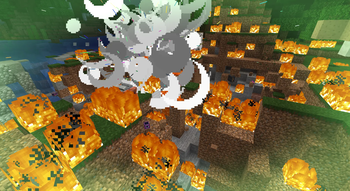
if you let them overheat and they melt down the and explosion scales with how many rods are nearby,
and it'll cascade into the rest of your reactor.
Boron Control Rods: absorb radiation particles and slow the reaction down.
Put them next to your fuel rods if you don't want things to go wrong.
Heat Pipes: move heat from your reactor to everywhere else and geneators and helps stablize the reactor.
Thermal Generator: connects to the heat network and outputs a Create shaft.
Needs water pumped in via fluid pipes. Converts it to steam after and, if you got no water, you got no power.
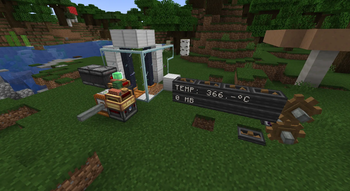
Heat Gauge: reads the temperature of the heat network it's placed in.
it can output a redstone signal proportional to heat (0–15 at 0–1000 c)
also works with display link to show the temperature.
Radiation is simulated as actual particles bounce through the world.
they bounce off walls and get absorbed by different materials, and give you radiation Sickness if they hit you.
Boron rods absorbs the most. everything else does a little, and Iron does nothing (it reflects everything)
Available Versions
How to Install create: nuclear industry on Your Server
Order Server
Order a Minecraft Java server with at least 4 GB RAM (6 GB recommended).
Set neoforge Loader
In the panel under "Egg", select the neoforge loader and matching Minecraft version (1.21.1).
Install Mod
Open the mod browser in the dashboard and search for "create: nuclear industry". Click "Install" – done! Alternatively, upload the .jar via SFTP to the /mods folder.
Compatibility
Mod Loaders
Minecraft Versions
1.21.1
Server-side
✓ RequiredRecommended RAM
6 GB(min. 4 GB)Frequently Asked Questions
create: nuclear industry server crashes on startup – what to do?
Most common cause: wrong neoforge version or insufficient RAM. Check the server log (latest.log) for "OutOfMemoryError" or "Mixin" errors. With Mado Hosting: ensure at least 4 GB RAM is allocated and the loader matches the mod version (1.21.1). You can switch loaders with one click in the panel.
Is create: nuclear industry compatible with neoforge?
create: nuclear industry officially supports neoforge for Minecraft 1.21.1. The Mado dashboard automatically detects incompatible loader combinations.
Server lagging with create: nuclear industry – how to optimize performance?
Recommended RAM: 6 GB (per 5 players). Use /spark profiler to check if create: nuclear industry consumes the most tick time. Common fixes: reduce server view-distance to 8-10, install "performant" or "starlight" as supplementary mods on Forge. With Mado Hosting, your server runs on NVMe SSDs with dedicated CPU cores for minimal latency.
Similar Mods




Rent Modded Server
Install create: nuclear industry with just one click on your server.