
Create: RailwaySignals
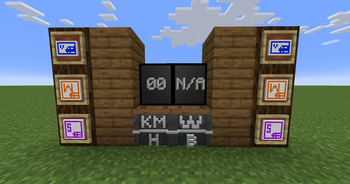
This Create addon adds Speedlimiter and SpeedSign blocks to control and display train speed limits. It also includes three ID items: Visitor, Supervisor, and Worker.
Screenshots
About this Mod
🚂 Create: Speed Control Addon
Enhance your railway systems in Create with new speed control mechanics and roleplay features!
📦 Dependencies
This addon requires the following mods to work:


Make sure these are installed before running the addon!
🛠 Features
Speedlimiter Block
- Set train speed limits in 20 steps, from 0 (maximum allowed speed) up to 200 km/h.
- Right-click to increase the speed limit.
- Shift-right-click to decrease the speed limit.
- Perfect for controlling traffic flow and ensuring safer operations on busy rail lines.
SpeedSign Block
- Place a SpeedSign above a Speedlimiter to automatically display the set speed.
- Shift-right-click a SpeedSign on a Speedlimiter to link them, then place the sign anywhere you like — great for visibility along the track.
Whistle Block
- Hold the Whistle Block and right-click on a track where you want trains to trigger a whistle.
- After linking, place the block anywhere — when a train passes the linked track, it will sound the whistle.
- Adds realism and audible cues for train movements.
ID Items
- Visitor ID
- Supervisor ID
- Worker ID
- Perfect for role-based multiplayer servers, permissions, and access control.
🎯 Why Use This Addon?
This addon adds both functionality and immersion to your Create railways. Control train speeds with ease, clearly display limits for operators, signal trains with whistles, and introduce roleplay possibilities with ID cards. Whether you're building a realistic rail network or running a multiplayer server with strict operations, these tools make your world more dynamic and organized.
Available Versions
How to Install Create: RailwaySignals on Your Server
Order Server
Order a Minecraft Java server with at least 4 GB RAM (6 GB recommended).
Set fabric Loader
In the panel under "Egg", select the fabric loader and matching Minecraft version (1.20.1).
Install Mod
Open the mod browser in the dashboard and search for "Create: RailwaySignals". Click "Install" – done! Alternatively, upload the .jar via SFTP to the /mods folder.
Compatibility
Mod Loaders
Minecraft Versions
1.20.1
Server-side
✓ RequiredRecommended RAM
6 GB(min. 4 GB)Frequently Asked Questions
Create: RailwaySignals server crashes on startup – what to do?
Most common cause: wrong fabric version or insufficient RAM. Check the server log (latest.log) for "OutOfMemoryError" or "Mixin" errors. With Mado Hosting: ensure at least 4 GB RAM is allocated and the loader matches the mod version (1.20.1). You can switch loaders with one click in the panel.
Is Create: RailwaySignals compatible with fabric and quilt?
Create: RailwaySignals officially supports fabric, quilt for Minecraft 1.20.1. The Mado dashboard automatically detects incompatible loader combinations.
Server lagging with Create: RailwaySignals – how to optimize performance?
Recommended RAM: 6 GB (per 5 players). Use /spark profiler to check if Create: RailwaySignals consumes the most tick time. Common fixes: reduce server view-distance to 8-10, install "performant" or "starlight" as supplementary mods on Forge. With Mado Hosting, your server runs on NVMe SSDs with dedicated CPU cores for minimal latency.
Similar Mods

![[ETF] Entity Texture Features](https://cdn.modrinth.com/data/BVzZfTc1/af683d206d50b05258d865b0d6e4aa2f2cee12f2_96.webp)
![[EMF] Entity Model Features](https://cdn.modrinth.com/data/4I1XuqiY/6e5bbd0d06b1741bfdab6c0cfab6de8fdaf0064c_96.webp)



Rent Modded Server
Install Create: RailwaySignals with just one click on your server.