
Create: Salvage
Use Create contraptions to melt unwanted tools back into resources.
Screenshots

About this Mod
Create: Salvage
Finally, a use for all those excess tools and armor pieces!
Create: Salvage provides a new category of recipes, allowing you to salvage raw materials from unwanted tools.
Features
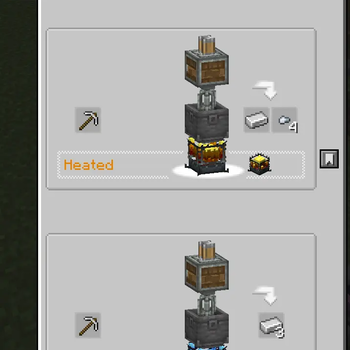
- Place a Mixer above a Basin and a Blaze Burner below, then add your unwanted items. When complete, you will receive Ingots and Nuggets equal to half the crafting cost of the item. Damaged tools salvage into proportionally less raw material.
- Superheat the Blaze Burner to increase the salvage rate to 100% for metal items, and enable salvaging higher tier items like Diamond and Netherite.
- A custom Ponder scene explaining the mod.
- A custom JEI recipe category to view all applicable recipes.
- Fully data-driven recipes for ease of modding and modpack development.
- Built-in recipes automatically applying recipes for a bunch of mods.
- A Diamond Nugget because I felt Diamond Shovels giving nothing was a feelsbad. Use Almost Unified if this conflicts with another mod.

Built-In Recipes
The following mods have built-in recipes:
Available Versions
How to Install Create: Salvage on Your Server
Order Server
Order a Minecraft Java server with at least 4 GB RAM (6 GB recommended).
Set neoforge Loader
In the panel under "Egg", select the neoforge loader and matching Minecraft version (1.21.1).
Install Mod
Open the mod browser in the dashboard and search for "Create: Salvage". Click "Install" – done! Alternatively, upload the .jar via SFTP to the /mods folder.
Compatibility
Mod Loaders
Minecraft Versions
1.21.1
Server-side
✓ RequiredRecommended RAM
6 GB(min. 4 GB)Frequently Asked Questions
Create: Salvage server crashes on startup – what to do?
Most common cause: wrong neoforge version or insufficient RAM. Check the server log (latest.log) for "OutOfMemoryError" or "Mixin" errors. With Mado Hosting: ensure at least 4 GB RAM is allocated and the loader matches the mod version (1.21.1). You can switch loaders with one click in the panel.
Is Create: Salvage compatible with neoforge?
Create: Salvage officially supports neoforge for Minecraft 1.21.1. The Mado dashboard automatically detects incompatible loader combinations.
Server lagging with Create: Salvage – how to optimize performance?
Recommended RAM: 6 GB (per 5 players). Use /spark profiler to check if Create: Salvage consumes the most tick time. Common fixes: reduce server view-distance to 8-10, install "performant" or "starlight" as supplementary mods on Forge. With Mado Hosting, your server runs on NVMe SSDs with dedicated CPU cores for minimal latency.
Similar Mods




![[ETF] Entity Texture Features](https://cdn.modrinth.com/data/BVzZfTc1/af683d206d50b05258d865b0d6e4aa2f2cee12f2_96.webp)
![[EMF] Entity Model Features](https://cdn.modrinth.com/data/4I1XuqiY/6e5bbd0d06b1741bfdab6c0cfab6de8fdaf0064c_96.webp)
Rent Modded Server
Install Create: Salvage with just one click on your server.