
Create: Smart Crafter
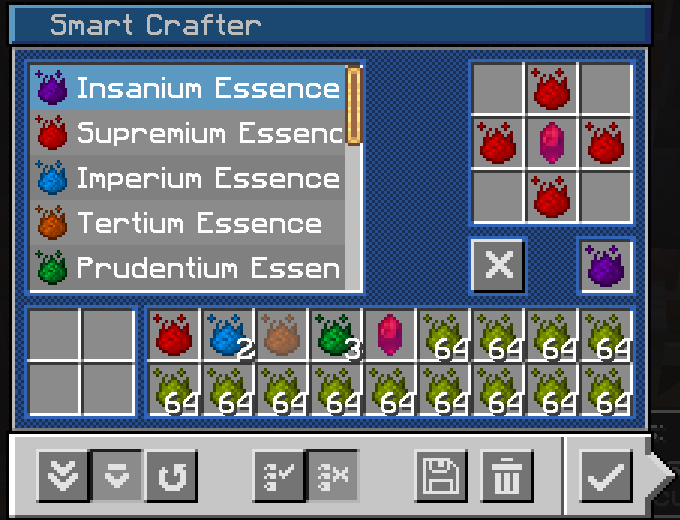
Add an autocrafting machine with an internal inventory that can store up to 9 different recipes
Screenshots
About this Mod
Create: SmartCrafter - Advanced Crafting Made Simple
Overview
The SmartCrafter brings a powerful and intuitive crafting system inspired by the RFTools Crafter, perfect for automating and customizing your crafting experience. This mod introduces a single, versatile block that allows you to store and manage multiple crafting recipes with advanced features.
Keep Mode
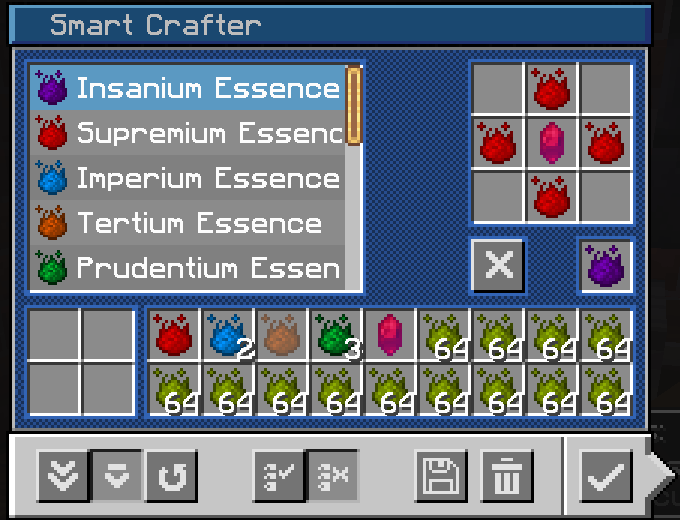
When enabled, at least one item will remain in each ingredient slot, ensuring that essential components are always available for future crafting cycles.
Ghost Items
Save and lock the arrangement of items in both the ingredient and output slots.
Multi-Recipe Storage
Each Crafter can store up to 9 unique recipes, allowing you to easily switch between different crafting setups without needing to reconfigure the block each time.
Customizable Output Options (Per Recipe)
Choose how your crafted items are handled based on your needs:
- Ext (External Output): All resulting items will go directly into the output slots.
- Secondary Int (Secondary Internal Output): The main result of the recipe will go into the output slots, while secondary items (like empty buckets) will return to the ingredient slots.
- Int (Internal Output): All resulting items will return to the ingredient slots, ideal for closed-loop crafting systems.
Usage
In modpacks
You can include this mod in any modpacks.
You can make any modifications to the mod with the goal of distributing it in a modpack.
In other cases
You can use this mod however you like as long as you obtain the mod via its Modrinth or CurseForge page.
You can make any modifications to the mod, but you cannot redistribute it unless you have modified a substantial portion of the mod's code. Changes to resource packs/data packs/mod metadata do not count as code modification.
This mod is open to suggestions, so if you have made any modification to the mod, please leave an issue/PR so I can consider adding your use case to the mod.
Available Versions
How to Install Create: Smart Crafter on Your Server
Order Server
Order a Minecraft Java server with at least 4 GB RAM (6 GB recommended).
Set forge Loader
In the panel under "Egg", select the forge loader and matching Minecraft version (1.20.1).
Install Mod
Open the mod browser in the dashboard and search for "Create: Smart Crafter". Click "Install" – done! Alternatively, upload the .jar via SFTP to the /mods folder.
Compatibility
Mod Loaders
Minecraft Versions
1.20.1
Server-side
✓ RequiredRecommended RAM
6 GB(min. 4 GB)Frequently Asked Questions
Create: Smart Crafter server crashes on startup – what to do?
Most common cause: wrong forge version or insufficient RAM. Check the server log (latest.log) for "OutOfMemoryError" or "Mixin" errors. With Mado Hosting: ensure at least 4 GB RAM is allocated and the loader matches the mod version (1.20.1). You can switch loaders with one click in the panel.
Is Create: Smart Crafter compatible with forge?
Create: Smart Crafter officially supports forge for Minecraft 1.20.1. The Mado dashboard automatically detects incompatible loader combinations.
Server lagging with Create: Smart Crafter – how to optimize performance?
Recommended RAM: 6 GB (per 5 players). Use /spark profiler to check if Create: Smart Crafter consumes the most tick time. Common fixes: reduce server view-distance to 8-10, install "performant" or "starlight" as supplementary mods on Forge. With Mado Hosting, your server runs on NVMe SSDs with dedicated CPU cores for minimal latency.
Similar Mods




Rent Modded Server
Install Create: Smart Crafter with just one click on your server.