
Create: Solarpunk
An addon for create that adds green energy to minecraft. (Solar panels, biofuel, thermal energy, etc.)
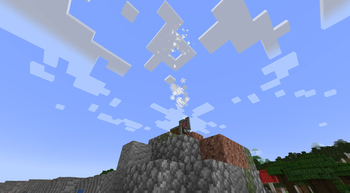
Screenshots
About this Mod
Create: Solarpunk
A NeoForge mod for Minecraft 1.21.1 that adds solar energy generation, thermal storage, biofuel production, and an optional global warming system to the Create ecosystem.
Requirements
- Minecraft 1.21.1
- NeoForge 21.1.228+
- Create 6.0.4+
- GeckoLib 4.7.2+
Optional: JEI (adds recipe categories for the Solar Heater and Fermentation Vat)
Features
Solar Heat Chain
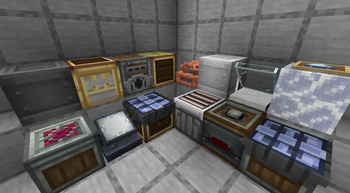
- Salt - a new material found as underground deposits in desert, badlands, and savanna biomes; the core fuel of the solar heat chain
- Solar Heater - concentrates sunlight to melt salt into molten salt or evaporate water into salt crystals; requires a clear view of the sky
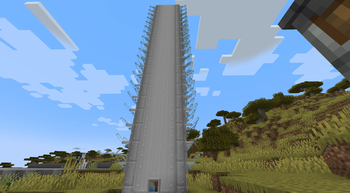
- Solar Power Tower - large multiblock structure (1×1 up to 3×3 footprint, up to 20 blocks tall) that concentrates reflected sunlight to produce molten salt at scale; pair with Solar Mirrors for maximum efficiency
- Solar Mirror - a heliostat that reflects sunlight toward a Solar Power Tower; place directly against the tower's side faces; can be mounted on floors, walls, and ceilings
- Heat Battery - stores thermal energy from molten salt and heats Create boilers
Electricity
- Andesite Solar Panel - generates Create rotational force (SU) from sunlight
- Brass Solar Panel - generates Forge Energy (FE) from sunlight
- Kinetic Battery - stores rotational energy (SU) for later use
Biofuel Chain
- Biomass - crafted from organic matter
- Biomass Pellet - a compacted form of biomass; burns slower in the Gasifier but produces twice the Biochar per piece
- Biomass Gasifier - processes raw biomass or pellets using rotational force; produces Biochar as a byproduct
- Fermentation Vat - multiblock structure (minimum 2×2 footprint, stackable vertically) that converts biomass into liquid biofuel using water; larger footprints process more batches per cycle
- Biofuel Engine - burns biofuel to generate rotational force (SU)
- Biochar - byproduct of the Gasifier; acts as a bonemeal substitute or mixes with water to make Fertilizer
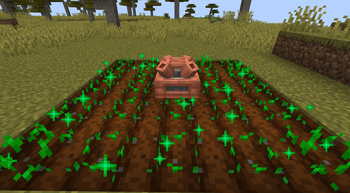
- Fertilizer - liquid made from Biochar and water; used in the Kinetic Sprinkler for forced instant crop growth
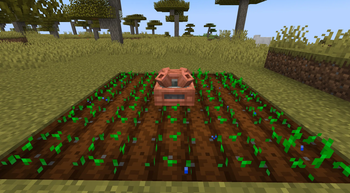
- Kinetic Sprinkler - hydrates farmland and accelerates crop growth in a 5×5 area; pipe in water to boost growth or Fertilizer for instant growth every cycle
Geothermal
- Geyser Vent - spawns naturally in desert, badlands, and savanna biomes
- Geyser Cap - harnesses geothermal energy from a Geyser Vent and converts it into rotational force; passive, works day and night in any weather
Global Warming (optional)
An opt-in pollution system, disabled by default and toggled in the config.
- Pollution sources - campfires, furnaces, blast furnaces, smokers, blaze burners, steam engines, biofuel engines, and biomass gasifiers emit smoke and accumulate pollution in nearby chunks
- Block decay - polluted chunks decay progressively: grass withers to Dead Grass, dirt crumbles to Ruined Dirt, then Ash; plants and leaves are cleared; biomes convert to a dead wasteland at high pollution levels
- Biofilter - a brass-tier machine that draws rotational power and scrubs pollution from surrounding chunks, reversing the decay over time; goggles show the current pollution level and filter rate
- All pollution rates, thresholds, decay speeds, and the target dead biome are configurable; see the wiki for full details
Quick Start
- Find salt underground in arid biomes (desert, badlands, savanna) or craft it
- Place a Solar Heater with a clear view of the sky
- Right-click salt into the heater's input slot - it converts to molten salt during daytime
- Pipe the molten salt into a Heat Battery
- Place the Heat Battery adjacent to a Create boiler to heat it
For high-volume molten salt production, build a Solar Power Tower and surround its sides with Solar Mirrors.
Solar Power Tower Guide
The tower is a multiblock built by stacking tower blocks and using the Solar Power Tower item to place multiple in a row (like fluid tanks). It operates only in direct sunlight and stops during rain or thunderstorms.
| Footprint | Max height | Optimal mirrors | Water demand (per mB salt) |
|---|---|---|---|
| 1×1 | 5 | 10 | 1× (1:1) |
| 2×2 | 10 | 40 | 4× (4:1) |
| 3×3 | 20 | 180 | 9× (9:1) |
Mirror efficiency follows a triangle curve: efficiency rises linearly from 0 mirrors to the optimal count (100%), then falls back to 0% at twice the optimal. Over-mirroring shuts the tower down.
Minimum size: the tower requires at least a 3×3 footprint to produce anything.
Thanks
Thanks to the following people for their ideas:
- Slopton
- Multyfora
- Jimmithy5
- pumpkin_p._patch
- yui_riku
- arccam
Links
Available Versions
How to Install Create: Solarpunk on Your Server
Order Server
Order a Minecraft Java server with at least 4 GB RAM (6 GB recommended).
Set neoforge Loader
In the panel under "Egg", select the neoforge loader and matching Minecraft version (1.21.11).
Install Mod
Open the mod browser in the dashboard and search for "Create: Solarpunk". Click "Install" – done! Alternatively, upload the .jar via SFTP to the /mods folder.
Compatibility
Mod Loaders
Minecraft Versions
1.21.11, 1.21.10, 1.21.9 (+8 more)
Server-side
✓ RequiredRecommended RAM
6 GB(min. 4 GB)Frequently Asked Questions
Create: Solarpunk server crashes on startup – what to do?
Most common cause: wrong neoforge version or insufficient RAM. Check the server log (latest.log) for "OutOfMemoryError" or "Mixin" errors. With Mado Hosting: ensure at least 4 GB RAM is allocated and the loader matches the mod version (1.21.11). You can switch loaders with one click in the panel.
Is Create: Solarpunk compatible with neoforge?
Create: Solarpunk officially supports neoforge for Minecraft 1.21.11, 1.21.10, 1.21.9. The Mado dashboard automatically detects incompatible loader combinations.
Server lagging with Create: Solarpunk – how to optimize performance?
Recommended RAM: 6 GB (per 5 players). Use /spark profiler to check if Create: Solarpunk consumes the most tick time. Common fixes: reduce server view-distance to 8-10, install "performant" or "starlight" as supplementary mods on Forge. With Mado Hosting, your server runs on NVMe SSDs with dedicated CPU cores for minimal latency.
Similar Mods




Rent Modded Server
Install Create: Solarpunk with just one click on your server.