
Create: Windmill Speed Control
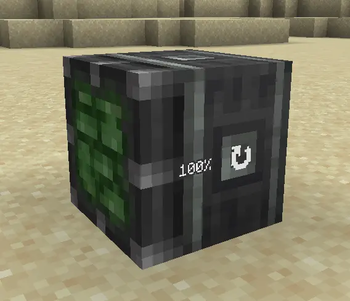
A small Create add-on mod that adds a new windmill bearing block allowing to change the rotation speed. Purely cosmetic, no logic modified.
Screenshots
About this Mod
Create: Windmill Speed Control
Ever built a beautiful large windmill in Create only to watch it spin like a helicopter?
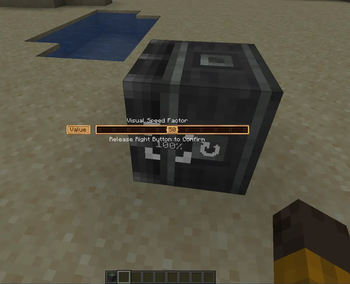
Create: Windmill Speed Control adds a new custom windmill bearing that lets you adjust the visual rotation speed of your windmills while keeping their mechanical performance unchanged.
⚙️ Features
- Adjustable visual speed factor (10% - 100%)
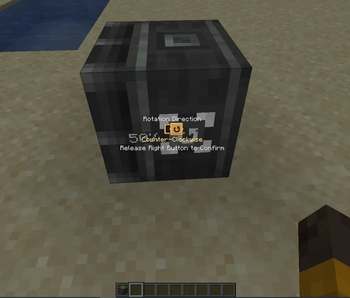
- Independent rotation direction control (vanilla)
- No changes to generated Stress Units (SU)
- No changes to gameplay balance
- Compatible with standard Create windmill contraptions
- Fully synchronized in multiplayer
- Dedicated server compatible
Perfect for builders who want large decorative windmills to look more natural without sacrificing Create's mechanics.
🧩 Requirements
- Minecraft == 1.21.1
- NeoForge >= 21.1.230
- Create == 6.0.10
🛠 Use
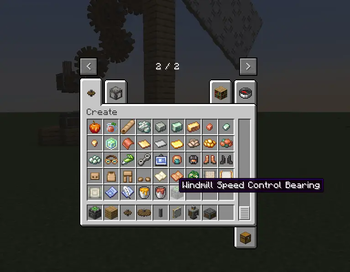
- can be crafted from a basic
windmill bearingand adding abrass ingoton top + aprecision mechanismbelow (cf JEI) - block friendly name :
Windmill Speed Control Bearing - block full name :
create_windmill_speed_control:visual_windmill_bearing
🧭 Roadmap
- dedicated texture
- improve parameter icons placement
- Fabric version
⚠️ Notes
- This mod requires Create to function.
- It is currently in active development, and new features could be added over time.
- Iris Flywheel Compat mod is highly recommended if you play with shaders, to prevent rendering issues with Create rotating blocks/structures.
Available Versions
How to Install Create: Windmill Speed Control on Your Server
Order Server
Order a Minecraft Java server with at least 4 GB RAM (6 GB recommended).
Set neoforge Loader
In the panel under "Egg", select the neoforge loader and matching Minecraft version (1.21.1).
Install Mod
Open the mod browser in the dashboard and search for "Create: Windmill Speed Control". Click "Install" – done! Alternatively, upload the .jar via SFTP to the /mods folder.
Compatibility
Mod Loaders
Minecraft Versions
1.21.1
Server-side
✓ RequiredRecommended RAM
6 GB(min. 4 GB)Frequently Asked Questions
Create: Windmill Speed Control server crashes on startup – what to do?
Most common cause: wrong neoforge version or insufficient RAM. Check the server log (latest.log) for "OutOfMemoryError" or "Mixin" errors. With Mado Hosting: ensure at least 4 GB RAM is allocated and the loader matches the mod version (1.21.1). You can switch loaders with one click in the panel.
Is Create: Windmill Speed Control compatible with neoforge?
Create: Windmill Speed Control officially supports neoforge for Minecraft 1.21.1. The Mado dashboard automatically detects incompatible loader combinations.
Server lagging with Create: Windmill Speed Control – how to optimize performance?
Recommended RAM: 6 GB (per 5 players). Use /spark profiler to check if Create: Windmill Speed Control consumes the most tick time. Common fixes: reduce server view-distance to 8-10, install "performant" or "starlight" as supplementary mods on Forge. With Mado Hosting, your server runs on NVMe SSDs with dedicated CPU cores for minimal latency.
Similar Mods

![[ETF] Entity Texture Features](https://cdn.modrinth.com/data/BVzZfTc1/af683d206d50b05258d865b0d6e4aa2f2cee12f2_96.webp)
![[EMF] Entity Model Features](https://cdn.modrinth.com/data/4I1XuqiY/6e5bbd0d06b1741bfdab6c0cfab6de8fdaf0064c_96.webp)



Rent Modded Server
Install Create: Windmill Speed Control with just one click on your server.