
Create: Create O' Plenty (Create + Biomes O' Plenty Mod compat)
Adds compatibility between Create and Biomes O' Plenty.
Screenshots
About this Mod
📜About
Create O’Plenty is a small compatibility add-on that bridges Create and Biomes O’ Plenty, letting you automate BOP’s unique blocks and resources with Create’s machines. (The pictures show some of the features)
⚠️Note
If you’re running Create 6.0.7 or higher, you might spot some duplicate/additional recipes. The Create team has been adding their own built-in compatibility, which overlaps with what’s here.
Create O Plenty still brings some unique recipes to the table, so I’ve left them in for now.
I'm planning to focus on a proper fix and some workarounds for this in Version 3.0.
Until then, It’s totally your call on which ones you prefer to use!
⚙️Features
- Fixes the inability to apply casings to several stripped woods/logs.
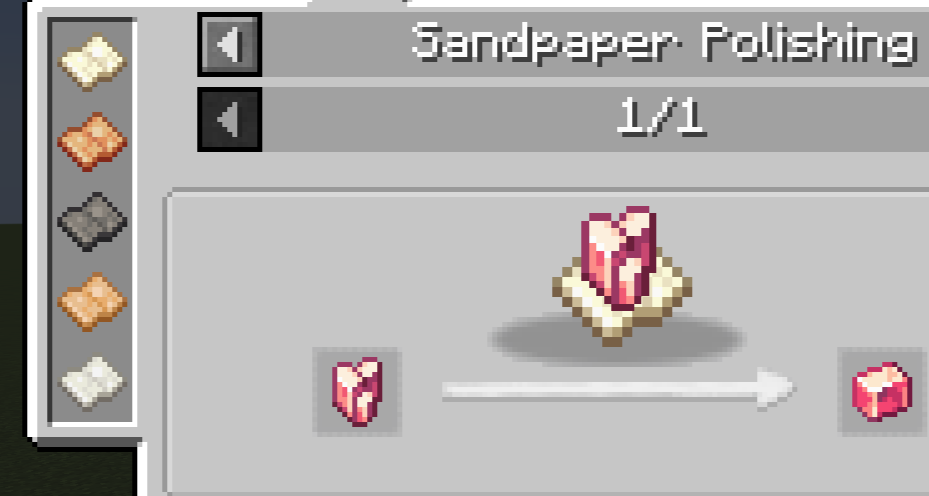
- Adds the missing Sand Papers: Black, Orange, and White.
- Compacting – turn BOP's Sands into rocks, or craft a Flesh Block using 100 mb of Blood as an alternative recipe.
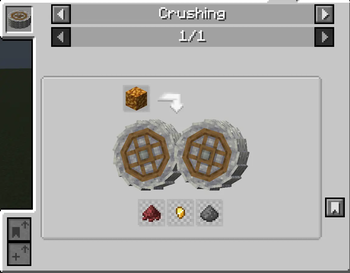
- Crushing – BOP sandstones, Flesh and Porous Flesh Blocks, Rose Quartz blocks and clusters, Thermal Calcite and Thermal Vent blocks, Brimstone, and all BOP flowers and tall flowers into their components.
- Milling – provides some early Crushing recipes. (All except Brimstone and Rose Quartz crushing)
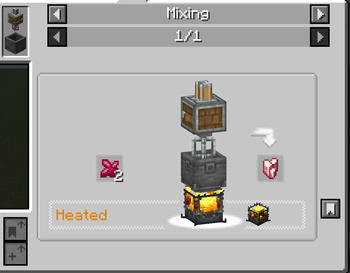
- Mixing – make Thermal Calcite using heat and form Create's Rose Quartz from Mixing BOP's Rose Quartz Chunks using Heat. (For grind's sake)'
⚙️Detailed Recipes( unhide the spoiler to see all thew new recipes with their detailed drops)
COMPACTING RECIPES
• Diorite
Inputs: 2 Flint + 1 White Sand + 100 mB Lava
• Scrochia
Inputs: Inputs: 2 Flint + 1 Black Sand + 100 mB Lava
• Flesh Block
Inputs: 4 Rotten Flesh + 100 mB Blood
CRUSHING & MILLING
(Brimstone and Rose Quartz blocks can only be crushed)
Orange Sandstone → Orange Sand ×1
White Sandstone → White Sand ×1
Flesh Block → Rotten Flesh ×2, 25% chance Bone Meal ×1
Porous Flesh → Rotten Flesh ×2, 25% chance Bone Meal ×1
Rose Quartz Block → Rose Quartz Chunk ×3, 50% chance +1 Chunk
Rose Quartz Cluster → Rose Quartz Chunk ×7, 50% chance +1 Chunk
Thermal Calcite → 75% chance Bone Meal ×1
Thermal Calcite Vent → 75% chance Bone Meal ×1
Brimstone → Create:Cinder Flour ×1, 20% chance Gold Nugget ×1, 10% chance Gunpowder ×1
White Petals → White Dye ×2, 20% chance Lime Dye ×1
Icy Iris → Light Blue Dye ×2, 20% chance Light Blue Dye ×1
Endbloom → Light Gray Dye ×2, 10% chance Orange Dye ×1
Waterlily → Red Dye ×2, 20% chance Lime Dye ×1, 10% chance Pink Dye ×1
Cattail → Brown Dye ×2, 20% chance Green Dye ×1
White Lavender → White Dye ×2, 20% chance Green Dye ×1
Tall White Lavender → White Dye ×3, 25% chance +2 White Dye, 5% chance +2 Green Dye
Tall Lavender → Purple Dye ×3, 25% chance +2 Purple Dye, 5% chance +2 Green Dye
Goldenrod → Yellow Dye ×3, 25% chance +2 Yellow Dye, 5% chance +2 Lime Dye
Tiny Cactus → Green Dye ×2, 10% chance Green Dye ×1
HEATED PROCESSING
Calcite Block → Thermal Calcite Block (Requires Heat)
2 Rose Quartz Chunks → Create:Rose Quartz (Requires Heat)
🔧Requirements (minimum)
Forge Requires:
- Minecraft Forge 1.20.1 (47.3.0)
- Create 6.0.0 or newer
- Biomes O’ Plenty 19.0.0.96 or newer
- Glitchcore and Terrablender (depending on your Biomes O’ Plenty version)\
- JEI for a better experience
undefined
Neoforge Requires:
- Minecraft Forge 1.21.1 (21.1.200)
- Create 6.0.6 or newer
- Biomes O' Plenty 21.1.0 or newer
- Glitchcore and Terrablender (depending on your Biomes O’ Plenty version)\
- JEI for a better experience
🏆Credits
Create by the Create team https://modrinth.com/mod/create
Biomes O’ Plenty by Forstride https://modrinth.com/mod/biomes-o-plenty
☕ Support me on Ko-Fi❤️Ko-fi.com/eggmain
🔒 Permissions
Modpacks: You are welcome to include Create O' Plenty in any public or private modpack. Please provide credit and a link back to the mod’s official page.
Modifications: You may create addons or modifications to Create O' Plenty as long as they are non-commercial and credit the original mod. If you plan to distribute modified versions, please ensure they are clearly labeled as unofficial.
Commercial Use: Create O' Plenty is not to be used for commercial purposes. This includes selling the mod, offering it as part of a paid service, or using it in monetized content without permission.
Attribution: If you feature Create O' Plenty in videos, streams, or other content, please provide proper attribution with a link to the mod’s official page.
Feel free to suggest new ideas or report any bugs on the GitHub repository, or contact me directly.
Available Versions
How to Install Create: Create O' Plenty (Create + Biomes O' Plenty Mod compat) on Your Server
Order Server
Order a Minecraft Java server with at least 4 GB RAM (6 GB recommended).
Set forge Loader
In the panel under "Egg", select the forge loader and matching Minecraft version (1.21.1).
Install Mod
Open the mod browser in the dashboard and search for "Create: Create O' Plenty (Create + Biomes O' Plenty Mod compat)". Click "Install" – done! Alternatively, upload the .jar via SFTP to the /mods folder.
Compatibility
Mod Loaders
Minecraft Versions
1.21.1, 1.20.1
Server-side
✓ RequiredRecommended RAM
6 GB(min. 4 GB)Frequently Asked Questions
Create: Create O' Plenty (Create + Biomes O' Plenty Mod compat) server crashes on startup – what to do?
Most common cause: wrong forge version or insufficient RAM. Check the server log (latest.log) for "OutOfMemoryError" or "Mixin" errors. With Mado Hosting: ensure at least 4 GB RAM is allocated and the loader matches the mod version (1.21.1). You can switch loaders with one click in the panel.
Is Create: Create O' Plenty (Create + Biomes O' Plenty Mod compat) compatible with forge and neoforge?
Create: Create O' Plenty (Create + Biomes O' Plenty Mod compat) officially supports forge, neoforge for Minecraft 1.21.1, 1.20.1. The Mado dashboard automatically detects incompatible loader combinations.
Server lagging with Create: Create O' Plenty (Create + Biomes O' Plenty Mod compat) – how to optimize performance?
Recommended RAM: 6 GB (per 5 players). Use /spark profiler to check if Create: Create O' Plenty (Create + Biomes O' Plenty Mod compat) consumes the most tick time. Common fixes: reduce server view-distance to 8-10, install "performant" or "starlight" as supplementary mods on Forge. With Mado Hosting, your server runs on NVMe SSDs with dedicated CPU cores for minimal latency.
Similar Mods

![[ETF] Entity Texture Features](https://cdn.modrinth.com/data/BVzZfTc1/af683d206d50b05258d865b0d6e4aa2f2cee12f2_96.webp)
![[EMF] Entity Model Features](https://cdn.modrinth.com/data/4I1XuqiY/6e5bbd0d06b1741bfdab6c0cfab6de8fdaf0064c_96.webp)



Rent Modded Server
Install Create: Create O' Plenty (Create + Biomes O' Plenty Mod compat) with just one click on your server.