
Create: Polyphony
NeoForge addon for Create + Create: Sound of Steam to add SoundFont MIDI playback
Screenshots
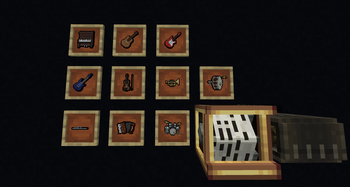
About this Mod
Create: Polyphony
Explore handheld instruments and co-op musical play in the Create ecosystem.
The idea is simple: pick up an instrument and play. Use it on your own, play with friends, annoy nearby mobs, or hand the job over to a Create contraption and let the machine join in. The mod is built around music as something you actively do in-game, not just something that happens in the background.
Custom SoundFont (.sf2) support is one of the big features here, giving you control over how instruments actually sound. Swap in different SoundFonts for different moods, styles, and instrument sets, from clean and orchestral to strange and chaotic.
Features
Handheld instruments
Play music directly in-game with instruments designed to be used by the player.Custom SoundFont support
Load your own.sf2SoundFonts to change the sound of your instruments and try out different timbres and styles.Play with friends
Great for group performances, improvised sessions, or just making your base a little more lively.Play at not-so-friends
Mobs are a perfectly valid audience, even if they do not always appreciate the performance. Some may even take a swing at learning themselves.Works with Create contraptions
Instruments fit nicely into the Create ecosystem and can be used alongside contraptions and components such as Deployers for more unusual musical setups.Made for musical builds
Useful for concert halls, workshops, taverns, moving bands, odd little roadside performances, and any other build that could use more noise in a good way.
Requirements
- NeoForge
- Create
- Create: Sound of Steam
Available Versions
How to Install Create: Polyphony on Your Server
Order Server
Order a Minecraft Java server with at least 4 GB RAM (6 GB recommended).
Set neoforge Loader
In the panel under "Egg", select the neoforge loader and matching Minecraft version (26.1.2).
Install Mod
Open the mod browser in the dashboard and search for "Create: Polyphony". Click "Install" – done! Alternatively, upload the .jar via SFTP to the /mods folder.
Compatibility
Mod Loaders
Minecraft Versions
26.1.2, 26.1.1, 26.1 (+12 more)
Server-side
✓ RequiredRecommended RAM
6 GB(min. 4 GB)Frequently Asked Questions
Create: Polyphony server crashes on startup – what to do?
Most common cause: wrong neoforge version or insufficient RAM. Check the server log (latest.log) for "OutOfMemoryError" or "Mixin" errors. With Mado Hosting: ensure at least 4 GB RAM is allocated and the loader matches the mod version (26.1.2). You can switch loaders with one click in the panel.
Is Create: Polyphony compatible with neoforge?
Create: Polyphony officially supports neoforge for Minecraft 26.1.2, 26.1.1, 26.1. The Mado dashboard automatically detects incompatible loader combinations.
Server lagging with Create: Polyphony – how to optimize performance?
Recommended RAM: 6 GB (per 5 players). Use /spark profiler to check if Create: Polyphony consumes the most tick time. Common fixes: reduce server view-distance to 8-10, install "performant" or "starlight" as supplementary mods on Forge. With Mado Hosting, your server runs on NVMe SSDs with dedicated CPU cores for minimal latency.
Similar Mods

![[ETF] Entity Texture Features](https://cdn.modrinth.com/data/BVzZfTc1/af683d206d50b05258d865b0d6e4aa2f2cee12f2_96.webp)
![[EMF] Entity Model Features](https://cdn.modrinth.com/data/4I1XuqiY/6e5bbd0d06b1741bfdab6c0cfab6de8fdaf0064c_96.webp)



Rent Modded Server
Install Create: Polyphony with just one click on your server.