
Creative Toggle
Switch betwenn Creative and your last gamemode with F3 + X.
Screenshots
About this Mod
English 
Creative Toggle – Fabric Mod
Minecraft 1.21.0 + | Fabric
What does the mod do?
Press F3 + X (default) to switch to Creative Mode - just like F3+N switches to Spectator Mode.
Press F3 + X again to return to your previous game mode.
Only works if the player has permission to use
/gamemode(Singleplayer or OP on a server).
Configuration
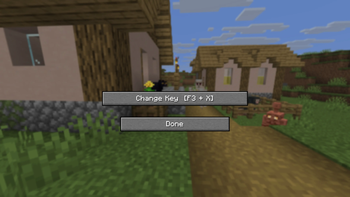
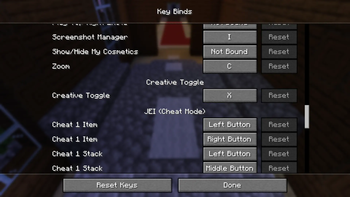
The key can be changed in the Settings under the Creative Toggle category:
- Via Mod Menu → Gear icon next to Creative Toggle
- Or directly in-game through the settings-key-screen
Manually (config file)
config/f3toggle.json:
{
  "toggleKeyCode": 88
}
GLFW key codes: X = 88, Z = 90, C = 67, V = 86, etc.
Compatibility
| 1.21.0 + | ✅ |
The mod uses only stable Fabric API and Vanilla APIs, with no version-specific hacks.
Languages
| Version | English | Portuguese | Russian | Frensh | German |
|---|---|---|---|---|---|
| 1.0.0 | ✅ | ✅ | ✅ | ✅ | ✅ |
Deutsch 
Creative Toggle – Fabric Mod
Minecraft 1.21.0 + | Fabric
Was macht die Mod?
Drücke F3 + X (Standard), um in den Kreativmodus zu wechseln – genau wie F3+N in den Spectator-Modus schaltet.
Drücke F3 + X nochmal, um in deinen vorherigen Spielmodus zurückzukehren.
Funktioniert nur, wenn der Spieler die
/gamemode-Berechtigung hat (Singleplayer oder OP auf Servern).
Einstellungen
Die Taste kann in den Einstellungen unter dem Reiter Creative Toggle geändert werden:
- Über Mod Menu → Zahnrad-Symbol neben „Creative Toggle"
- Oder direkt im Spiel über den Einstellung-Steuerung-Bildschirm
Manuell (config-Datei)
config/f3toggle.json:
{
  "toggleKeyCode": 88
}
GLFW-Key-Codes: X = 88, Z = 90, C = 67, V = 86, usw.
Kompatibilität
| 1.21.0 + | ✅ |
Die Mod nutzt ausschließlich stabile Fabric-API und Vanilla-APIs, keine versionsspezifischen Hacks.
Sprachen
| Version | Englisch | Deutsch | Portugiesich | Russisch | Französich |
|---|---|---|---|---|---|
| 1.0.0 | ✅ | ✅ | ✅ | ✅ | ✅ |
Available Versions
How to Install Creative Toggle on Your Server
Order Server
Order a Minecraft Java server with at least 3 GB RAM (4 GB recommended).
Set fabric Loader
In the panel under "Egg", select the fabric loader and matching Minecraft version (26.1.2).
Install Mod
Open the mod browser in the dashboard and search for "Creative Toggle". Click "Install" – done! Alternatively, upload the .jar via SFTP to the /mods folder.
Compatibility
Mod Loaders
Minecraft Versions
26.1.2, 26.1.1, 26.1 (+12 more)
Server-side
✗ UnsupportedRecommended RAM
4 GB(min. 3 GB)Frequently Asked Questions
Creative Toggle server crashes on startup – what to do?
Most common cause: wrong fabric version or insufficient RAM. Check the server log (latest.log) for "OutOfMemoryError" or "Mixin" errors. With Mado Hosting: ensure at least 3 GB RAM is allocated and the loader matches the mod version (26.1.2). You can switch loaders with one click in the panel.
Is Creative Toggle compatible with fabric?
Creative Toggle officially supports fabric for Minecraft 26.1.2, 26.1.1, 26.1. The Mado dashboard automatically detects incompatible loader combinations.
Server lagging with Creative Toggle – how to optimize performance?
Recommended RAM: 4 GB (per 8 players). Use /spark profiler to check if Creative Toggle consumes the most tick time. Common fixes: reduce server view-distance to 8-10, install "performant" or "starlight" as supplementary mods on Forge. With Mado Hosting, your server runs on NVMe SSDs with dedicated CPU cores for minimal latency.
Similar Mods




Rent Modded Server
Install Creative Toggle with just one click on your server.