
Creeper Heal port
Creeper explosions gradually heal over time. Port of Forge Creeper Heal by EyZox
About this Mod
An open source mod for Minecraft Forge to auto-heal world after an explosion
HEALING IN ACTION
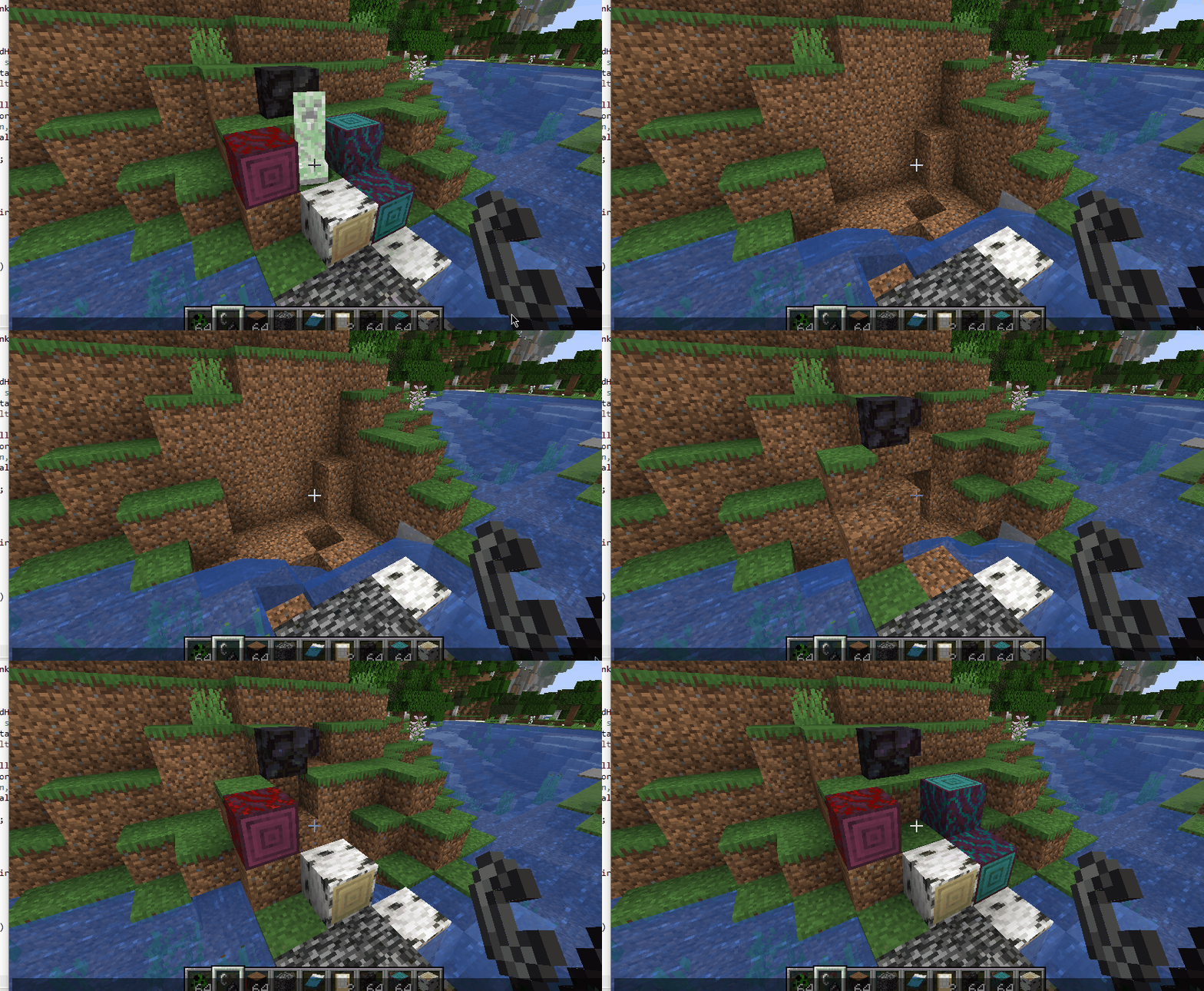
Inspired by a forgotten Bukkit plugin, these links might exist?
https://dev.bukkit.org/server-mods/creeperheal-nitnelave/
https://dev.bukkit.org/projects/creeperheal-nitnelave
Example config file from 1.16+
https://github.com/Lothrazar/ForgeCreeperHeal/blob/trunk/1.16/creeperheal.toml
Original project (which has downloads 1.7.10 all the way to 1.10.2) is here. Original version is a complete rewrite of the engine from scratch by the original author EyZox, check it out for sure — it has lots of new features and optimizations!
This is a port of the old simple 1.x version that I'm just keeping alive. At the time I updated this port to 1.11.2, the original was last updated Aug 28, 2016.
Once upon a time, there was a bukkit plugin by nitnelave. Then EyZox made a forge mod that did the same thing.
I love this mod and I want it to continue existing, and I still use it in my worlds — that's why I am porting it to newer versions.
History and other stuff
In Jan 14 2016 I started updating it; I submitted a pull request on GitHub to update to 1.8.9 from 1.8.0. It was accepted, but it looks like that was never released on GitHub.
In the new 1.9 versions and forward, I completely overhauled the config system. Instead of using a config reload command, it now uses the in-game config GUI system (doesn't make sense for servers I guess, but good for single player). For this reason, I changed the mod version to 1.3.0 (the last released version is 1.1.1, although in the source code there is an unreleased 1.2.0 and a 2.0.0).
It looks like EyZox was rebuilding everything from scratch in a way that is probably better but that isn't released. This uses a lot of the old code from the old version (as you can see here, my version is the green line).
I did keep the original open source license that EyZox set in the mod, you can see that here. It seems like the original license gives me permission to change the license under the 'derived code' section, but I saw no reason to change it. Since there is no "monetizing link" then I am not breaking those terms.
Please report any issues on the GitHub issues page and I will address them when I can.

Available Versions
How to Install Creeper Heal port on Your Server
Order Server
Order a Minecraft Java server with at least 3 GB RAM (4 GB recommended).
Set forge Loader
In the panel under "Egg", select the forge loader and matching Minecraft version (1.21.1).
Install Mod
Open the mod browser in the dashboard and search for "Creeper Heal port". Click "Install" – done! Alternatively, upload the .jar via SFTP to the /mods folder.
Compatibility
Mod Loaders
Minecraft Versions
1.21.1, 1.20.1, 1.18.2 (+5 more)
Server-side
✓ RequiredRecommended RAM
4 GB(min. 3 GB)Frequently Asked Questions
Creeper Heal port server crashes on startup – what to do?
Most common cause: wrong forge version or insufficient RAM. Check the server log (latest.log) for "OutOfMemoryError" or "Mixin" errors. With Mado Hosting: ensure at least 3 GB RAM is allocated and the loader matches the mod version (1.21.1). You can switch loaders with one click in the panel.
Is Creeper Heal port compatible with forge and neoforge?
Creeper Heal port officially supports forge, neoforge for Minecraft 1.21.1, 1.20.1, 1.18.2. The Mado dashboard automatically detects incompatible loader combinations.
Server lagging with Creeper Heal port – how to optimize performance?
Recommended RAM: 4 GB (per 8 players). Use /spark profiler to check if Creeper Heal port consumes the most tick time. Common fixes: reduce server view-distance to 8-10, install "performant" or "starlight" as supplementary mods on Forge. With Mado Hosting, your server runs on NVMe SSDs with dedicated CPU cores for minimal latency.
Similar Mods




Rent Modded Server
Install Creeper Heal port with just one click on your server.