
Crimson Tools & Blocks
This mod adds lots of tools and armor and blocks.
Screenshots

About this Mod
Crimson Tools is a vibrant Minecraft mod that introduces Crimson Ore, a rare and powerful material found deep underground. Once mined and smelted, Crimson can be used to craft a complete set of tools, armor, and weapons that are far stronger than Netherite. With exceptional durability and efficiency, Crimson gear is perfect for late-game players looking to take their adventures to the next level.
This mod is designed to feel natural in any world—no dark themes or scary elements, just a bold and colorful upgrade path for experienced explorers. The Crimson set features a sleek red design and is ideal for players who enjoy progression, powerful gear, and a polished aesthetic.
Whether you're battling bosses, clearing dungeons, or just mining in style, Crimson Tools gives you the ultimate edge. Add it to your world and experience what it means to wield true crimson power!
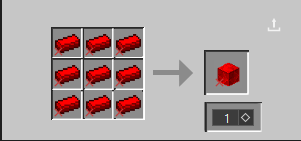
To find the ore and the armor for cheats do /give or you can not find it in the creative tab or just craft it recipes in media.
Available Versions
How to Install Crimson Tools & Blocks on Your Server
Order Server
Order a Minecraft Java server with at least 3 GB RAM (4 GB recommended).
Set fabric Loader
In the panel under "Egg", select the fabric loader and matching Minecraft version (1.20.6).
Install Mod
Open the mod browser in the dashboard and search for "Crimson Tools & Blocks". Click "Install" – done! Alternatively, upload the .jar via SFTP to the /mods folder.
Compatibility
Mod Loaders
Minecraft Versions
1.20.6, 1.20.5, 1.20.4 (+4 more)
Server-side
~ OptionalRecommended RAM
4 GB(min. 3 GB)Frequently Asked Questions
Crimson Tools & Blocks server crashes on startup – what to do?
Most common cause: wrong fabric version or insufficient RAM. Check the server log (latest.log) for "OutOfMemoryError" or "Mixin" errors. With Mado Hosting: ensure at least 3 GB RAM is allocated and the loader matches the mod version (1.20.6). You can switch loaders with one click in the panel.
Is Crimson Tools & Blocks compatible with fabric?
Crimson Tools & Blocks officially supports fabric for Minecraft 1.20.6, 1.20.5, 1.20.4. The Mado dashboard automatically detects incompatible loader combinations.
Server lagging with Crimson Tools & Blocks – how to optimize performance?
Recommended RAM: 4 GB (per 8 players). Use /spark profiler to check if Crimson Tools & Blocks consumes the most tick time. Common fixes: reduce server view-distance to 8-10, install "performant" or "starlight" as supplementary mods on Forge. With Mado Hosting, your server runs on NVMe SSDs with dedicated CPU cores for minimal latency.
Similar Mods

![[ETF] Entity Texture Features](https://cdn.modrinth.com/data/BVzZfTc1/af683d206d50b05258d865b0d6e4aa2f2cee12f2_96.webp)
![[EMF] Entity Model Features](https://cdn.modrinth.com/data/4I1XuqiY/6e5bbd0d06b1741bfdab6c0cfab6de8fdaf0064c_96.webp)



Rent Modded Server
Install Crimson Tools & Blocks with just one click on your server.