
CritIndicator
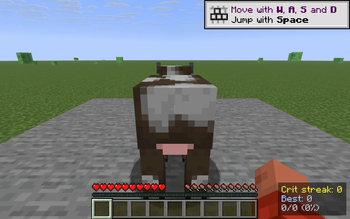
Flashes a big "CRIT!" on screen on every critical hit and tracks your crit streak + personal best in a bottom-right HUD. Toggle with V, reset with Shift+V.
Screenshots
About this Mod
CritIndicator turns vanilla's nearly invisible crit sparkle into something you can actually feel. When you land a critical hit on a living entity, a large yellow CRIT! flashes in the upper-third of your screen and fades out over 1.5 seconds — and a small bottom-right counter ticks up your current streak. Miss a crit and the streak resets; nail a clean run and you'll watch your personal best climb.
What it shows
Crit streak: 7
Best:        21
14/26 (54%)
- Crit streak — consecutive crits since your last non-crit attack on a mob.
- Best — highest streak this session.
hits/total (%)— running crit ratio: how many of your attacks were crits.
How it detects crits
Same conditions vanilla uses when computing critical hits, evaluated the moment you swing at a living entity:
- Player is falling (
fallDistance > 0) - Player is not on ground, climbing, in water, in a vehicle or sprinting
- Player is not under Blindness
- Attack cooldown is at least ~90% recharged
- Target is a
LivingEntity
This means the indicator agrees with the server's actual crit calculation — if vanilla would crit, CRIT! flashes; if not, nothing fires and your streak breaks.
Controls
- V — toggle the HUD on / off
- Shift + V — reset streak, best, and ratio counters
Both keys are read via raw GLFW polling, so they work the same on every supported Minecraft version without a rebind UI.
Compatibility
Works on Minecraft 1.21.8, 1.21.9, 1.21.10, and 1.21.11 (Fabric Loader 0.16+). One JAR for all four versions — install with Fabric API and drop into your mods/ folder.
- Pure client-side — install on the client only, works on any server, no game-state changes, no anti-cheat impact.
- Hides automatically when you press F1 to hide the rest of the HUD.
- Counters live in memory only — they reset when you quit (this is a session streak, not a lifetime stat).
Why
Critical hits in vanilla are subtle: a small particle puff and a slightly higher damage number. CritIndicator gives you instant, glanceable feedback that your timing was right — and a streak counter you can chase.
Available Versions
How to Install CritIndicator on Your Server
Order Server
Order a Minecraft Java server with at least 3 GB RAM (4 GB recommended).
Set fabric Loader
In the panel under "Egg", select the fabric loader and matching Minecraft version (1.21.11).
Install Mod
Open the mod browser in the dashboard and search for "CritIndicator". Click "Install" – done! Alternatively, upload the .jar via SFTP to the /mods folder.
Compatibility
Mod Loaders
Minecraft Versions
1.21.11, 1.21.10, 1.21.9 (+1 more)
Server-side
✗ UnsupportedRecommended RAM
4 GB(min. 3 GB)Frequently Asked Questions
CritIndicator server crashes on startup – what to do?
Most common cause: wrong fabric version or insufficient RAM. Check the server log (latest.log) for "OutOfMemoryError" or "Mixin" errors. With Mado Hosting: ensure at least 3 GB RAM is allocated and the loader matches the mod version (1.21.11). You can switch loaders with one click in the panel.
Is CritIndicator compatible with fabric?
CritIndicator officially supports fabric for Minecraft 1.21.11, 1.21.10, 1.21.9. The Mado dashboard automatically detects incompatible loader combinations.
Server lagging with CritIndicator – how to optimize performance?
Recommended RAM: 4 GB (per 8 players). Use /spark profiler to check if CritIndicator consumes the most tick time. Common fixes: reduce server view-distance to 8-10, install "performant" or "starlight" as supplementary mods on Forge. With Mado Hosting, your server runs on NVMe SSDs with dedicated CPU cores for minimal latency.
Similar Mods




![[ETF] Entity Texture Features](https://cdn.modrinth.com/data/BVzZfTc1/af683d206d50b05258d865b0d6e4aa2f2cee12f2_96.webp)
![[EMF] Entity Model Features](https://cdn.modrinth.com/data/4I1XuqiY/6e5bbd0d06b1741bfdab6c0cfab6de8fdaf0064c_96.webp)
Rent Modded Server
Install CritIndicator with just one click on your server.