
Crosshair Damage Indicator
The Crosshair Damage Indicator mod displays real-time damage numbers below your crosshair, enhancing combat feedback and strategy in Minecraft.
Screenshots
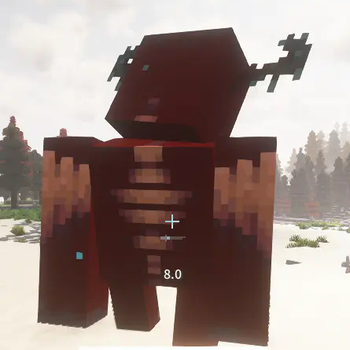
About this Mod
The Damage Indicator Below Crosshair mod for Minecraft is a highly useful and visually appealing addition to your gaming experience. This mod enhances the default HUD by displaying a damage indicator directly below the crosshair, providing instant feedback on the damage dealt to mobs and players.
Key Features:
- Instant Feedback: See the amount of damage dealt with every hit without diverting your attention from the action.
- Enhanced Combat Awareness: Keep track of your combat effectiveness in real-time, making it easier to adjust strategies and improve your gameplay.
- Clear and Intuitive Design: The damage indicator is displayed in a clean and non-intrusive manner, ensuring it complements the existing HUD without clutter.
- Compatibility: Designed to work seamlessly with various other popular mods, ensuring a smooth integration into your modded gameplay.
Benefits:
- Improved Efficiency: Quickly gauge the strength of your attacks and the health of your targets, helping you make faster and more informed decisions during combat.
- Enhanced Immersion: Enjoy a more immersive and engaging gameplay experience with real-time damage indicators enhancing the feedback loop.
- Better Strategy Planning: Utilize the instant feedback to refine your combat tactics, manage resources more effectively, and optimize your weapon and armor choices.
Whether you're a seasoned warrior or a novice explorer, the Crosshair Damage Indicator mod is an essential tool for anyone looking to gain a competitive edge in Minecraft. It transforms the way you interact with the game, making combat more intuitive, strategic, and rewarding.
Available Versions
How to Install Crosshair Damage Indicator on Your Server
Order Server
Order a Minecraft Java server with at least 3 GB RAM (4 GB recommended).
Set fabric Loader
In the panel under "Egg", select the fabric loader and matching Minecraft version (1.20.6).
Install Mod
Open the mod browser in the dashboard and search for "Crosshair Damage Indicator". Click "Install" – done! Alternatively, upload the .jar via SFTP to the /mods folder.
Compatibility
Mod Loaders
Minecraft Versions
1.20.6, 1.20.5, 1.20.4 (+3 more)
Server-side
✓ RequiredRecommended RAM
4 GB(min. 3 GB)Frequently Asked Questions
Crosshair Damage Indicator server crashes on startup – what to do?
Most common cause: wrong fabric version or insufficient RAM. Check the server log (latest.log) for "OutOfMemoryError" or "Mixin" errors. With Mado Hosting: ensure at least 3 GB RAM is allocated and the loader matches the mod version (1.20.6). You can switch loaders with one click in the panel.
Is Crosshair Damage Indicator compatible with fabric and forge?
Crosshair Damage Indicator officially supports fabric, forge for Minecraft 1.20.6, 1.20.5, 1.20.4. Note: Forge and Fabric mods are NOT cross-compatible – pick one loader and stick with it. The Mado dashboard automatically detects incompatible loader combinations.
Server lagging with Crosshair Damage Indicator – how to optimize performance?
Recommended RAM: 4 GB (per 8 players). Use /spark profiler to check if Crosshair Damage Indicator consumes the most tick time. Common fixes: reduce server view-distance to 8-10, install "performant" or "starlight" as supplementary mods on Forge. With Mado Hosting, your server runs on NVMe SSDs with dedicated CPU cores for minimal latency.
Similar Mods




Rent Modded Server
Install Crosshair Damage Indicator with just one click on your server.