CrosshairDist
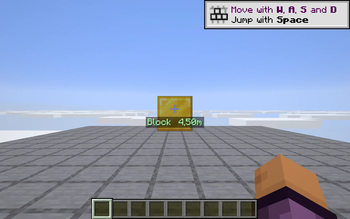
Shows a live decimal distance readout under your crosshair for whatever block or mob you aim at (e.g. "Block 4.50m"). Great for builders and archers. Toggle with J.
Screenshots
About this Mod
CrosshairDist answers a question the vanilla game never quite does: how far away is the thing I'm pointing at? While you aim at a block or entity within reach, a small line under your crosshair shows the kind ("Block" or "Entity") plus the exact distance from your eyes, to two decimal places.
What it shows
Block 4.50m— when the crosshair hits a block face. Green text.Entity 3.56m— when the crosshair hits a mob, animal, or other player. Orange text.- Nothing when you're aiming at empty space — no clutter when there's nothing to measure.
The distance is the straight-line distance from your eye position to the exact ray-hit point, so leaning closer or backing off updates the readout smoothly.
What it's good for
- Builders — pillar height, gap width, bridge spans, redstone alignment ranges.
- Archers — judge arrow drop at exact ranges instead of guessing.
- Map makers — pick precise camera angles and document scenes.
How it works
- Reads
MinecraftClient.crosshairTargetevery frame and computes the distance from your eyes to the hit point. - Drawn via Fabric's
HudRenderCallback— respects F1 (hide HUD), pause menus, and inventory screens automatically. - No mixins, no server traffic. Fully client-side.
Controls
- J — toggle the readout on / off (default: on)
Compatibility
Works on Minecraft 1.21.8, 1.21.9, 1.21.10, and 1.21.11 (Fabric Loader 0.16+). One JAR for all four versions — install alongside Fabric API and drop into your mods/ folder. Pure client-side; works on any server, zero config.
Available Versions
How to Install CrosshairDist on Your Server
Order Server
Order a Minecraft Java server with at least 3 GB RAM (4 GB recommended).
Set fabric Loader
In the panel under "Egg", select the fabric loader and matching Minecraft version (1.21.11).
Install Mod
Open the mod browser in the dashboard and search for "CrosshairDist". Click "Install" – done! Alternatively, upload the .jar via SFTP to the /mods folder.
Compatibility
Mod Loaders
Minecraft Versions
1.21.11, 1.21.10, 1.21.9 (+1 more)
Server-side
✗ UnsupportedRecommended RAM
4 GB(min. 3 GB)Frequently Asked Questions
CrosshairDist server crashes on startup – what to do?
Most common cause: wrong fabric version or insufficient RAM. Check the server log (latest.log) for "OutOfMemoryError" or "Mixin" errors. With Mado Hosting: ensure at least 3 GB RAM is allocated and the loader matches the mod version (1.21.11). You can switch loaders with one click in the panel.
Is CrosshairDist compatible with fabric?
CrosshairDist officially supports fabric for Minecraft 1.21.11, 1.21.10, 1.21.9. The Mado dashboard automatically detects incompatible loader combinations.
Server lagging with CrosshairDist – how to optimize performance?
Recommended RAM: 4 GB (per 8 players). Use /spark profiler to check if CrosshairDist consumes the most tick time. Common fixes: reduce server view-distance to 8-10, install "performant" or "starlight" as supplementary mods on Forge. With Mado Hosting, your server runs on NVMe SSDs with dedicated CPU cores for minimal latency.
Similar Mods




![[ETF] Entity Texture Features](https://cdn.modrinth.com/data/BVzZfTc1/af683d206d50b05258d865b0d6e4aa2f2cee12f2_96.webp)
![[EMF] Entity Model Features](https://cdn.modrinth.com/data/4I1XuqiY/6e5bbd0d06b1741bfdab6c0cfab6de8fdaf0064c_96.webp)
Rent Modded Server
Install CrosshairDist with just one click on your server.