CreateWorldUI
Modern Minecraft world creation, backported to 1.7.10
Screenshots


About this Mod
CreateWorldUI
A complete redesign of the Minecraft 1.7.10 world creation screen, inspired by the clean and intuitive UI of modern Minecraft.
CreateWorldUI brings a smoother, more organized, and more user‑friendly experience to a classic version of the game.
If you feel the vanilla 1.7.10 world creation menu is outdated or cluttered, this mod gives it a fresh, modern upgrade.
✨ Features
Modern Tabbed Layout
World creation options are reorganized into three clear tabs:
- Game – game mode, difficulty, cheats
- World – seed, world type, structure generation
- More – additional settings and future extensions
This layout mirrors modern Minecraft and makes navigation faster and more intuitive.
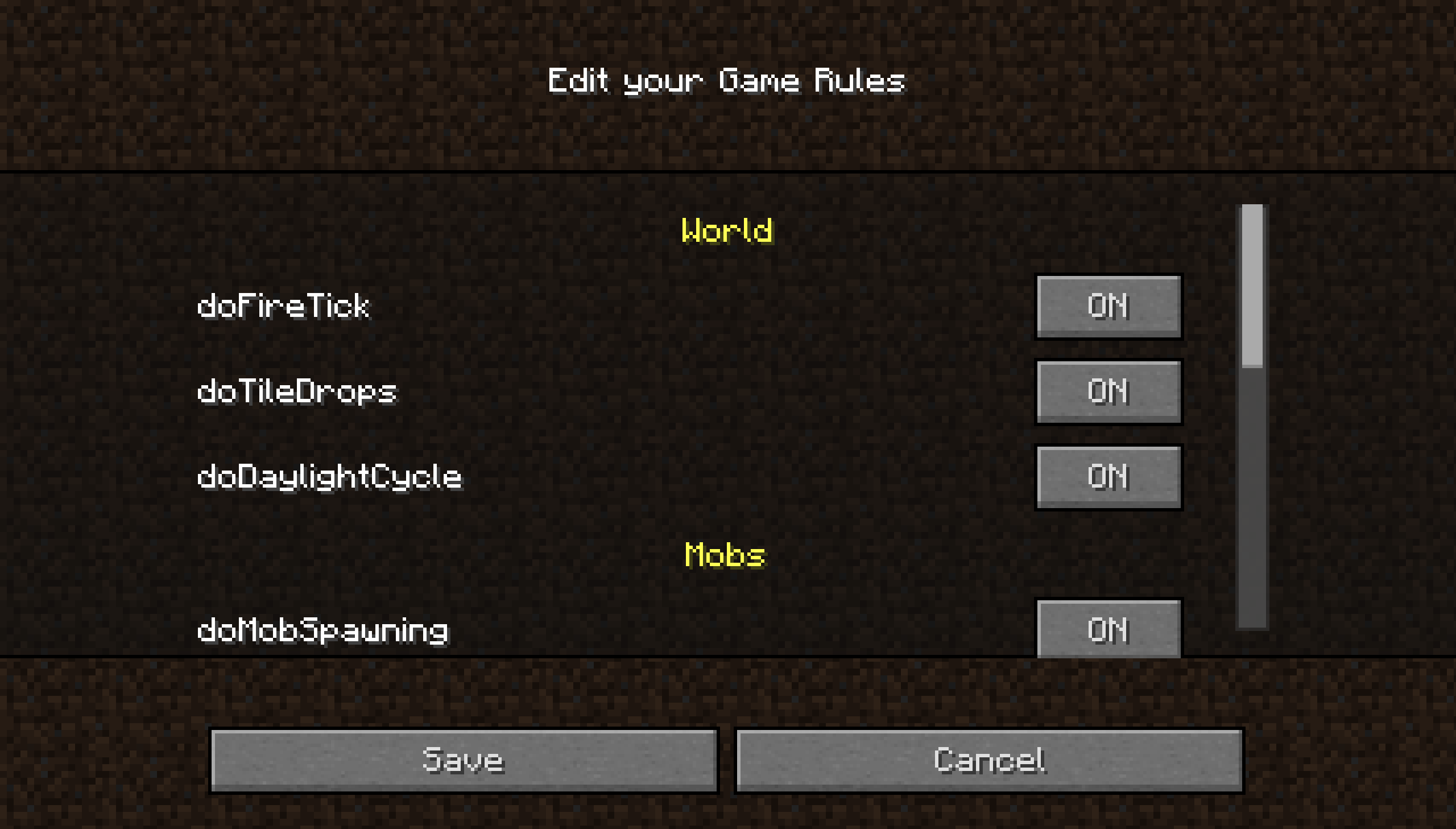
Built‑in GameRule Editor
Edit gamerules directly in the UI:
- Toggle buttons for boolean rules
- Text fields for numeric or string rules
- Reset and Save buttons for quick adjustments
No more typing /gamerule commands manually.
UI Improvements
- Cleaner layout for world name, seed, and buttons
- Custom textures for tabs and gradients
- Backported modern difficulty selection, including difficulty lock
- Overall smoother and more polished user experience
Tab overview
Spoiler
GameRule Edit overview
Spoiler
📱 Want the best experience?
For the smoothest installation and updates, use the Modrinth App.
Downloads through the Modrinth App also help support the project and future development.
A companion resource pack is also provided, enhancing CreateWorldUI and ClearMyBackground with a 1.20.5+‑inspired visual style.
Wiki
More detailed infomations, see here.
Notification
With the release of v4.0.0 CreateWorldUI has achieved its core goals. The mod is now maintained rather than actively developed: you can expect fixes for serious bugs and regressions, but no regular feature additions. Community contributions and pull requests are welcome.
📦 Dependency
- UniMixins (required)
📜 License
- Code: MIT License
- Textures (PreAlpha / Alpha): © 2025 dfdvdsf. All Rights Reserved.
- Current textures & UI inspirations: Inspired by modern Minecraft UI.
Minecraft is a trademark of Microsoft. This project is not affiliated with Mojang/Microsoft.
🙌 Credits
- Thanks to mappings.dev for helping resolve obfuscated names
- UI inspired by modern Minecraft versions
Available Versions
How to Install CreateWorldUI on Your Server
Order Server
Order a Minecraft Java server with at least 4 GB RAM (6 GB recommended).
Set forge Loader
In the panel under "Egg", select the forge loader and matching Minecraft version (1.7.10).
Install Mod
Open the mod browser in the dashboard and search for "CreateWorldUI". Click "Install" – done! Alternatively, upload the .jar via SFTP to the /mods folder.
Compatibility
Mod Loaders
Minecraft Versions
1.7.10
Server-side
✓ RequiredRecommended RAM
6 GB(min. 4 GB)Frequently Asked Questions
CreateWorldUI server crashes on startup – what to do?
Most common cause: wrong forge version or insufficient RAM. Check the server log (latest.log) for "OutOfMemoryError" or "Mixin" errors. With Mado Hosting: ensure at least 4 GB RAM is allocated and the loader matches the mod version (1.7.10). You can switch loaders with one click in the panel.
Is CreateWorldUI compatible with forge?
CreateWorldUI officially supports forge for Minecraft 1.7.10. The Mado dashboard automatically detects incompatible loader combinations.
Server lagging with CreateWorldUI – how to optimize performance?
Recommended RAM: 6 GB (per 5 players). Use /spark profiler to check if CreateWorldUI consumes the most tick time. Common fixes: reduce server view-distance to 8-10, install "performant" or "starlight" as supplementary mods on Forge. With Mado Hosting, your server runs on NVMe SSDs with dedicated CPU cores for minimal latency.
Similar Mods

![[ETF] Entity Texture Features](https://cdn.modrinth.com/data/BVzZfTc1/af683d206d50b05258d865b0d6e4aa2f2cee12f2_96.webp)
![[EMF] Entity Model Features](https://cdn.modrinth.com/data/4I1XuqiY/6e5bbd0d06b1741bfdab6c0cfab6de8fdaf0064c_96.webp)



Rent Modded Server
Install CreateWorldUI with just one click on your server.