
Crystalix
Adds a bunch of colored glass blocks with many different functions
About this Mod
Information
The Crystalix Wand
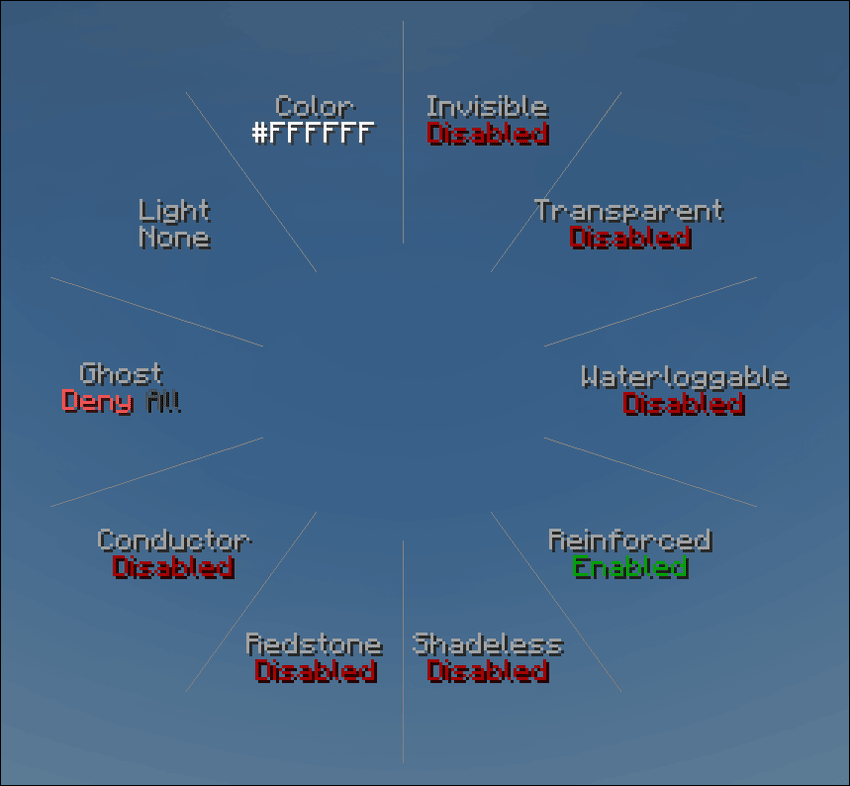
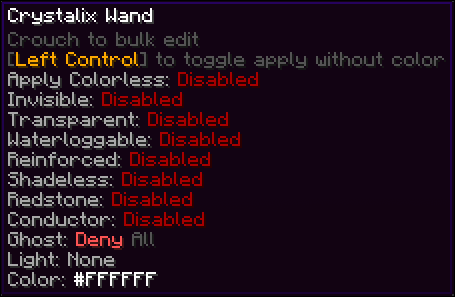
The Wand allows you to cycle through all possible properties the config window to set the property of a block.
Crouching will let you edit all connecting blocks at once
CTRL will make it so you only apply properties but not color
X will copy the properties from the block you're currently targeting onto the wand
You can open the config window by holding V by default
Left Clicking or Scrolling Down will cycle forwards, Right Clicking or Scrolling Up cycles backwards
Blocks
Unlike previous versions, the block variaty was cut down dramatically, since 2.3.0 there's only 3 different versions of glass what do you mean the first one is basically invisible. You can apply any color to any type of glass to have an infinity combination of colors

Properties
- Properties can be mixed and matches however you want
Invisibility
- Makes the block invisible (What did you expect)
- Useful if you want the properties of the glass without having a visual block there
Transparent
- With this toggled the texture of the glass will be fully transparent and color will only be applied to the few specs on the glass
Waterloggable
- Sets whether the block can be waterlogged or not
Reinforced
- Completly indestructible to everything, including wither and ender dragon, except for the player mining it
- Makes the block 10x harder to mine
Shadeless
- Removes the shadows and shade from the block
Redstone
- Makes the block emit a redstone signal of 15
Conductor
- Makes the block conduct redstone through it like a solid block
Ghost
- Makes the block passthough for one of the following
- Nothing
- Everything
- Only Players
- Everything except Players
- Only Hostile Mobs
- Everything except Hostile Mobs
- Only Passive Mobs
- Everything except Passive Mobs
Light
- Cycles through the following modes
- None: No special property
- Light: Glows at a light level of 15
- Dark: Blocks light the same way as tinted glass
- Fake Light: Glows with a light level of 15, still allowing for mobs to spawn
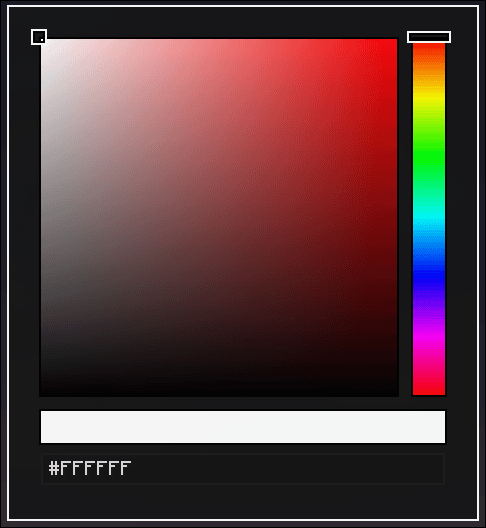
Color
Opens the color picker screen which lets you choose any color you like to apply to your glass
Available Versions
How to Install Crystalix on Your Server
Order Server
Order a Minecraft Java server with at least 3 GB RAM (4 GB recommended).
Set neoforge Loader
In the panel under "Egg", select the neoforge loader and matching Minecraft version (1.21.1).
Install Mod
Open the mod browser in the dashboard and search for "Crystalix". Click "Install" – done! Alternatively, upload the .jar via SFTP to the /mods folder.
Compatibility
Mod Loaders
Minecraft Versions
1.21.1
Server-side
✓ RequiredRecommended RAM
4 GB(min. 3 GB)Frequently Asked Questions
Crystalix server crashes on startup – what to do?
Most common cause: wrong neoforge version or insufficient RAM. Check the server log (latest.log) for "OutOfMemoryError" or "Mixin" errors. With Mado Hosting: ensure at least 3 GB RAM is allocated and the loader matches the mod version (1.21.1). You can switch loaders with one click in the panel.
Is Crystalix compatible with neoforge?
Crystalix officially supports neoforge for Minecraft 1.21.1. The Mado dashboard automatically detects incompatible loader combinations.
Server lagging with Crystalix – how to optimize performance?
Recommended RAM: 4 GB (per 8 players). Use /spark profiler to check if Crystalix consumes the most tick time. Common fixes: reduce server view-distance to 8-10, install "performant" or "starlight" as supplementary mods on Forge. With Mado Hosting, your server runs on NVMe SSDs with dedicated CPU cores for minimal latency.
Similar Mods

![[ETF] Entity Texture Features](https://cdn.modrinth.com/data/BVzZfTc1/af683d206d50b05258d865b0d6e4aa2f2cee12f2_96.webp)
![[EMF] Entity Model Features](https://cdn.modrinth.com/data/4I1XuqiY/6e5bbd0d06b1741bfdab6c0cfab6de8fdaf0064c_96.webp)



Rent Modded Server
Install Crystalix with just one click on your server.