
CTM Selector
This mod allows you to choose which blocks will have connected textures in every CTM resource pack you have loaded
Screenshots

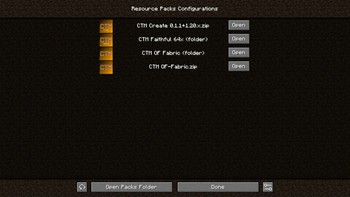

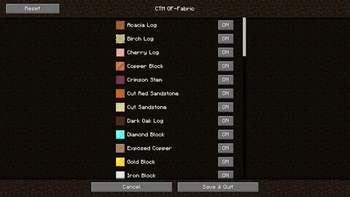
About this Mod



or
🎴 Show available versions
| Supported MC Version | Up to date | Last version |
|---|---|---|
| 1.19.4 | ❌ | 0.1.2 |
| 1.20.x | ❌ | 0.1.2 |
| 1.20.2 | ✅ | latest |
| 1.20.4 | ✅ | latest |
| 1.20.6 | ✅ | latest |
| 1.21-1.21.8 | ✅ | latest |
| 1.21.9 | ❌ | none |
| 1.21.10-1.21.11 | ✅ | latest |
Description
This mod allows you to choose which blocks with connected textures will be enabled in your pack. For example, if you
have a connected textures pack, but you don't want the log textures to be connected, then you can simply disable only
these textures, while keeping the other textures connected
🏛️ In order to work, this mod needs 3 things (for links, you can click the badges above) :
- The Fabric or Quilt API
- A connected textures mod like Continuity or Optifine
- A CTM capable resource pack (basically a resource pack that adds connected textures)
For the resource packs to be detected, they simply have to be in your usual resourcepacks folder
Once you have installed the mods and resource pack(s), you have to select in Minecraft the resource packs you want (you
just need to activate the resource pack like in vanilla). Then you can go in the config screen of the mod using the U
key or ModMenu, and you will have access to all the options
💲Features
- Choose which blocks will have connected textures among the possible ones (❗ if your pack is a zip file, the
resources will reload 2 times when enabling or disabling textures, this is normal. It is because zip files can't be
modified while used by Minecraft, so we the mod unloads the pack, modifies it and reloads it) - Choose which group of block will connect (ex: all logs or all metals)
If you want a CTM capable resource pack, you can check these (the badges are clickable) :
For pack developers
If you want to make your resource pack compatible with this mod, read the documentation
here : https://git.sr.ht/~aeldit/CTMSelector/tree/main/item/docs/GROUPS.md
If you find any issue, please make sure to report it here: https://todo.sr.ht/~aeldit/CTMSelector so I can fix it
If you have a suggestion, you can go on my discord server and create a post in 🗽-suggestions-forum

Check out the rest of my projects !


Available Versions
How to Install CTM Selector on Your Server
Order Server
Order a Minecraft Java server with at least 3 GB RAM (4 GB recommended).
Set fabric Loader
In the panel under "Egg", select the fabric loader and matching Minecraft version (1.21.11).
Install Mod
Open the mod browser in the dashboard and search for "CTM Selector". Click "Install" – done! Alternatively, upload the .jar via SFTP to the /mods folder.
Compatibility
Mod Loaders
Minecraft Versions
1.21.11, 1.21.10, 1.21.8 (+16 more)
Server-side
✗ UnsupportedRecommended RAM
4 GB(min. 3 GB)Frequently Asked Questions
CTM Selector server crashes on startup – what to do?
Most common cause: wrong fabric version or insufficient RAM. Check the server log (latest.log) for "OutOfMemoryError" or "Mixin" errors. With Mado Hosting: ensure at least 3 GB RAM is allocated and the loader matches the mod version (1.21.11). You can switch loaders with one click in the panel.
Is CTM Selector compatible with fabric?
CTM Selector officially supports fabric for Minecraft 1.21.11, 1.21.10, 1.21.8. The Mado dashboard automatically detects incompatible loader combinations.
Server lagging with CTM Selector – how to optimize performance?
Recommended RAM: 4 GB (per 8 players). Use /spark profiler to check if CTM Selector consumes the most tick time. Common fixes: reduce server view-distance to 8-10, install "performant" or "starlight" as supplementary mods on Forge. With Mado Hosting, your server runs on NVMe SSDs with dedicated CPU cores for minimal latency.
Similar Mods

![[ETF] Entity Texture Features](https://cdn.modrinth.com/data/BVzZfTc1/af683d206d50b05258d865b0d6e4aa2f2cee12f2_96.webp)
![[EMF] Entity Model Features](https://cdn.modrinth.com/data/4I1XuqiY/6e5bbd0d06b1741bfdab6c0cfab6de8fdaf0064c_96.webp)



Rent Modded Server
Install CTM Selector with just one click on your server.