
CullTag
Server-side mod that hides player nametags through walls
Screenshots
About this Mod
CullTag
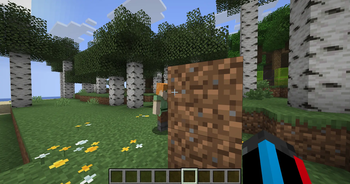
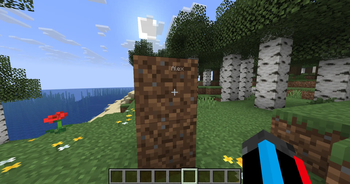
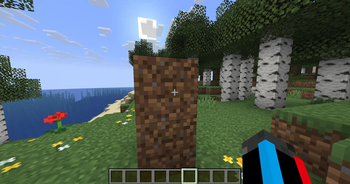
True Server-Side Nametag Culling for Fair Play
Vanilla Minecraft gives every player a free, built-in wallhack: nametags visible through solid blocks. CullTag fixes this unfair advantage with highly optimized, server-side raycasting.
If a player is hiding behind a wall, their nametag is gone. It’s that simple.
Because all calculations and packet interceptions happen entirely on the server, your players don't need to install anything. They can connect with a 100% vanilla client and immediately experience fairer gameplay, making it perfect for SMPs, PvP arenas, and hardcore survival servers.
Key Features
- Zero Client Setup: 100% server-side. Vanilla and modded clients both see the correct, culled nametags automatically.
- Engineered for Performance: Raycasting can be heavy, so CullTag is built to protect your server's TPS. It utilizes symmetric LOS (calculating only one ray per pair of players instead of two) and only runs a sweep every few ticks - typical cost is well under a millisecond.
- Crouch to Hide: Crouching players have their nametag hidden from everyone entirely, regardless of line of sight - great for staying unseen. Enabled by default and fully optional.
- Live Configuration: Tweak maximum tracking distance, tick frequency, and crouch-hiding in
config/culltag.properties. - Hot-Swappable: Toggle the entire system or reload config changes live without ever needing to restart your server.
- Built-in Profiling: Monitor exactly how the mod is operating under the hood with built-in performance metrics.
How It Works
Every few ticks, the server quietly casts a ray between each pair of online players. If that ray intersects with a block, the server intercepts the vanilla network packets and hides the target's nametag from the viewer. The exact moment a player steps out of cover and Line of Sight (LOS) is restored, the server updates the packet and the nametag seamlessly reappears.
When crouch_hides_nametag is enabled (the default), a crouching player's nametag is hidden from everyone outright - no line-of-sight check needed.
Commands
Manage the mod entirely in-game (requires appropriate permissions):
/culltag enable&/culltag disable- Toggle the culling system live. Your choice automatically persists to the config file./culltag reload- Hot-reload any changes made toculltag.properties./culltag stats- View real-time raycast performance metrics and active tracking data.
Requirements
- Environment: Server-side ONLY (Drop it in your server's
modsfolder and you're done) - Dependencies: Fabric API
Known Incompatibilities
- PassableFoliage - mutates leaf collision shapes on both client and server, desynchronising LOS raycasts through foliage and producing erratic nametag visibility.
Available Versions
How to Install CullTag on Your Server
Order Server
Order a Minecraft Java server with at least 3 GB RAM (4 GB recommended).
Set fabric Loader
In the panel under "Egg", select the fabric loader and matching Minecraft version (26.1.2).
Install Mod
Open the mod browser in the dashboard and search for "CullTag". Click "Install" – done! Alternatively, upload the .jar via SFTP to the /mods folder.
Compatibility
Mod Loaders
Minecraft Versions
26.1.2, 26.1.1, 26.1
Server-side
✓ RequiredRecommended RAM
4 GB(min. 3 GB)Frequently Asked Questions
CullTag server crashes on startup – what to do?
Most common cause: wrong fabric version or insufficient RAM. Check the server log (latest.log) for "OutOfMemoryError" or "Mixin" errors. With Mado Hosting: ensure at least 3 GB RAM is allocated and the loader matches the mod version (26.1.2). You can switch loaders with one click in the panel.
Is CullTag compatible with fabric?
CullTag officially supports fabric for Minecraft 26.1.2, 26.1.1, 26.1. The Mado dashboard automatically detects incompatible loader combinations.
Server lagging with CullTag – how to optimize performance?
Recommended RAM: 4 GB (per 8 players). Use /spark profiler to check if CullTag consumes the most tick time. Common fixes: reduce server view-distance to 8-10, install "performant" or "starlight" as supplementary mods on Forge. With Mado Hosting, your server runs on NVMe SSDs with dedicated CPU cores for minimal latency.
Similar Mods




Rent Modded Server
Install CullTag with just one click on your server.