Custom Capes
Allows players to upload their own capes and see them in game.
Screenshots
About this Mod
Custom Capes
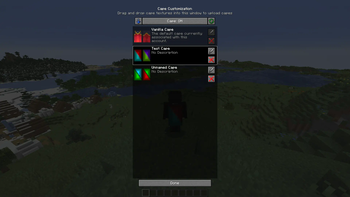
This mod lets you use and upload custom cape textures and see them in-game, without going out to the browser.
Usage
To open the Cape Customization menu, go to settings, then open Skin Customization, and then click Cape Settings.
Syncing Capes from other cape services
To get capes from other cape services, click the blue arrow which will add capes that you have. Currently this will only get capes from Optifine and add them to your capes.
Adding Capes
Open the Cape Customization menu, and drag-and-drop a cape texture, which you can make yourself or download an already made one.
Editing Capes
You can edit the name and description of the cape you uploaded by clicking the Edit button next to the cape, after you edited the input fields, press Done. That will update the cape name and description.
Deleting Capes
To delete a cape you have to press the X button on the cape which you uploaded.
Displaying Capes
To show a cape, simply click a cape you uploaded in the Cape Customization menu, this will show the cape. To go back to the default cape, click the Vanilla Cape.
Hiding/Showing other players capes (available before version 1.0.4)
To hide or show a player's cape, open the Social Interactions menu, and click the red or green button on the player, this will hide or show the player's cape, click it again to reverse the action.
Other Info
All players using this mod will be able to see capes you are currently using through this mod.
This mod does not support non-premium accounts, and it is not going to.
You can use this mod in modpacks.
Available Versions
How to Install Custom Capes on Your Server
Order Server
Order a Minecraft Java server with at least 3 GB RAM (4 GB recommended).
Set fabric Loader
In the panel under "Egg", select the fabric loader and matching Minecraft version (26.1.2).
Install Mod
Open the mod browser in the dashboard and search for "Custom Capes". Click "Install" – done! Alternatively, upload the .jar via SFTP to the /mods folder.
Compatibility
Mod Loaders
Minecraft Versions
26.1.2, 26.1.1, 26.1 (+18 more)
Server-side
✗ UnsupportedRecommended RAM
4 GB(min. 3 GB)Frequently Asked Questions
Custom Capes server crashes on startup – what to do?
Most common cause: wrong fabric version or insufficient RAM. Check the server log (latest.log) for "OutOfMemoryError" or "Mixin" errors. With Mado Hosting: ensure at least 3 GB RAM is allocated and the loader matches the mod version (26.1.2). You can switch loaders with one click in the panel.
Is Custom Capes compatible with fabric and quilt?
Custom Capes officially supports fabric, quilt for Minecraft 26.1.2, 26.1.1, 26.1. The Mado dashboard automatically detects incompatible loader combinations.
Server lagging with Custom Capes – how to optimize performance?
Recommended RAM: 4 GB (per 8 players). Use /spark profiler to check if Custom Capes consumes the most tick time. Common fixes: reduce server view-distance to 8-10, install "performant" or "starlight" as supplementary mods on Forge. With Mado Hosting, your server runs on NVMe SSDs with dedicated CPU cores for minimal latency.
Similar Mods




![[ETF] Entity Texture Features](https://cdn.modrinth.com/data/BVzZfTc1/af683d206d50b05258d865b0d6e4aa2f2cee12f2_96.webp)
![[EMF] Entity Model Features](https://cdn.modrinth.com/data/4I1XuqiY/6e5bbd0d06b1741bfdab6c0cfab6de8fdaf0064c_96.webp)
Rent Modded Server
Install Custom Capes with just one click on your server.