
Custom MOTD
Custom server MOTD for Forge 1.7.10.
About this Mod
Custom MOTD
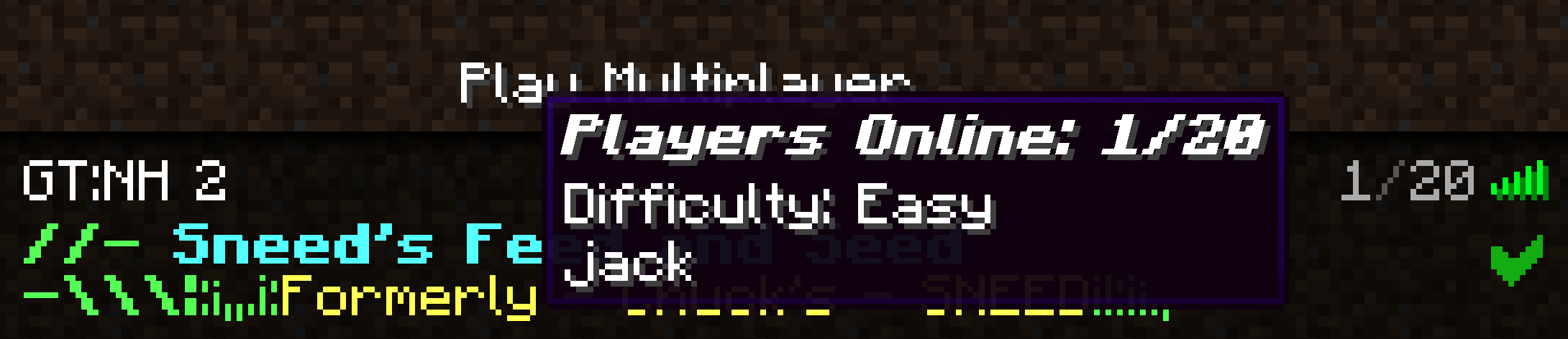
A 1.7.10 Forge server-side mod to customize your server MOTD and player list!









Dependencies
- As of version
1.0.1,UniMixins( ,
,  ,
,  ) is a required dependency.
Features
- Vanilla Compatible
- Customizable Random MOTDs
- Customizable
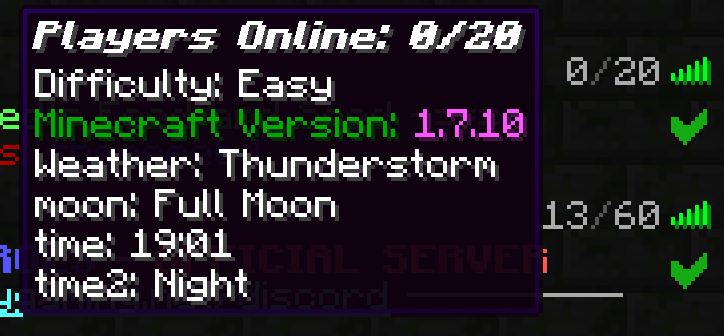
PlayerListtooltip
New Features
- Mod is fully server-side
{playerlist}variable backport,{weather},{time},{time_of_the_day}- Configurable server info update and hot reload intervals
- Config reload command
/cmotd_reload TabFaces(, , ) compat- Modded compat variables
On first run, the mod will generate the two required files for MOTD customization in <server root dir>/CustomMOTD.
There are 2 files used for configuration:
customotdlist.txtcustomplayerlist.txt
This mod supports multiline MOTDs (2 lines as per vanilla). To set a new line, use the pipe | character in the entry in custommotdlist.txt
Each entry in custommotdlist.txt is a separate MOTD entry.customplayerlist.txt contains the replacement template for the player list tooltip.
Variables
{playercount}- number of players currently on the server{maxplayers}- maximum number of players the server supports{difficulty}- server difficulty level{mcversion}- server Minecraft version{radio}- obfuscated radio bars{playerlist}- list up to 10 players currently online{weather}- displays weather, formatting is configurable{time}- displays time, formatting is configurable{time_of_the_day}- displays the time of the day (e.g. Noon, Midnight)
Modded Variables
{rt_bloodmoon}- Random Things Blood Moon, formatting is configurable{serene_season}- Serene Seasons season1.7.10port of Serene Seasons is broken{lycanites_event}- Active Lycanites Mobs event in the overworld, formatting is configurable- TerraFirmaCraft - Various vars:
{tfc_season},{tfc_day_of_month},{tfc_day_of_week},{tfc_day_of_year},{tfc_month},{tfc_month_name},{tfc_year},{tfc_hour},{tfc_temperature}
Feel free to reach out to me to propose new modded variables.
Color Codes and Formatting
Full support for default Minecraft color codes and formatting using &.
You can comment out a line by prefixing it with #.
Special characters | and &, as well as leading # can be escaped with a backslash (\).
Credits
This mod is based on p455w0rd's MOTD Customizer ().
License
LGPLv3.

Available Versions
How to Install Custom MOTD on Your Server
Order Server
Order a Minecraft Java server with at least 3 GB RAM (4 GB recommended).
Set forge Loader
In the panel under "Egg", select the forge loader and matching Minecraft version (1.7.10).
Install Mod
Open the mod browser in the dashboard and search for "Custom MOTD". Click "Install" – done! Alternatively, upload the .jar via SFTP to the /mods folder.
Compatibility
Mod Loaders
Minecraft Versions
1.7.10
Server-side
✓ RequiredRecommended RAM
4 GB(min. 3 GB)Frequently Asked Questions
Custom MOTD server crashes on startup – what to do?
Most common cause: wrong forge version or insufficient RAM. Check the server log (latest.log) for "OutOfMemoryError" or "Mixin" errors. With Mado Hosting: ensure at least 3 GB RAM is allocated and the loader matches the mod version (1.7.10). You can switch loaders with one click in the panel.
Is Custom MOTD compatible with forge?
Custom MOTD officially supports forge for Minecraft 1.7.10. The Mado dashboard automatically detects incompatible loader combinations.
Server lagging with Custom MOTD – how to optimize performance?
Recommended RAM: 4 GB (per 8 players). Use /spark profiler to check if Custom MOTD consumes the most tick time. Common fixes: reduce server view-distance to 8-10, install "performant" or "starlight" as supplementary mods on Forge. With Mado Hosting, your server runs on NVMe SSDs with dedicated CPU cores for minimal latency.
Similar Mods




![[ETF] Entity Texture Features](https://cdn.modrinth.com/data/BVzZfTc1/af683d206d50b05258d865b0d6e4aa2f2cee12f2_96.webp)

Rent Modded Server
Install Custom MOTD with just one click on your server.