Custom Nickname
A mod for assigning custom Nicknames for Players.
Screenshots
About this Mod
Custom Nickname
A client-side Fabric mod that lets you assign custom nicknames to any player. Nicknames are displayed everywhere — nametags, tab list, chat, and scoreboard sidebar.
Features
- Custom Nicknames — Set a personalized nickname for any player by username or UUID
- Color Code Support — Use
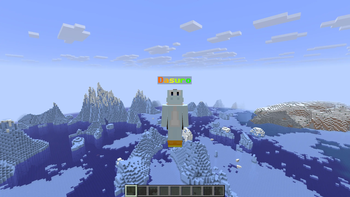
&aformatting codes and hex colors&#FF0000for colorful nicknames - Rainbow Wave Effect — Apply an animated rainbow wave to any nickname with adjustable speed
- Team Prefix/Suffix Toggle — Choose whether to show or hide scoreboard team prefixes and suffixes per player
- Nickname Indicator — Optional ✎ indicator appended to nicknames so you can tell them apart from real names
- Global & Local Storage — Store nicknames globally (shared across all instances) or locally (per modpack)
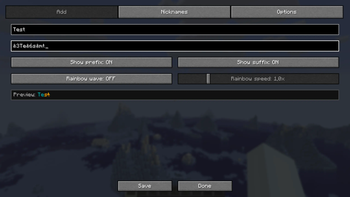
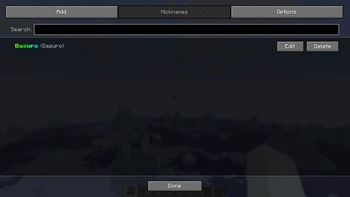
- In-Game Config GUI — Tabbed configuration screen with Add, Nicknames, and Options tabs (accessible via Mod Menu or keybind)
- Live Preview — See how your nickname will look before saving
- Search & Filter — Quickly find entries in the nickname list
- Keybind Support — Press
N(rebindable) to open the nickname config screen at any time - Nametag Replacement — Nicknames replace the player's nametag above their head
- Tab List Replacement — Nicknames are shown in the player list (Tab menu)
- Chat Replacement — Player names in chat messages are automatically replaced with their nickname
- Scoreboard Sidebar Replacement — Nicknames appear in the scoreboard sidebar as well
- Mojang UUID Lookup — Automatically resolves player UUIDs via Mojang API for offline nickname assignment
- Auto Username Update — Detects player name changes and keeps stored entries up to date
- Persistent Config — All nicknames are saved to a JSON config file and persist across sessions
- Mod Compatibility — Works with Entity Culling, LabyMod, and other common client-side mods
Requirements
- Fabric Loader
>= 0.18.4 - Fabric API
- Mod Menu
Contributing
If you have feature ideas or find any bugs, feel free to open an issue or submit a pull request on GitHub!
License
This project is licensed under the MIT License.
Available Versions
How to Install Custom Nickname on Your Server
Order Server
Order a Minecraft Java server with at least 3 GB RAM (4 GB recommended).
Set fabric Loader
In the panel under "Egg", select the fabric loader and matching Minecraft version (26.1.2).
Install Mod
Open the mod browser in the dashboard and search for "Custom Nickname". Click "Install" – done! Alternatively, upload the .jar via SFTP to the /mods folder.
Compatibility
Mod Loaders
Minecraft Versions
26.1.2, 26.1.1, 26.1 (+1 more)
Server-side
✗ UnsupportedRecommended RAM
4 GB(min. 3 GB)Frequently Asked Questions
Custom Nickname server crashes on startup – what to do?
Most common cause: wrong fabric version or insufficient RAM. Check the server log (latest.log) for "OutOfMemoryError" or "Mixin" errors. With Mado Hosting: ensure at least 3 GB RAM is allocated and the loader matches the mod version (26.1.2). You can switch loaders with one click in the panel.
Is Custom Nickname compatible with fabric?
Custom Nickname officially supports fabric for Minecraft 26.1.2, 26.1.1, 26.1. The Mado dashboard automatically detects incompatible loader combinations.
Server lagging with Custom Nickname – how to optimize performance?
Recommended RAM: 4 GB (per 8 players). Use /spark profiler to check if Custom Nickname consumes the most tick time. Common fixes: reduce server view-distance to 8-10, install "performant" or "starlight" as supplementary mods on Forge. With Mado Hosting, your server runs on NVMe SSDs with dedicated CPU cores for minimal latency.
Similar Mods

![[ETF] Entity Texture Features](https://cdn.modrinth.com/data/BVzZfTc1/af683d206d50b05258d865b0d6e4aa2f2cee12f2_96.webp)
![[EMF] Entity Model Features](https://cdn.modrinth.com/data/4I1XuqiY/6e5bbd0d06b1741bfdab6c0cfab6de8fdaf0064c_96.webp)



Rent Modded Server
Install Custom Nickname with just one click on your server.