
custom portal forge
this mod adds custom portals to empty dimensions you can customize!
Screenshots
About this Mod
Custom Portal Forge
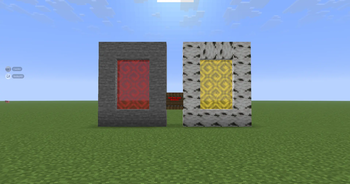
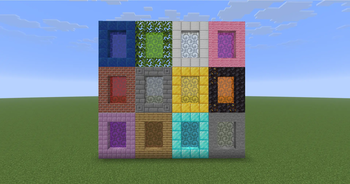
Custom Portal Forge is a Minecraft mod that lets you create and manage custom portal-based dimensions. Build a portal frame, activate it with the Dimension Igniter, and create unique portal-linked dimensions with colors that can be changed using dyes.
Main Features
- Create custom dimensions through portal frames.
- Activate portals using the Dimension Igniter.
- Change portal colors by throwing dyes into the portal.
- Portals keep their current frame material while changing only the portal color.
- Includes glowing animated portal visuals.
- Includes admin commands for managing custom dimensions.
- Works in singleplayer and multiplayer when installed correctly.
How to Use
- Build a valid portal frame.
- Use the Dimension Igniter on the frame to activate the portal.
- Enter the portal to travel to the linked custom dimension.
- Throw dye into the portal to change the portal color.
- Use admin commands to manage, rename, delete, or give access to custom dimensions.
What Happens When You Enter a Portal
When a custom portal is entered, it sends the player to that portal’s linked custom dimension.
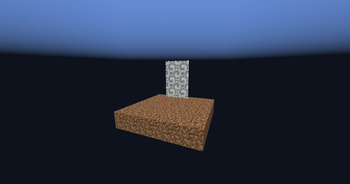
Newly created dimensions start with a simple blank template:
- A 5x5 dirt starter island
- Surrounded by the void
- Designed as a blank starting point for building your own dimension
Commands
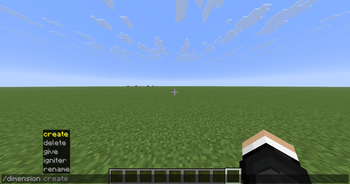
Create
Creates a new custom dimension.
Command:
/dimension create <name>
Use this to create a new blank custom dimension with the default 5x5 dirt starter island surrounded by the void.
Delete
Deletes an existing custom dimension.
Command:
/dimension delete <name>
Use this carefully. Deleting a dimension removes that custom dimension from the mod.
Give Igniter
Gives a Dimension Igniter for a specific dimension.
Command:
/dimension give igniter <player> <dimension>
Use this to give yourself or another player a Dimension Igniter linked to a specific custom dimension.
Rename
Renames an existing custom dimension.
Command:
/dimension rename <old_name> <new_name>
After using this command, the portal may take a few moments to update.
Crafting
The Dimension Igniter can be crafted using this recipe:
Torch | Empty | Empty
Diamond Block | Soul Soil | Empty
Flint and Steel | Amethyst Block | Torch
Installation
This mod is required on both the client and server.
For singleplayer, install it in your local mods folder.
For multiplayer, install it on the server and make sure every player also has the mod installed.
Notes
This mod is designed for custom portal travel, dimension experimentation, and building unique worlds from a blank void-island starting point.
Available Versions
How to Install custom portal forge on Your Server
Order Server
Order a Minecraft Java server with at least 4 GB RAM (6 GB recommended).
Set fabric Loader
In the panel under "Egg", select the fabric loader and matching Minecraft version (26.1.2).
Install Mod
Open the mod browser in the dashboard and search for "custom portal forge". Click "Install" – done! Alternatively, upload the .jar via SFTP to the /mods folder.
Compatibility
Mod Loaders
Minecraft Versions
26.1.2
Server-side
✓ RequiredRecommended RAM
6 GB(min. 4 GB)Frequently Asked Questions
custom portal forge server crashes on startup – what to do?
Most common cause: wrong fabric version or insufficient RAM. Check the server log (latest.log) for "OutOfMemoryError" or "Mixin" errors. With Mado Hosting: ensure at least 4 GB RAM is allocated and the loader matches the mod version (26.1.2). You can switch loaders with one click in the panel.
Is custom portal forge compatible with fabric?
custom portal forge officially supports fabric for Minecraft 26.1.2. The Mado dashboard automatically detects incompatible loader combinations.
Server lagging with custom portal forge – how to optimize performance?
Recommended RAM: 6 GB (per 5 players). Use /spark profiler to check if custom portal forge consumes the most tick time. Common fixes: reduce server view-distance to 8-10, install "performant" or "starlight" as supplementary mods on Forge. With Mado Hosting, your server runs on NVMe SSDs with dedicated CPU cores for minimal latency.
Similar Mods

![[ETF] Entity Texture Features](https://cdn.modrinth.com/data/BVzZfTc1/af683d206d50b05258d865b0d6e4aa2f2cee12f2_96.webp)
![[EMF] Entity Model Features](https://cdn.modrinth.com/data/4I1XuqiY/6e5bbd0d06b1741bfdab6c0cfab6de8fdaf0064c_96.webp)



Rent Modded Server
Install custom portal forge with just one click on your server.