
Custom Treasure Maps
Turn any empty map into a custom treasure map pointing to your chests!
Screenshots
About this Mod
Custom Treasure Maps
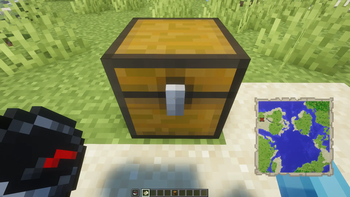
Custom Treasure Maps is a Fabric mod that allows players to easily create their own treasure maps pointing to hidden loot! Perfect for map makers, multiplayer servers, and roleplay.
🌟 Features
- Create Custom Maps: Turn any ordinary Empty Map into a Treasure Map that points directly to a container.
- Red 'X' Marker: The generated map features the classic red 'X' marker, just like vanilla buried treasure maps.
- Custom Names: If the target container has a custom name (e.g., renamed in an anvil), the resulting map will inherit that name.
- Supported Containers: Works with Chests, Trapped Chests, and Barrels.
📖 How to Use
Creating a custom treasure map is simple and integrated right into gameplay:
- Place down a Chest, Trapped Chest, or Barrel (this will be your treasure).
- Equip an Empty Map in your Main Hand.
- Equip a Compass in your Off-Hand.
- Sneak (Shift) + Right-Click on the container.
The Empty Map will be consumed, and you will immediately receive a Custom Treasure Map pointing to that exact location!
⚙️ Requirements
- Minecraft: 26.1.2 or 26.2 (Works on supported snapshot/release versions).
- Mod Loader: Fabric Loader (0.19.3+ recommended).
- Dependencies: Fabric API.
📥 Installation
- Install Fabric Loader for your Minecraft version.
- Download the latest version of the Fabric API and place it in your
modsfolder. - Download the
CustomTreasureMaps.jarfile and place it in yourmodsfolder. - Launch the game and enjoy hiding your treasures!
📄 License
This project is open-source and available for use in any modpack. Please refer to the LICENSE file for more details.
Пользовательские Карты Сокровищ (Custom Treasure Maps)
Custom Treasure Maps — это Fabric мод, который позволяет игрокам легко создавать собственные карты сокровищ, указывающие на спрятанный лут! Идеально подходит для создателей карт, мультиплеерных серверов и ролевых игр.
🌟 Особенности
- Создание своих карт: Превратите любую обычную Пустую карту в Карту Сокровищ, которая указывает прямо на контейнер.
- Красный крестик 'X': На созданной карте появляется классический красный крестик 'X', прямо как на ванильных картах сокровищ.
- Свои названия: Если у целевого контейнера есть свое имя (например, переименован в наковальне), полученная карта унаследует это название.
- Поддерживаемые контейнеры: Работает с Сундуками, Сундуками-ловушками и Бочками.
📖 Как использовать
Создать свою карту сокровищ очень просто, процесс интегрирован прямо в игровой процесс:
- Поставьте Сундук, Сундук-ловушку или Бочку (это будет ваше сокровище).
- Возьмите Пустую карту в Главную руку.
- Возьмите Компас во Вторую (левую) руку.
- Нажмите Shift (приседание) + Правая кнопка мыши по контейнеру.
Пустая карта пропадет, и вы сразу же получите Пользовательскую Карту Сокровищ, указывающую точно на это место!
⚙️ Требования
- Загрузчик модов: Fabric Loader (рекомендуется 0.19.3+).
- Зависимости: Fabric API.
📥 Установка
- Установите Fabric Loader для вашей версии Minecraft.
- Скачайте последнюю версию Fabric API и поместите ее в папку
mods. - Скачайте файл
CustomTreasureMaps.jarи поместите его в папкуmods. - Запустите игру и наслаждайтесь прятаньем своих сокровищ!
📄 Лицензия
Available Versions
How to Install Custom Treasure Maps on Your Server
Order Server
Order a Minecraft Java server with at least 3 GB RAM (4 GB recommended).
Set fabric Loader
In the panel under "Egg", select the fabric loader and matching Minecraft version (26.1.2).
Install Mod
Open the mod browser in the dashboard and search for "Custom Treasure Maps". Click "Install" – done! Alternatively, upload the .jar via SFTP to the /mods folder.
Compatibility
Mod Loaders
Minecraft Versions
26.1.2
Server-side
✓ RequiredRecommended RAM
4 GB(min. 3 GB)Frequently Asked Questions
Custom Treasure Maps server crashes on startup – what to do?
Most common cause: wrong fabric version or insufficient RAM. Check the server log (latest.log) for "OutOfMemoryError" or "Mixin" errors. With Mado Hosting: ensure at least 3 GB RAM is allocated and the loader matches the mod version (26.1.2). You can switch loaders with one click in the panel.
Is Custom Treasure Maps compatible with fabric?
Custom Treasure Maps officially supports fabric for Minecraft 26.1.2. The Mado dashboard automatically detects incompatible loader combinations.
Server lagging with Custom Treasure Maps – how to optimize performance?
Recommended RAM: 4 GB (per 8 players). Use /spark profiler to check if Custom Treasure Maps consumes the most tick time. Common fixes: reduce server view-distance to 8-10, install "performant" or "starlight" as supplementary mods on Forge. With Mado Hosting, your server runs on NVMe SSDs with dedicated CPU cores for minimal latency.
Similar Mods






Rent Modded Server
Install Custom Treasure Maps with just one click on your server.