
Custom Watermark
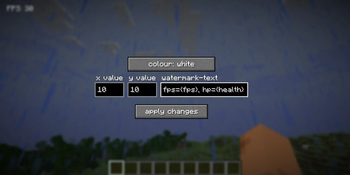
Adds a customisable text watermark to the game that you can edit using the built-in GUI
Screenshots



About this Mod
Custom-watermark
This mod adds a customisable watermark to your client that you can modify and edit using the built-in GUI
Keybinds
watermark.gui - Opens the custom-watermark gui (set to the V key by default)
watermark.cycle - Cycles the watermark colour without opening the GUI (set to the / key by default, if it doesn't work please check if / is already bound to something)
Colour options
Here are the colour options currently implemented in the mod, more will be implemented soon...
white
blue
red
blue
green
yellow
orange
pink
pastel red
pastel blue
pastel green
pastel yellow
pastel pink
Custom tags
Custom-watermark has some tags that use in game data to allow for a more customisable gui, here they are:
{fps} - shows the current frames-per-second (fps){health} - shows your current player health (including decimal places){time} - shows the current time (systemclock){date} - shows the current date{username} - displays your username{x} - displays your x coordinates{y} - displays your y coordinates{z} - displays your z coordinates{moonphase} - This tag shows the current Moon phase in text form (for example "Full Moon"){moon} - This tag is basically the same as the {moonphase} tag, but instead displays it as an integer (such as "1" for a full Moon, see the Minecraft wiki here for the full list)
Tag aliases:
{hp} - alias of {health}{player} - alias of {username}
To show the data, put the tags (with the brackets) in any part of your watermark text. Here is an example:
fps={fps}, health={health}
This will show up as:
fps=144, health=18
The 144 fps and 18 health are just example numbers
Json config
Custom-watermark includes a JSON config file, which can be found in the .minecraft/config folder. This config file is used to store preference data, but can also be used to directly modify the watermark configuration, as an alternative to the GUI
custom-watermark.json
{
"x":10,
"y":10,
"scale":1.0,
"txt":"FPS: {fps}",
"colour":"literal{white}"
}
How to temporarily disable the watermark
To temporarily disable the watermark, remove all of the text from the watermark text bar and press the "apply changes" button
Please feel free to make a Github issue for feature requests
1.0 Notice
To anyone running version 1.0, please note that the mod may come up with the name "pumpkin", as 1.0's mod id wasn't refractored from the original id that came from what this project was initially meant to be (a halloween mod)
Modpack usage notice
You may use this mod for any modpacks, as long as the modpack follows terms of the GPL v3 License this mod uses.
Available Versions
How to Install Custom Watermark on Your Server
Order Server
Order a Minecraft Java server with at least 3 GB RAM (4 GB recommended).
Set fabric Loader
In the panel under "Egg", select the fabric loader and matching Minecraft version (1.21.8).
Install Mod
Open the mod browser in the dashboard and search for "Custom Watermark". Click "Install" – done! Alternatively, upload the .jar via SFTP to the /mods folder.
Compatibility
Mod Loaders
Minecraft Versions
1.21.8, 1.21.7, 1.21.6 (+2 more)
Server-side
✗ UnsupportedRecommended RAM
4 GB(min. 3 GB)Frequently Asked Questions
Custom Watermark server crashes on startup – what to do?
Most common cause: wrong fabric version or insufficient RAM. Check the server log (latest.log) for "OutOfMemoryError" or "Mixin" errors. With Mado Hosting: ensure at least 3 GB RAM is allocated and the loader matches the mod version (1.21.8). You can switch loaders with one click in the panel.
Is Custom Watermark compatible with fabric?
Custom Watermark officially supports fabric for Minecraft 1.21.8, 1.21.7, 1.21.6. The Mado dashboard automatically detects incompatible loader combinations.
Server lagging with Custom Watermark – how to optimize performance?
Recommended RAM: 4 GB (per 8 players). Use /spark profiler to check if Custom Watermark consumes the most tick time. Common fixes: reduce server view-distance to 8-10, install "performant" or "starlight" as supplementary mods on Forge. With Mado Hosting, your server runs on NVMe SSDs with dedicated CPU cores for minimal latency.
Similar Mods




Rent Modded Server
Install Custom Watermark with just one click on your server.