
custom_knight
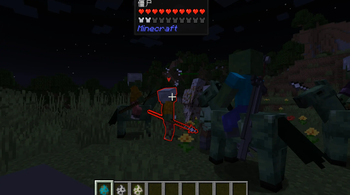
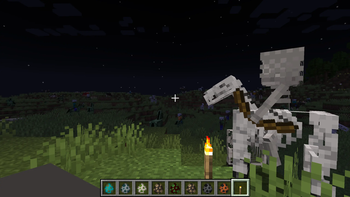
You can make creatures ride other creatures and take up weapons
Screenshots

About this Mod
costom knight
Mod Introduction
Creative Knight Config is a Minecraft 1.20.1 Forge mod that allows players to configure knight behaviors, mounts, and weapons for various mobs in-game.
Features
1. In-Game Configuration
- Intuitive configuration interface accessible through the in-game mod configuration button
- Supports Chinese interface with simple and easy-to-understand operations
2. Mob Configuration
- Spawn Chance: Adjust the probability of various mobs becoming knights, who can wield weapons and ride mounts
- Weapon Configuration: Set default weapons for each type of mob knight
- Mount Configuration: Set default mounts for each type of mob
- Mount System: Enable/disable mount system and adjust mount spawn probability
3. Supported Mobs
- Zombie
- Skeleton
- Pillager
- Piglin
- Witch
- Zombie Villager
- Zombified Piglin
- Wither Skeleton
- Vindicator
- Evoker
- Husk
- Piglin Brute
- Custom mobs added through configuration files
4. No Faction Restrictions
- Removed mount faction restrictions, any knight can ride any type of mount (preferably configure same factions, as I don't know what might happen with random combinations)
- Supports more free mount combinations
5. ID Copy Function
- Hover over an item and press the shortcut key (default I key) to copy the item's English ID to clipboard
- Can customize the copy key through the game's built-in key binding function
Usage
Configuration Interface
- After entering the game, click the "Mods" button in the main menu
- Find the "custom knight" mod and click the "Config" button
- In the configuration interface, you can:
- Adjust various mobs' knight spawn probability in the "Spawn Chance" tab
- Enable/disable mount system and adjust mount spawn probability in the "Mount System" tab
- Set default weapons for each mob in the "Weapon Settings" tab
- Set default mounts for each mob in the "Mount Settings" tab
Or enter the command/creativeknight config
Adding Custom Mobs
(Actually, I haven't tried this)
Find the configuration file:
The configuration file is located in the config folder of the game directory, named knightmod-common.toml.
Modify the configuration file:
After opening the configuration file, find the following two configuration items:customCreatures: Custom mob listcustomCreaturesConfig: Custom mob configurationAdd custom mobs:
Format example:
# Custom mob list, format:
modid:entity1,modid:entity2,...
customCreatures =
"minecraft:stray,
example:custom_creature"

# Custom mob configuration, format:
modid:entity1:spawnChance:weapon:mountFaction,
modid:entity2:spawnChance:weapon:mountFaction,...
customCreaturesConfig =
"minecraft:stray:0.2:minecraft:bow:undead,
example:custom_creature:0.3:example:custom_sword:undead"
Configuration item description:
modid:entity: Full mob ID, e.g.,minecraft:strayspawnChance: Knight spawn probability, range 0-1weapon: Weapon ID, e.g.,minecraft:bowmountFaction: Mount faction, optional values:undead(undead),illager(illager),piglin(piglin),witch(witch)
Save the configuration file:
After modification, save the configuration file and restart the game to take effect.
Example Configuration
# Custom mob list
customCreatures = "minecraft:stray,example:custom_creature"

# Custom mob configuration
customCreaturesConfig = "minecraft:stray:0.2:minecraft:bow:undead,example:custom_creature:0.3:example:custom_sword:undead"
Technical Features
- Dynamic Configuration: Configuration changes take effect immediately without restarting the game
- Compatibility: Compatible with most mods
- Performance Optimization: Efficient event handling with minimal impact on game performance
- Extensibility: Supports adding custom mobs through configuration files
Installation
- Make sure your Minecraft has Forge 1.20.1 installed
- Download the JAR file of this mod
- Put the JAR file into the
modsfolder of your game directory - Start the game and enjoy the fun of custom knights!
Author
Baolong Zhanshen Tiezhu
Contact
Bilibili Personal Homepage
GitHub
Version History
- v1.0: Initial version, implemented basic features
License
All Rights Reserved
Available Versions
How to Install custom_knight on Your Server
Order Server
Order a Minecraft Java server with at least 3 GB RAM (4 GB recommended).
Set forge Loader
In the panel under "Egg", select the forge loader and matching Minecraft version (1.20.1).
Install Mod
Open the mod browser in the dashboard and search for "custom_knight". Click "Install" – done! Alternatively, upload the .jar via SFTP to the /mods folder.
Compatibility
Mod Loaders
Minecraft Versions
1.20.1
Server-side
✓ RequiredRecommended RAM
4 GB(min. 3 GB)Frequently Asked Questions
custom_knight server crashes on startup – what to do?
Most common cause: wrong forge version or insufficient RAM. Check the server log (latest.log) for "OutOfMemoryError" or "Mixin" errors. With Mado Hosting: ensure at least 3 GB RAM is allocated and the loader matches the mod version (1.20.1). You can switch loaders with one click in the panel.
Is custom_knight compatible with forge?
custom_knight officially supports forge for Minecraft 1.20.1. The Mado dashboard automatically detects incompatible loader combinations.
Server lagging with custom_knight – how to optimize performance?
Recommended RAM: 4 GB (per 8 players). Use /spark profiler to check if custom_knight consumes the most tick time. Common fixes: reduce server view-distance to 8-10, install "performant" or "starlight" as supplementary mods on Forge. With Mado Hosting, your server runs on NVMe SSDs with dedicated CPU cores for minimal latency.
Similar Mods




Rent Modded Server
Install custom_knight with just one click on your server.