
CustomCapes
# Custom Capes Ever wanted a cape that's truly your own? With **Custom Capes**, you can design, edit, animate, and wear completely custom capes directly inside Minecraft. No external editors, no complicated setup—just install the mod alongside Fabric API
Screenshots
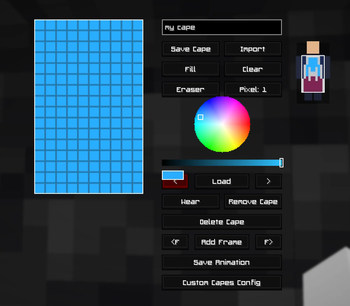
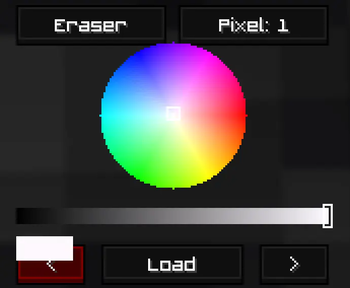
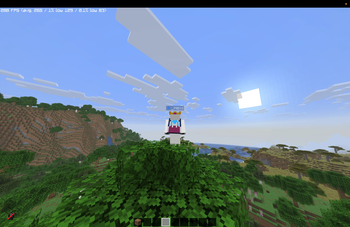
About this Mod
Custom Capes
Ever wanted a cape that's truly your own? With Custom Capes, you can design, edit, animate, and wear completely custom capes directly inside Minecraft. No external editors, no complicated setup—just install the mod alongside Fabric API and start creating.
Whether you're personalizing your singleplayer experience or creating a unique look for multiplayer, Custom Capes gives you all the tools you need to make your character stand out.
Unlimited Creativity
Custom Capes has evolved beyond the original 16-color palette.
16 Million+ Colors
Choose from over 16 million colors to create detailed artwork, gradients, logos, and pixel art. Your creativity is no longer limited by a small selection of preset colors.
In-Game Cape Editor
Create and edit capes without ever leaving Minecraft.
Features
- Draw and edit capes directly in-game
- Real-time cape preview while editing
- Advanced pixel-art tools
- No external websites required
- No file uploading or exporting
Simply press C at any time to open the editor.
Custom Animations
Bring your capes to life with frame-by-frame animation support.
Create animated effects such as:
- Waving capes
- Glowing patterns
- Pulsing designs
- Fully custom animations
Preview animations instantly before saving your work.
Cape Wardrobe
Save and manage all of your creations in one place.
The wardrobe system allows you to:
- Save multiple cape designs
- Load previous creations instantly
- Match capes to different skins
- Switch styles whenever you want
Wear Your Cape In-Game
Once you've created your cape, equip it and wear it while playing.
Note: Custom Capes are currently client-side only and are visible through the mod client.
Intuitive Interface
Custom Capes is designed to be simple for beginners while providing powerful tools for experienced creators.
- Easy-to-use interface
- Lightweight performance
- Powerful editing tools
- Instant previews
- Everything accessible directly from Minecraft
Controls
Open Editor & Wardrobe
C — Opens the Custom Capes editor and wardrobe menu from anywhere in-game.
Installation
- Install Fabric Loader.
- Install Fabric API.
- Install Custom Capes.
- Launch Minecraft.
- Press C and start creating.
No accounts, no external editors, and no complicated setup required.
Available Versions
How to Install CustomCapes on Your Server
Order Server
Order a Minecraft Java server with at least 3 GB RAM (4 GB recommended).
Set fabric Loader
In the panel under "Egg", select the fabric loader and matching Minecraft version (1.21.11).
Install Mod
Open the mod browser in the dashboard and search for "CustomCapes". Click "Install" – done! Alternatively, upload the .jar via SFTP to the /mods folder.
Compatibility
Mod Loaders
Minecraft Versions
1.21.11
Server-side
✗ UnsupportedRecommended RAM
4 GB(min. 3 GB)Frequently Asked Questions
CustomCapes server crashes on startup – what to do?
Most common cause: wrong fabric version or insufficient RAM. Check the server log (latest.log) for "OutOfMemoryError" or "Mixin" errors. With Mado Hosting: ensure at least 3 GB RAM is allocated and the loader matches the mod version (1.21.11). You can switch loaders with one click in the panel.
Is CustomCapes compatible with fabric?
CustomCapes officially supports fabric for Minecraft 1.21.11. The Mado dashboard automatically detects incompatible loader combinations.
Server lagging with CustomCapes – how to optimize performance?
Recommended RAM: 4 GB (per 8 players). Use /spark profiler to check if CustomCapes consumes the most tick time. Common fixes: reduce server view-distance to 8-10, install "performant" or "starlight" as supplementary mods on Forge. With Mado Hosting, your server runs on NVMe SSDs with dedicated CPU cores for minimal latency.
Similar Mods

![[ETF] Entity Texture Features](https://cdn.modrinth.com/data/BVzZfTc1/af683d206d50b05258d865b0d6e4aa2f2cee12f2_96.webp)
![[EMF] Entity Model Features](https://cdn.modrinth.com/data/4I1XuqiY/6e5bbd0d06b1741bfdab6c0cfab6de8fdaf0064c_96.webp)



Rent Modded Server
Install CustomCapes with just one click on your server.