
Multi Chat Windows
Allows to add customizable Chat Tabs in Mc
Screenshots
About this Mod
Custom Chat tabs
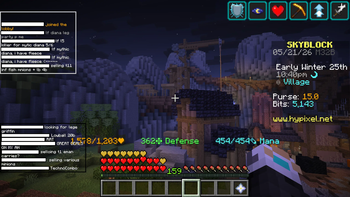
Custom Chat tabs allows you to add customizable chat tabs/windows to Minecraft.
Use cases
- Filter messages from specific players, for example friends, into a separate chat window on large servers
- Split chat into multiple tabs based on words, players, or custom rules
- Add timestamps, notifications, and message stacking to improve chat readability
Features
Custom Chat Tabs
Create multiple chat tabs/windows that:
- can be configured individually for each server
- use dependencies/rules to decide when a message should appear in a specific tab
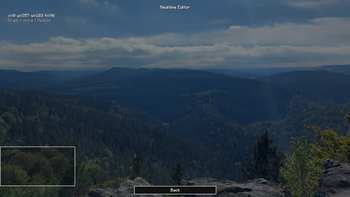
- can be customized visually, including opacity, outline, position, size, and text scale
- keep a session chat cache, allowing you to switch servers without instantly losing previous chat messages
Chat Filtering
- Filter chat based on words or player names
- Enable or disable individual or all filters
Timestamps
- Add timestamps to chat messages
- Customize timestamp format and color
Notifications
- Set up notifications for specific messages
- having custom sounds for each notification
Copy Menu
- Copy Messages to clipboard
Chat Stacking
- Stack repeated messages into a single line to msg (*2), 3 etc
Save the Chat after leaving a server or optionally after leaving minecraft
Configuration
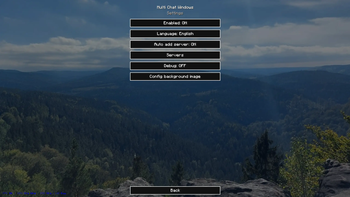
- Config Menu using cloth config, with the ability to set a background image
Languages
Currently supported languages:
- en_us
- de_de
Compatibility
This mod will probably not work together with some other chat-based mods
If you find an incompatibility, bug, or unexpected behavior, please report it on GitHub
Development
This mod is AI-Coded, which takes its time so:
Bug reports, feedback, and forks are welcome on GitHub
Planned features can be found in features.md
Inspired by
- LabyMod
- TabbyChat
- Chat Patches
Available Versions
How to Install Multi Chat Windows on Your Server
Order Server
Order a Minecraft Java server with at least 3 GB RAM (4 GB recommended).
Set fabric Loader
In the panel under "Egg", select the fabric loader and matching Minecraft version (1.21.11).
Install Mod
Open the mod browser in the dashboard and search for "Multi Chat Windows". Click "Install" – done! Alternatively, upload the .jar via SFTP to the /mods folder.
Compatibility
Mod Loaders
Minecraft Versions
1.21.11, 1.21.10
Server-side
✗ UnsupportedRecommended RAM
4 GB(min. 3 GB)Frequently Asked Questions
Multi Chat Windows server crashes on startup – what to do?
Most common cause: wrong fabric version or insufficient RAM. Check the server log (latest.log) for "OutOfMemoryError" or "Mixin" errors. With Mado Hosting: ensure at least 3 GB RAM is allocated and the loader matches the mod version (1.21.11). You can switch loaders with one click in the panel.
Is Multi Chat Windows compatible with fabric?
Multi Chat Windows officially supports fabric for Minecraft 1.21.11, 1.21.10. The Mado dashboard automatically detects incompatible loader combinations.
Server lagging with Multi Chat Windows – how to optimize performance?
Recommended RAM: 4 GB (per 8 players). Use /spark profiler to check if Multi Chat Windows consumes the most tick time. Common fixes: reduce server view-distance to 8-10, install "performant" or "starlight" as supplementary mods on Forge. With Mado Hosting, your server runs on NVMe SSDs with dedicated CPU cores for minimal latency.
Similar Mods




Rent Modded Server
Install Multi Chat Windows with just one click on your server.