
Custom Player Heads
Drops player heads with your current skin on player death or via a command - with Bedrock support (via Geyser). Also works with FabricTailor!
Screenshots
About this Mod
Small Fabric mod to drop player heads upon player death - or get them via a command - that's compatible with Bedrock players joined through Geyser, or other mods changing the skin while in-game; e.g. FabricTailor.
Unlike a datapack, this will drop a head that will keep the skin you are currently playing with!
Requires FabricAPI!
Because of https://bugs.mojang.com/browse/MC-174496, it is recommended to use a mod like https://modrinth.com/mod/headfix to keep custom head names when breaking the head.
Floodgate for Bedrock support is optional, but necessary if you're using a prefix other than ".".
Current features:
- drops a playerhead upon player death
- will display (and keep displaying) the skin used at the time of death!
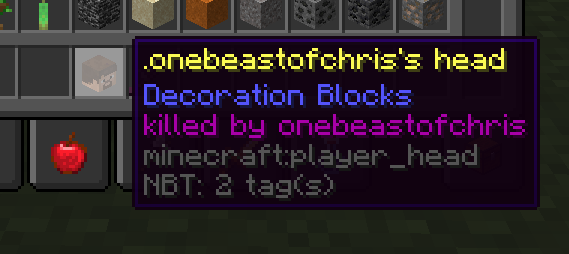
- if killed by player: adds "killed by [player]" in the lore of the item - or anything else; fully customizable!
- optional "/getskull" command - you can get heads for Java and Bedrock players. For the latter, it will work as long as they have a skin uploaded to the GeyserAPI (done automatically when they join any Geyser+floodgate server)
- option to disable floodgate prefixes showing in the head names
/getskull bedrock .onebeastofchris <- gets you the Bedrock head of onebeastofchris. You don't have to add the prefix!
/getskull jeb_ <- gets you the Java player's head of jeb_
This command is optional, and is disabled by default in the config file. You can restrict access to it by changing the CommandPermissionLevel. 2 is the default - 0 is everyone, 4 is only OP's.
Config file options
- "ShowLore": whether the heads should show who killed them in the lore. True by default.
- "DropNonPlayerKillHeads": Should this mod drop heads when the player died by a non-player death? True by default.
- "CommandEnabled": Whether /getskull is usable. false by default.
- "CommandPermissionLevel": Which permission level is needed to use the command. 2 by default. Set 0 for everyone, or 4 for only OPs.
- "Debug": Whether debug mode is on. Off by default.
- "IncludeFloodgatePrefixInNames": Should bedrock player names have their prefix included? Applies to head names, heads gotten via /getskull bedrock, and the lore tag.
Available Versions
How to Install Custom Player Heads on Your Server
Order Server
Order a Minecraft Java server with at least 3 GB RAM (4 GB recommended).
Set fabric Loader
In the panel under "Egg", select the fabric loader and matching Minecraft version (1.21).
Install Mod
Open the mod browser in the dashboard and search for "Custom Player Heads". Click "Install" – done! Alternatively, upload the .jar via SFTP to the /mods folder.
Compatibility
Mod Loaders
Minecraft Versions
1.21, 1.20.6, 1.20.5 (+8 more)
Server-side
✓ RequiredRecommended RAM
4 GB(min. 3 GB)Frequently Asked Questions
Custom Player Heads server crashes on startup – what to do?
Most common cause: wrong fabric version or insufficient RAM. Check the server log (latest.log) for "OutOfMemoryError" or "Mixin" errors. With Mado Hosting: ensure at least 3 GB RAM is allocated and the loader matches the mod version (1.21). You can switch loaders with one click in the panel.
Is Custom Player Heads compatible with fabric?
Custom Player Heads officially supports fabric for Minecraft 1.21, 1.20.6, 1.20.5. The Mado dashboard automatically detects incompatible loader combinations.
Server lagging with Custom Player Heads – how to optimize performance?
Recommended RAM: 4 GB (per 8 players). Use /spark profiler to check if Custom Player Heads consumes the most tick time. Common fixes: reduce server view-distance to 8-10, install "performant" or "starlight" as supplementary mods on Forge. With Mado Hosting, your server runs on NVMe SSDs with dedicated CPU cores for minimal latency.
Similar Mods

![[ETF] Entity Texture Features](https://cdn.modrinth.com/data/BVzZfTc1/af683d206d50b05258d865b0d6e4aa2f2cee12f2_96.webp)
![[EMF] Entity Model Features](https://cdn.modrinth.com/data/4I1XuqiY/6e5bbd0d06b1741bfdab6c0cfab6de8fdaf0064c_96.webp)



Rent Modded Server
Install Custom Player Heads with just one click on your server.