
Cuttable Wood
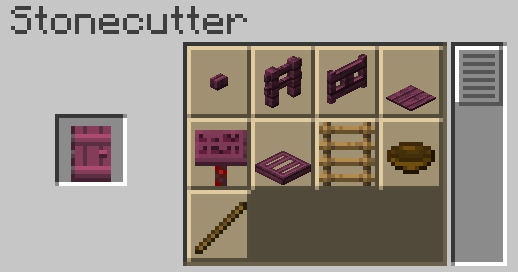
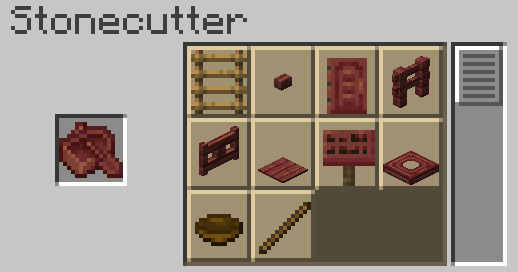
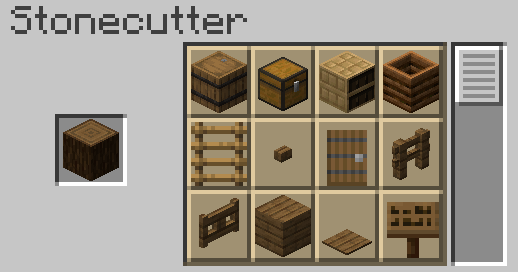
Makes wood blocks cuttable in the stonecutter, to make the crafting of wooden items more comfortable and sensible.
Screenshots
About this Mod
Features
In short, this adds stonecutting recipes for almost all wooden blocks. Some general things this datapack allows you to do:
- Use less wood crafting some wooden items (e.g. 1 plank -> 1 stair).
- Craft fences and signs directly from logs, without having to craft sticks first.
- Repurpose items, cutting them into smaller ones (e.g. doors into trapdoors; stairs into slabs, etc.).
- Convert fences into fence gates and viceversa.
- Strip huge amounts of wood faster than by hand.
For a full-ish list of recipes, please check my website. It would take too much space here.
There's an alternate, more over-powered version of this pack available for download in my website.
Notes
- This datapack was designed to be as balanced as possible while making it make sense. No recipe should be exploitable to get free items/blocks.
- However, it is possible to slightly exploit the recipes to get "free" fuel. I nerfed this down as much as possible, but this is also the case in vanilla crafting recipes (for example, by crafting logs into slabs you get 4x fuel), so I decided to not get rid of the possibility alltogether.
- The recipes were also designed taking into account Vanilla Tweak's Back to Blocks datapack, I recommend using that datapack along with this one to make the most efficient use of wooden blocks.
Available Versions
How to Install Cuttable Wood on Your Server
Order Server
Order a Minecraft Java server with at least 3 GB RAM (4 GB recommended).
Set datapack Loader
In the panel under "Egg", select the datapack loader and matching Minecraft version (26.1.2).
Install Mod
Open the mod browser in the dashboard and search for "Cuttable Wood". Click "Install" – done! Alternatively, upload the .jar via SFTP to the /mods folder.
Compatibility
Mod Loaders
Minecraft Versions
26.1.2, 26.1.1, 26.1 (+7 more)
Server-side
✓ RequiredRecommended RAM
4 GB(min. 3 GB)Frequently Asked Questions
Cuttable Wood server crashes on startup – what to do?
Most common cause: wrong datapack version or insufficient RAM. Check the server log (latest.log) for "OutOfMemoryError" or "Mixin" errors. With Mado Hosting: ensure at least 3 GB RAM is allocated and the loader matches the mod version (26.1.2). You can switch loaders with one click in the panel.
Is Cuttable Wood compatible with datapack and fabric and forge and neoforge and quilt?
Cuttable Wood officially supports datapack, fabric, forge, neoforge, quilt for Minecraft 26.1.2, 26.1.1, 26.1. Note: Forge and Fabric mods are NOT cross-compatible – pick one loader and stick with it. The Mado dashboard automatically detects incompatible loader combinations.
Server lagging with Cuttable Wood – how to optimize performance?
Recommended RAM: 4 GB (per 8 players). Use /spark profiler to check if Cuttable Wood consumes the most tick time. Common fixes: reduce server view-distance to 8-10, install "performant" or "starlight" as supplementary mods on Forge. With Mado Hosting, your server runs on NVMe SSDs with dedicated CPU cores for minimal latency.
Similar Mods




Rent Modded Server
Install Cuttable Wood with just one click on your server.