
cyanspeech
Text-to-speech with SimpleVoiceChat!
Screenshots
About this Mod
cyanspeech
cyanspeech adds local text-to-speech to Minecraft with a large LibriTTS/Piper voice catalog, in-game voice controls, and optional playback through Simple Voice Chat. It is built for players who want typed chat, roleplay lines, accessibility speech, or quick client-side voice output without running a separate server.
WARNING
cyanspeech does not presently work well with Linux!
Features
- Local text-to-speech rendering prepared automatically when the mod loads.
- 904-speaker voice catalog based on the
en_US-libritts_r-mediumPiper voice model. - Voice IDs that support catalog names such as
libritts-...,piper-000,voice-0, and numeric speaker indexes. - Optional Simple Voice Chat output when Simple Voice Chat is installed and connected.
- Optional local desktop playback for hearing generated speech on your own client.
- Optional outgoing chat auto-speech for non-command chat messages.
- Persisted client settings for voice, playback, chat speech, keybinds, starred voices, star colors, and voice effects.
- Full in-game settings screen on Fabric, Quilt, and NeoForge builds.
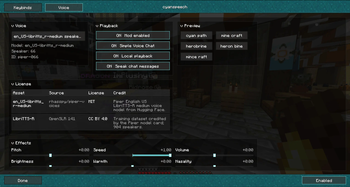
- Collapsible settings sections for voice, playback, preview, effects, and licenses.
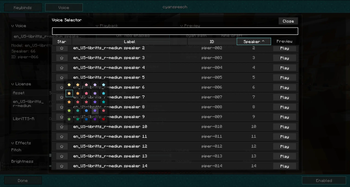
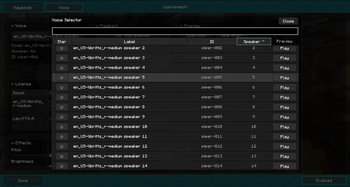
- Sortable voice selector popup with search, starred voices, star colors, voice metadata, and preview buttons.
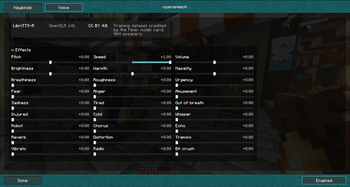
- Tiled voice effect controls for pitch, speed, volume, tone, texture, emotion, radio-style processing, echo, reverb, chorus, vibrato, tremolo, distortion, and bit crush.
- Built-in license and source attribution for the included voice model metadata and dataset lineage.
In-Game Controls
cyanspeech exposes a compact client command surface for speech, voice selection, playback toggles, and effects.
| Command | Description |
|---|---|
/cyanspeech |
Shows cyanspeech status and current settings. |
/cyanspeech <text> |
Speaks the provided text. |
/cyanspeech say <text> |
Speaks the provided text. |
/cyanspeech speak <text> |
Alias for speaking the provided text. |
/cyanspeech enable |
Enables generated speech output. |
/cyanspeech disable |
Disables generated speech output. |
/cyanspeech toggle |
Toggles generated speech output. |
/cyanspeech voice |
Shows the active voice and a preview of the available catalog. |
/cyanspeech voice <voice> |
Selects a voice from the cyanspeech catalog. |
/cyanspeech settings |
Shows current persisted settings. |
/cyanspeech settings voice <voice> |
Selects a voice through the settings command. |
| `/cyanspeech settings svc <on | off>` |
| `/cyanspeech settings local <on | off>` |
| `/cyanspeech settings chat <on | off>` |
/cyanspeech settings effect <name> <value> |
Adjusts a voice effect value. |
/cyanspeech options |
Alias for /cyanspeech settings. |
Supported effect names include pitch, speed, volume, brightness, warmth, nasality, breathiness, roughness, urgency, fear, anger, amusement, sadness, tired, outOfBreath, injured, cold, whisper, robot, chorus, echo, reverb, distortion, tremolo, vibrato, radio, and bitcrush.
Settings Screen
The in-game settings screen brings the same controls into one place: voice selection, playback routing, preview phrases, effect sliders, starred voice management, and license attribution. The voice selector can search and sort the full catalog, preview a selected voice, filter starred voices, and customize star colors locally.
Compatibility
cyanspeech ships through the cyancore multi-loader build system and currently includes client adapters for:
- Fabric 1.21.11
- Fabric 26.1.2
- Quilt 1.21.11
- NeoForge 26.1.2
Older 26.1 and 26.1.1 target requests are routed to the available 26.1.2 adapter in the cyancore build matrix.
Notes
Simple Voice Chat is optional. When it is present and connected, cyanspeech can send generated speech through the voice chat route. Local playback can also be used independently for client-side listening.
Voice model and dataset attribution is shown in the in-game license section. The current catalog is based on Piper voice metadata and the LibriTTS-R/OpenSLR 141 source lineage.
Available Versions
How to Install cyanspeech on Your Server
Order Server
Order a Minecraft Java server with at least 3 GB RAM (4 GB recommended).
Set fabric Loader
In the panel under "Egg", select the fabric loader and matching Minecraft version (26.1.2).
Install Mod
Open the mod browser in the dashboard and search for "cyanspeech". Click "Install" – done! Alternatively, upload the .jar via SFTP to the /mods folder.
Compatibility
Mod Loaders
Minecraft Versions
26.1.2, 26.1.1, 26.1 (+12 more)
Server-side
✗ UnsupportedRecommended RAM
4 GB(min. 3 GB)Frequently Asked Questions
cyanspeech server crashes on startup – what to do?
Most common cause: wrong fabric version or insufficient RAM. Check the server log (latest.log) for "OutOfMemoryError" or "Mixin" errors. With Mado Hosting: ensure at least 3 GB RAM is allocated and the loader matches the mod version (26.1.2). You can switch loaders with one click in the panel.
Is cyanspeech compatible with fabric and forge and java-agent and neoforge and quilt?
cyanspeech officially supports fabric, forge, java-agent, neoforge, quilt for Minecraft 26.1.2, 26.1.1, 26.1. Note: Forge and Fabric mods are NOT cross-compatible – pick one loader and stick with it. The Mado dashboard automatically detects incompatible loader combinations.
Server lagging with cyanspeech – how to optimize performance?
Recommended RAM: 4 GB (per 8 players). Use /spark profiler to check if cyanspeech consumes the most tick time. Common fixes: reduce server view-distance to 8-10, install "performant" or "starlight" as supplementary mods on Forge. With Mado Hosting, your server runs on NVMe SSDs with dedicated CPU cores for minimal latency.
Similar Mods




Rent Modded Server
Install cyanspeech with just one click on your server.