
Damage Indicator YS
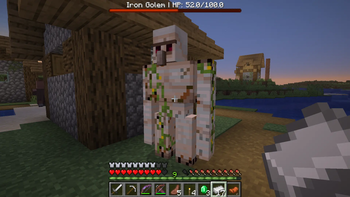
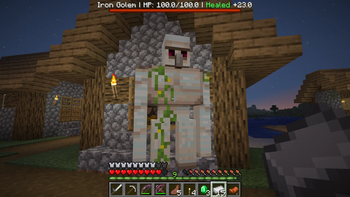
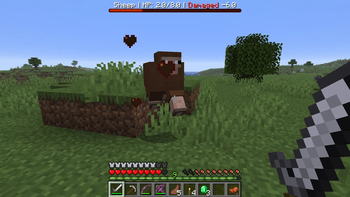
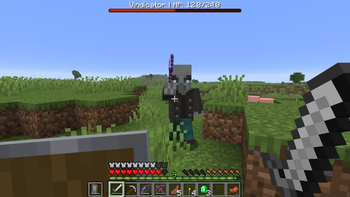
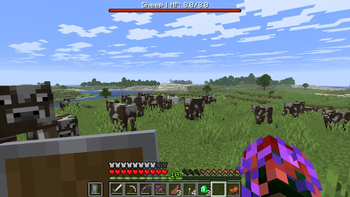
Adds a clean red bossbar health display for the entity you’re looking at, with readable damage, healing, and health feedback.
Screenshots
About this Mod
Damage Indicator YS
Focus Mode Design
Damage Indicator YS is designed as a low-clutter alternative to floating health text datapacks.
Instead of showing health above every nearby entity, it only displays information for the entity you are actively looking at. This keeps the screen cleaner while still giving useful combat feedback.
Features
- Clean red bossbar health indicator
- Shows the entity name and HP
- Displays recent damage as
Damaged -X - Displays recent healing as
Healed +X - Briefly shows 0 HP when a tracked entity dies
- Multiplayer-friendly per-player bossbar system
- Optional player targeting, disabled by default
- No resource pack required
Commands
Use these commands after installing or reloading the datapack:
/function dmi:systems/info
/function dmi:systems/install
/function dmi:systems/refresh
/function dmi:systems/repair
/function dmi:systems/uninstall
Roadmap
Version 1.0 focuses on the clean bossbar-based display.
Future updates may expand the datapack with more optional display modes, better configuration controls, combat memory tracking, and additional server-friendly customization.
Support
If you enjoy the datapack and want to support future Minecraft projects from ManaMage and Yazsras Studios, donation links are available on the project page.
Available Versions
How to Install Damage Indicator YS on Your Server
Order Server
Order a Minecraft Java server with at least 3 GB RAM (4 GB recommended).
Set datapack Loader
In the panel under "Egg", select the datapack loader and matching Minecraft version (26.1.2).
Install Mod
Open the mod browser in the dashboard and search for "Damage Indicator YS". Click "Install" – done! Alternatively, upload the .jar via SFTP to the /mods folder.
Compatibility
Mod Loaders
Minecraft Versions
26.1.2, 26.1.1, 26.1
Server-side
✓ RequiredRecommended RAM
4 GB(min. 3 GB)Frequently Asked Questions
Damage Indicator YS server crashes on startup – what to do?
Most common cause: wrong datapack version or insufficient RAM. Check the server log (latest.log) for "OutOfMemoryError" or "Mixin" errors. With Mado Hosting: ensure at least 3 GB RAM is allocated and the loader matches the mod version (26.1.2). You can switch loaders with one click in the panel.
Is Damage Indicator YS compatible with datapack and fabric and forge and neoforge and quilt?
Damage Indicator YS officially supports datapack, fabric, forge, neoforge, quilt for Minecraft 26.1.2, 26.1.1, 26.1. Note: Forge and Fabric mods are NOT cross-compatible – pick one loader and stick with it. The Mado dashboard automatically detects incompatible loader combinations.
Server lagging with Damage Indicator YS – how to optimize performance?
Recommended RAM: 4 GB (per 8 players). Use /spark profiler to check if Damage Indicator YS consumes the most tick time. Common fixes: reduce server view-distance to 8-10, install "performant" or "starlight" as supplementary mods on Forge. With Mado Hosting, your server runs on NVMe SSDs with dedicated CPU cores for minimal latency.
Similar Mods




Rent Modded Server
Install Damage Indicator YS with just one click on your server.