
Damage Profiling Suite
Real-time damage profiling, DPS tracking, BigInteger-safe math, and clean overlays for combat testing and balance tuning.
Screenshots
About this Mod
⭐ Damage Profiling Suite
🔍 Overview
Damage Profiling Suite is a lightweight, developer‑focused combat analytics mod built for creators who need accurate, readable insight into Minecraft’s damage engine. Whether you’re balancing bosses, tuning weapons, or analyzing player performance, this suite delivers precision without bloat.
📊 Core Features
Real‑Time Damage Tracking
- Profiles every hit as it happens
- Displays source, amount, timing, and type
- Zero clutter, zero guesswork
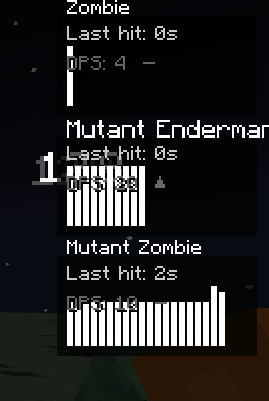
DPS Graph Overlay
- Clean, minimal HUD
- Hit‑by‑hit damage visualization
- Burst and sustained DPS tracking
- Ideal for boss testing and weapon tuning
Per‑Entity Reports
- Total damage dealt
- Damage type breakdown
- Critical hit detection
- Hit frequency and peak DPS windows
BigInteger Calculations
- Supports extreme modded damage values
- No caps, overflow, or precision loss
🎨 Design Philosophy
- Pure utility — adds no gameplay content
- Clean, unobtrusive UI
- Event‑driven and optimized
- Fully compatible with other combat or boss mods
- Built for modders, pack makers, and theorycrafters
⚙️ Configuration
Customize the suite to your workflow:
- Toggle overlays
- Adjust smoothing and timing windows
- Control logging verbosity
- Enable developer debug output
🧪 Perfect For
- Mod developers balancing weapons or bosses
- Pack creators tuning progression
- Players optimizing builds
- Content creators showcasing combat mechanics
- Anyone who wants deeper insight into damage behavior
🚀 Lightweight & Accurate
Install, fight, analyze — Damage Profiling Suite is your drop‑in toolkit for understanding Minecraft combat at a professional level.
Available Versions
How to Install Damage Profiling Suite on Your Server
Order Server
Order a Minecraft Java server with at least 3 GB RAM (4 GB recommended).
Set forge Loader
In the panel under "Egg", select the forge loader and matching Minecraft version (1.20.1).
Install Mod
Open the mod browser in the dashboard and search for "Damage Profiling Suite". Click "Install" – done! Alternatively, upload the .jar via SFTP to the /mods folder.
Compatibility
Mod Loaders
Minecraft Versions
1.20.1
Server-side
✓ RequiredRecommended RAM
4 GB(min. 3 GB)Frequently Asked Questions
Damage Profiling Suite server crashes on startup – what to do?
Most common cause: wrong forge version or insufficient RAM. Check the server log (latest.log) for "OutOfMemoryError" or "Mixin" errors. With Mado Hosting: ensure at least 3 GB RAM is allocated and the loader matches the mod version (1.20.1). You can switch loaders with one click in the panel.
Is Damage Profiling Suite compatible with forge?
Damage Profiling Suite officially supports forge for Minecraft 1.20.1. The Mado dashboard automatically detects incompatible loader combinations.
Server lagging with Damage Profiling Suite – how to optimize performance?
Recommended RAM: 4 GB (per 8 players). Use /spark profiler to check if Damage Profiling Suite consumes the most tick time. Common fixes: reduce server view-distance to 8-10, install "performant" or "starlight" as supplementary mods on Forge. With Mado Hosting, your server runs on NVMe SSDs with dedicated CPU cores for minimal latency.
Similar Mods




Rent Modded Server
Install Damage Profiling Suite with just one click on your server.