
Damage Vignette
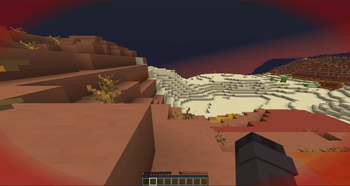
A Minecraft Mod who adds a fully-customizable vignette when you are low health.
Screenshots
About this Mod
Damage Vignette
A client-side Fabric mod for Minecraft 1.21 that renders a customizable vignette overlay when your health is low — with support for status effect tints, hex color picking, and a live preview GUI.
Features
- Health-based vignette — activates when your health drops below a configurable percentage of your max HP
- Oval-shaped overlay — the effect appears only in the corners, following an ellipse that touches all 4 screen edges; the center stays clean
- Status effect tints — automatically switches color when you have Poison (green) or Wither (gray)
- Fully customizable via ModMenu GUI or in-game commands
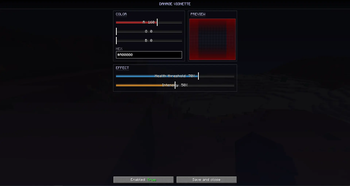
- Live preview in the settings screen — see exactly how your vignette will look before closing the menu
- Preset system — export and import configurations by name
Configuration
ModMenu GUI
Open the settings screen from the ModMenu mod list. The interface is split into three sections:
| Section | Controls |
|---|---|
| COLOR | R / G / B sliders + hex input field (#RRGGBB) |
| PREVIEW | Live preview of the vignette with the selected color |
| EFFECT | Health threshold (%), intensity (%), and enable toggle |
The R, G, B sliders are color-coded and sync bidirectionally with the hex field.
Commands
All commands are client-side (no server required).
/damagevignette color hex #RRGGBB       — set color by hex code
/damagevignette color <r> <g> <b>       — set color by RGB values (0–255)
/damagevignette health <1–100>          — set health threshold (percentage)
/damagevignette intensity <1–100>       — set vignette intensity (percentage)
/damagevignette toggle                  — enable or disable the vignette
/damagevignette preset export <name>    — save current config as a named preset
/damagevignette preset import <name>    — load a saved preset
Default Settings
| Setting | Default | Range |
|---|---|---|
| Color | #FF0000 (red) |
any hex color |
| Health threshold | 30% | 1–100% |
| Intensity | 100% | 1–100% |
| Enabled | true | — |
Dependencies
- Fabric Loader ≥ 0.15.11
- Fabric API for Minecraft 1.21
- YACL 3 3.x for GUI Menu
- ModMenu 11.x (optional, for GUI settings)
Author
Made by Indifferenzah
Available Versions
How to Install Damage Vignette on Your Server
Order Server
Order a Minecraft Java server with at least 3 GB RAM (4 GB recommended).
Set fabric Loader
In the panel under "Egg", select the fabric loader and matching Minecraft version (1.21.11).
Install Mod
Open the mod browser in the dashboard and search for "Damage Vignette". Click "Install" – done! Alternatively, upload the .jar via SFTP to the /mods folder.
Compatibility
Mod Loaders
Minecraft Versions
1.21.11, 1.21.10, 1.21.9 (+15 more)
Server-side
✗ UnsupportedRecommended RAM
4 GB(min. 3 GB)Frequently Asked Questions
Damage Vignette server crashes on startup – what to do?
Most common cause: wrong fabric version or insufficient RAM. Check the server log (latest.log) for "OutOfMemoryError" or "Mixin" errors. With Mado Hosting: ensure at least 3 GB RAM is allocated and the loader matches the mod version (1.21.11). You can switch loaders with one click in the panel.
Is Damage Vignette compatible with fabric?
Damage Vignette officially supports fabric for Minecraft 1.21.11, 1.21.10, 1.21.9. The Mado dashboard automatically detects incompatible loader combinations.
Server lagging with Damage Vignette – how to optimize performance?
Recommended RAM: 4 GB (per 8 players). Use /spark profiler to check if Damage Vignette consumes the most tick time. Common fixes: reduce server view-distance to 8-10, install "performant" or "starlight" as supplementary mods on Forge. With Mado Hosting, your server runs on NVMe SSDs with dedicated CPU cores for minimal latency.
Similar Mods




Rent Modded Server
Install Damage Vignette with just one click on your server.