
Day/Night Progress Bar
A sleek client-side HUD mod that displays the current day/night cycle progress with beautiful sun and moon indicators. Features customizable positioning, size scaling, weather effects, and an easy F8 configuration menu.
Screenshots
About this Mod
A sleek client-side HUD mod that displays the current day/night cycle progress with beautiful sun and moon indicators.
✨ Features
🎯 Core Functionality
- Real-time progress bar showing day/night cycle advancement
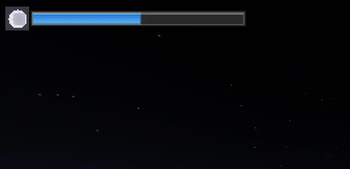
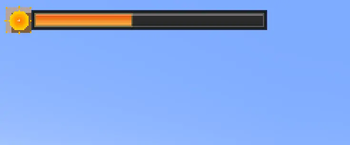
- Dynamic sun/moon icons that change based on time of day
- Weather integration - different colors during rain and thunderstorms
- Clean, modern design with gradient effects and shadows
⚙️ Customization Options
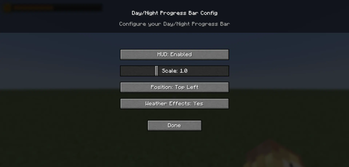
- 4 position presets: Top-left, Top-right, Bottom-left, Bottom-right
- Size scaling: Adjust from 50% to 200% to fit your screen
- Toggle on/off: Easily disable when not needed
- Weather effects: Optional color changes during storms
- Persistent settings: All preferences saved between sessions
🎮 Easy Configuration
- Press F8 to open the config menu
- Intuitive GUI with sliders and buttons
- Real-time preview of changes
- No restart required
🖼️ Visual Design
The progress bar features:
- Detailed sun icon with animated rays and golden gradients
- Realistic moon icon with craters and soft glow effects
- Multi-layered shadows and borders for depth
- Smooth color transitions between day/night themes
- Weather-responsive colors (blue for rain, purple for storms)
🔧 Technical Details
- Client-side only - works on any server
- Lightweight - minimal performance impact
- No dependencies beyond Fabric API
- Clean code - well-optimized rendering
📋 Requirements
- Minecraft: 1.21+
- Java: 21+
- Fabric Loader: 0.17.2+
- Fabric API: Any version
🚀 Installation
- Install Fabric Loader
- Download Fabric API
- Drop this mod into your
modsfolder - Launch the game and press F8 to configure!
Perfect for players who want to keep track of time without opening menus or checking the sky! 🌙✨
Available Versions
How to Install Day/Night Progress Bar on Your Server
Order Server
Order a Minecraft Java server with at least 3 GB RAM (4 GB recommended).
Set fabric Loader
In the panel under "Egg", select the fabric loader and matching Minecraft version (1.21.10).
Install Mod
Open the mod browser in the dashboard and search for "Day/Night Progress Bar". Click "Install" – done! Alternatively, upload the .jar via SFTP to the /mods folder.
Compatibility
Mod Loaders
Minecraft Versions
1.21.10, 1.21.9, 1.21.8 (+8 more)
Server-side
✗ UnsupportedRecommended RAM
4 GB(min. 3 GB)Frequently Asked Questions
Day/Night Progress Bar server crashes on startup – what to do?
Most common cause: wrong fabric version or insufficient RAM. Check the server log (latest.log) for "OutOfMemoryError" or "Mixin" errors. With Mado Hosting: ensure at least 3 GB RAM is allocated and the loader matches the mod version (1.21.10). You can switch loaders with one click in the panel.
Is Day/Night Progress Bar compatible with fabric?
Day/Night Progress Bar officially supports fabric for Minecraft 1.21.10, 1.21.9, 1.21.8. The Mado dashboard automatically detects incompatible loader combinations.
Server lagging with Day/Night Progress Bar – how to optimize performance?
Recommended RAM: 4 GB (per 8 players). Use /spark profiler to check if Day/Night Progress Bar consumes the most tick time. Common fixes: reduce server view-distance to 8-10, install "performant" or "starlight" as supplementary mods on Forge. With Mado Hosting, your server runs on NVMe SSDs with dedicated CPU cores for minimal latency.
Similar Mods

![[ETF] Entity Texture Features](https://cdn.modrinth.com/data/BVzZfTc1/af683d206d50b05258d865b0d6e4aa2f2cee12f2_96.webp)
![[EMF] Entity Model Features](https://cdn.modrinth.com/data/4I1XuqiY/6e5bbd0d06b1741bfdab6c0cfab6de8fdaf0064c_96.webp)



Rent Modded Server
Install Day/Night Progress Bar with just one click on your server.