
Death & Taxes
Death comes at a price.
Screenshots
About this Mod
About
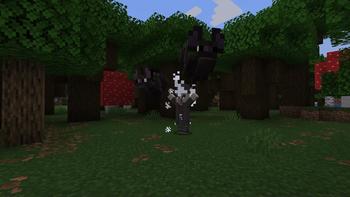
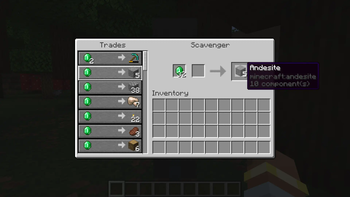
Instead of losing your items to the void, lava, or a distant cave thousands of blocks from your base, they will now be picked up by a new mob called the Scavenger. The Scavenger arrives once you have respawned, willing to return your loot for a price. But be quick, the Scavenger leaves one day after being summoned.
Compatibility
This is technically a gravestone mod, where the Scavenger functions as the gravestone block. Using this mod alongside other gravestone mods can cause item duplication, empty inventories, or other instabilities. The goal of this mod is to add a price to death, balancing the fact that items are no longer lost on death.
Merchant Pricing
Upon player death, every item is evaluated using this loot table:
deathtaxes:gameplay/scavenger_pricing
The loot table contains these parameters:
origin: The player's respawn locationentity: The respawned playertool: The currently evaluated item
The loot table uses match_tool and adds to the count of minecraft:emerald for every match.
Player Drop Blacklist
To prevent the player from buying emeralds with emeralds, an item tag list has been added that discards any matching items:
deathtaxes:gameplay/blacklisted_loot
Additional Conditions
Two new loot conditions have been added to versions prior to 1.21.5 to make up for the lack of data component comparison. These two loot conditions are:
deathtaxes:has_raritydeathtaxes:has_enchantments
Available Versions
How to Install Death & Taxes on Your Server
Order Server
Order a Minecraft Java server with at least 3 GB RAM (4 GB recommended).
Set forge Loader
In the panel under "Egg", select the forge loader and matching Minecraft version (1.21.6).
Install Mod
Open the mod browser in the dashboard and search for "Death & Taxes". Click "Install" – done! Alternatively, upload the .jar via SFTP to the /mods folder.
Compatibility
Mod Loaders
Minecraft Versions
1.21.6, 1.21.5, 1.20.6 (+5 more)
Server-side
✓ RequiredRecommended RAM
4 GB(min. 3 GB)Frequently Asked Questions
Death & Taxes server crashes on startup – what to do?
Most common cause: wrong forge version or insufficient RAM. Check the server log (latest.log) for "OutOfMemoryError" or "Mixin" errors. With Mado Hosting: ensure at least 3 GB RAM is allocated and the loader matches the mod version (1.21.6). You can switch loaders with one click in the panel.
Is Death & Taxes compatible with forge and neoforge?
Death & Taxes officially supports forge, neoforge for Minecraft 1.21.6, 1.21.5, 1.20.6. The Mado dashboard automatically detects incompatible loader combinations.
Server lagging with Death & Taxes – how to optimize performance?
Recommended RAM: 4 GB (per 8 players). Use /spark profiler to check if Death & Taxes consumes the most tick time. Common fixes: reduce server view-distance to 8-10, install "performant" or "starlight" as supplementary mods on Forge. With Mado Hosting, your server runs on NVMe SSDs with dedicated CPU cores for minimal latency.
Similar Mods




Rent Modded Server
Install Death & Taxes with just one click on your server.