
DeathCoords
Prints your last death coordinates and dimension to chat — and copies them to clipboard — so you can find your stuff after respawn.
Screenshots
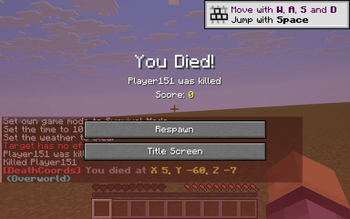
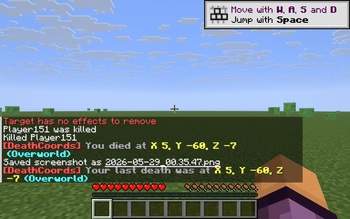
About this Mod
DeathCoords is a small, client-only Fabric mod for players who keep losing their inventory to lava, mobs, or that one unexpected drop. Whenever you die, the mod records exactly where it happened and tells you in chat — twice — so you can walk back and reclaim your gear.
Features
- Death message in chat. As soon as you die, the mod posts your X, Y, Z coordinates and the dimension to chat:
[DeathCoords] You died at X 124, Y 64, Z -312 (Overworld) - Repeats after respawn. A second message is posted right after you respawn, so you don't miss it on the death screen:
[DeathCoords] Your last death was at X 124, Y 64, Z -312 (Overworld) - Clipboard copy. The coordinates are copied to your system clipboard as
X Y Z, ready to paste into a waypoint mod, a wiki, or a Discord chat. - Dimension-aware. Recognizes the Overworld, the Nether, the End, and any modded dimension (printed by its registry id).
- Client-only. Works on any server — singleplayer or multiplayer. No mixins, no server install required.
How it works
On every client tick, the mod polls the player's death state. On the alive→dead edge it captures the current position and dimension key, prints the death message, and writes the coordinates to the system clipboard. On the dead→alive edge (respawn), it prints the last-known death location again so you see it in chat once the death screen is gone.
Cross-version
Tested on 1.21.8, 1.21.9, 1.21.10, 1.21.11. One JAR, one install.
No configuration
There is nothing to configure — the mod just works. No keybinds, no GUI, no JSON file.
Available Versions
How to Install DeathCoords on Your Server
Order Server
Order a Minecraft Java server with at least 3 GB RAM (4 GB recommended).
Set fabric Loader
In the panel under "Egg", select the fabric loader and matching Minecraft version (1.21.11).
Install Mod
Open the mod browser in the dashboard and search for "DeathCoords". Click "Install" – done! Alternatively, upload the .jar via SFTP to the /mods folder.
Compatibility
Mod Loaders
Minecraft Versions
1.21.11, 1.21.10, 1.21.9 (+1 more)
Server-side
✗ UnsupportedRecommended RAM
4 GB(min. 3 GB)Frequently Asked Questions
DeathCoords server crashes on startup – what to do?
Most common cause: wrong fabric version or insufficient RAM. Check the server log (latest.log) for "OutOfMemoryError" or "Mixin" errors. With Mado Hosting: ensure at least 3 GB RAM is allocated and the loader matches the mod version (1.21.11). You can switch loaders with one click in the panel.
Is DeathCoords compatible with fabric?
DeathCoords officially supports fabric for Minecraft 1.21.11, 1.21.10, 1.21.9. The Mado dashboard automatically detects incompatible loader combinations.
Server lagging with DeathCoords – how to optimize performance?
Recommended RAM: 4 GB (per 8 players). Use /spark profiler to check if DeathCoords consumes the most tick time. Common fixes: reduce server view-distance to 8-10, install "performant" or "starlight" as supplementary mods on Forge. With Mado Hosting, your server runs on NVMe SSDs with dedicated CPU cores for minimal latency.
Similar Mods




![[ETF] Entity Texture Features](https://cdn.modrinth.com/data/BVzZfTc1/af683d206d50b05258d865b0d6e4aa2f2cee12f2_96.webp)
![[EMF] Entity Model Features](https://cdn.modrinth.com/data/4I1XuqiY/6e5bbd0d06b1741bfdab6c0cfab6de8fdaf0064c_96.webp)
Rent Modded Server
Install DeathCoords with just one click on your server.