
DeathPing
DeathPing is a Fabric client-side mod that automatically sends your coordinates to chat when you leave a server, helping friends locate and rescue you in critical moments like death.
Screenshots
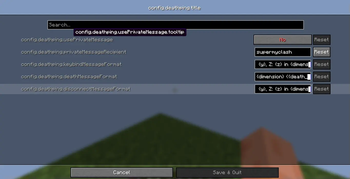

About this Mod
DeathPing Mod
DeathPing is a Minecraft Fabric mod that automatically sends your coordinates to chat or a private message when you die, press a keybind, or disconnect from a server. Customize the message format and behavior through an in-game
configuration screen.
Overview
- Mod ID: deathping
- Type: Client-side utility mod
- Supported Version: Minecraft 1.21
- Features:
- Sends coordinates on death, keybind press (default: ESCAPE), or disconnection.
- Supports private messaging with a configurable recipient.
- Customizable message formats using placeholders (e.g., {x}, {y}, {z}, {player}, {dimension}, {death_cause}).
- Accessible configuration screen via ModMenu (optional).
Installation
- Ensure you have Fabric Loader and Fabric API installed for your Minecraft version.
- Download the latest version of DeathPing
- Place the
.jarfile in your Minecraftmodsfolder. - (Optional) Install ModMenu for an in-game configuration screen.
- Launch Minecraft and enjoy!
Configuration
- Access: Open the configuration screen by pressing
O(default keybind) or through ModMenu if installed. - Options:
- Use Private Message: Toggle to send coordinates privately (default: false).
- Private Message Recipient: Enter the username to send private messages to (required if private messaging is enabled).
- Keybind Message Format: Customize the message sent on keybind press (default: "[DeathPing] {player}'s coords: X: {x}, Y: {y}, Z: {z} in {dimension}").
- Death Message Format: Customize the message sent on death (default: "[DeathPing] {player} died at X: {x}, Y: {y}, Z: {z} in {dimension} ({death_cause})").
- Disconnect Message Format: Customize the message sent on disconnect (default: "[DeathPing] {player} disconnected at X: {x}, Y: {y}, Z: {z} in {dimension}").
Usage
- Send Coordinates: Press
ESCAPE(default) to manually send your current coordinates. - Death Detection: Automatically sends coordinates when you die, including the death cause.
- Disconnect Notification: Sends coordinates when you disconnect from a server via the "Disconnect" button.
- Messages are sent to chat unless private messaging is enabled with a recipient.
Keybinds
- Send Coordinates:
ESCAPE(customizable via controls menu). - Open Config Screen:
O(customizable via controls menu).
Building from Source
- Clone the repository:
git clone [insert repository URL]. - Set up the project with Gradle:
./gradlew genSources. - Build the mod:
./gradlew build. - Find the
.jarfile in thebuild/libsfolder.
Dependencies
- Fabric Loader
- Fabric API
- Cloth Config API (for configuration)
- ModMenu (optional, for configuration screen)
Contributing
Feel free to submit issues or pull requests on the GitHub repository. Contributions are welcome!
License
This mod is licensed under the MIT License. See the LICENSE file for details.
Available Versions
How to Install DeathPing on Your Server
Order Server
Order a Minecraft Java server with at least 3 GB RAM (4 GB recommended).
Set fabric Loader
In the panel under "Egg", select the fabric loader and matching Minecraft version (1.21).
Install Mod
Open the mod browser in the dashboard and search for "DeathPing". Click "Install" – done! Alternatively, upload the .jar via SFTP to the /mods folder.
Compatibility
Mod Loaders
Minecraft Versions
1.21
Server-side
✗ UnsupportedRecommended RAM
4 GB(min. 3 GB)Frequently Asked Questions
DeathPing server crashes on startup – what to do?
Most common cause: wrong fabric version or insufficient RAM. Check the server log (latest.log) for "OutOfMemoryError" or "Mixin" errors. With Mado Hosting: ensure at least 3 GB RAM is allocated and the loader matches the mod version (1.21). You can switch loaders with one click in the panel.
Is DeathPing compatible with fabric?
DeathPing officially supports fabric for Minecraft 1.21. The Mado dashboard automatically detects incompatible loader combinations.
Server lagging with DeathPing – how to optimize performance?
Recommended RAM: 4 GB (per 8 players). Use /spark profiler to check if DeathPing consumes the most tick time. Common fixes: reduce server view-distance to 8-10, install "performant" or "starlight" as supplementary mods on Forge. With Mado Hosting, your server runs on NVMe SSDs with dedicated CPU cores for minimal latency.
Similar Mods




Rent Modded Server
Install DeathPing with just one click on your server.