
Debug Block Collision Overlay Reloaded
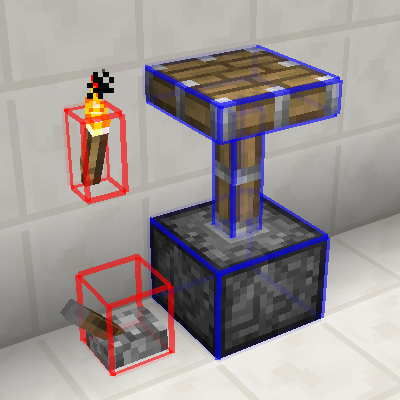
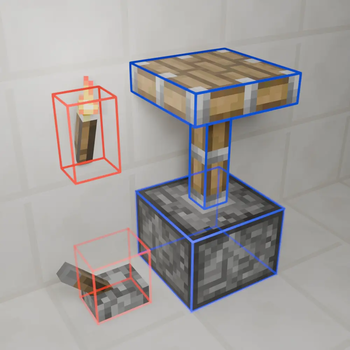
A client-side mod that adds a new F3 debug overlay showing you exact block collisions, for 1.12.2.
Screenshots


About this Mod
Debug Block Collision Overlay Reloaded

A client-side mod that adds a new F3 debug overlay showing you exact block collisions.
About
Original Mod's Github - Original Mod's Curseforge
Features
- Toggleable overlay, default keybind
F3 + O. - Multiple overlay modes, default keybind
F3 + I. - Config file which allows you to set the overlay mode, the level of chat feedback and line rendering settings.
- In-game configuration through Forge that is dynamicly reloaded.
- Has been tested with Cleanroom Loader (0.4.2-alpha) and Celeritas.
Usage
The main way to interact with this mods is by using the F3 + KEY keybinds which by default are F3 + O to toggle the overlay on/off and F3 + I to change the overlay mode.
There is also a config file which is dynamicly reloaded and can be edited in game or on the main menu.
Why
Well working on ProjectE-Charms I had to create some custom collision for a block but was having trouble visualizing the boxes so I looked on curseforge for mod that would help me do that, I ended up on Debug Block Collision's Curseforge so I downloaded it. After I had used it for a little bit on the Cleanroom Mod Loader I noticed a few main issues:
- The keybind handling had broken debouce (actually a Cleanroom issue with modifier keys).
- Toggling modes was clunky since there was only one keybind.
- And the text and formatting could do with some improvement.
All of this inspired me to improve this mod by adding a second keybind, improving Cleanroom compatibility and rewriting the lang file; so I did.
Modpacks
You don't need to ask permission or anything to use this in your modpack.
Issues
If you notice an issue and want to make me aware please report them on the project's Github issues tab.
Available Versions
How to Install Debug Block Collision Overlay Reloaded on Your Server
Order Server
Order a Minecraft Java server with at least 3 GB RAM (4 GB recommended).
Set forge Loader
In the panel under "Egg", select the forge loader and matching Minecraft version (1.12.2).
Install Mod
Open the mod browser in the dashboard and search for "Debug Block Collision Overlay Reloaded". Click "Install" – done! Alternatively, upload the .jar via SFTP to the /mods folder.
Compatibility
Mod Loaders
Minecraft Versions
1.12.2
Server-side
✗ UnsupportedRecommended RAM
4 GB(min. 3 GB)Frequently Asked Questions
Debug Block Collision Overlay Reloaded server crashes on startup – what to do?
Most common cause: wrong forge version or insufficient RAM. Check the server log (latest.log) for "OutOfMemoryError" or "Mixin" errors. With Mado Hosting: ensure at least 3 GB RAM is allocated and the loader matches the mod version (1.12.2). You can switch loaders with one click in the panel.
Is Debug Block Collision Overlay Reloaded compatible with forge?
Debug Block Collision Overlay Reloaded officially supports forge for Minecraft 1.12.2. The Mado dashboard automatically detects incompatible loader combinations.
Server lagging with Debug Block Collision Overlay Reloaded – how to optimize performance?
Recommended RAM: 4 GB (per 8 players). Use /spark profiler to check if Debug Block Collision Overlay Reloaded consumes the most tick time. Common fixes: reduce server view-distance to 8-10, install "performant" or "starlight" as supplementary mods on Forge. With Mado Hosting, your server runs on NVMe SSDs with dedicated CPU cores for minimal latency.
Similar Mods




![[ETF] Entity Texture Features](https://cdn.modrinth.com/data/BVzZfTc1/af683d206d50b05258d865b0d6e4aa2f2cee12f2_96.webp)
![[EMF] Entity Model Features](https://cdn.modrinth.com/data/4I1XuqiY/6e5bbd0d06b1741bfdab6c0cfab6de8fdaf0064c_96.webp)
Rent Modded Server
Install Debug Block Collision Overlay Reloaded with just one click on your server.