
Deep-Retrograde
"Adds Deepslate, Tuff, Calcite, and Sculk with smooth world generation and optimized ore replacement for 1.12.2."
Screenshots
About this Mod
🌑 Deepslate Evolution
Bring the modern Cave & Cliffs aesthetic to the classic 1.12.2 era!
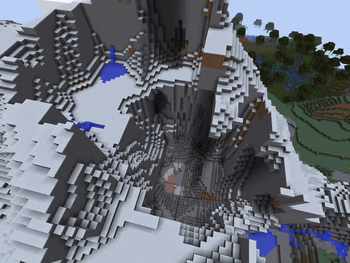
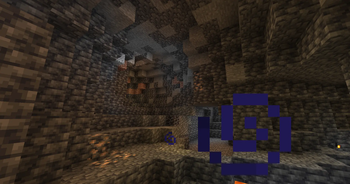
Deepslate Evolution is a lightweight yet powerful world generation mod that backports the "Deep Dark" atmosphere to Minecraft 1.12.2. No more endless, monotonous stone down to bedrock—experience a layered, geological progression that makes underground exploration exciting again.
💎 Deepslate Ores
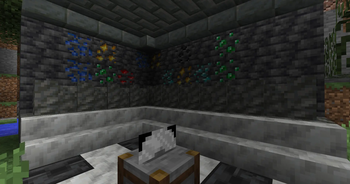
Consistency is key. Any vanilla ore (Iron, Gold, Diamond, Redstone, etc.) that generates within the Deepslate layers is automatically converted into its Deepslate variant. These ores are tougher to mine and look perfect against the dark backdrop.
🧪 Calcite, Tuff, and Sculk
The underground is no longer just a two-tone world:
- Calcite: Discover rare, bright spherical clusters of white rock.
- Tuff: Find massive, rugged patches of volcanic rock breaking up the Deepslate strata.
- Sculk: Mysterious "living" darkness that infests the walls and floors of deep caverns. Watch your step—the void is listening.
⚙️ Seamless Integration
- Furnace Recipes: Smelt Cobbled Deepslate back into smooth Deepslate or blast your Deepslate ores into ingots.
- Modern Physics: Custom breaking sounds and increased hardness for Deepslate blocks, mimicking the 1.17+ experience perfectly.
🛠 Technical Excellence
- Unlike many backport mods, Deepslate Evolution is built with performance in mind:
- No Cascading Worldgen: Uses direct chunk memory access to replace blocks, preventing the dreaded "StackOverflow" and world-loading lag.
- Optimized Math: The spherical generation and sculk patching algorithms are designed to be extremely lightweight.
- Mod Compatibility: Works alongside most major 1.12.2 cave generation and biome mods.
Available Versions
How to Install Deep-Retrograde on Your Server
Order Server
Order a Minecraft Java server with at least 4 GB RAM (6 GB recommended).
Set forge Loader
In the panel under "Egg", select the forge loader and matching Minecraft version (1.12.2).
Install Mod
Open the mod browser in the dashboard and search for "Deep-Retrograde". Click "Install" – done! Alternatively, upload the .jar via SFTP to the /mods folder.
Compatibility
Mod Loaders
Minecraft Versions
1.12.2
Server-side
✓ RequiredRecommended RAM
6 GB(min. 4 GB)Frequently Asked Questions
Deep-Retrograde server crashes on startup – what to do?
Most common cause: wrong forge version or insufficient RAM. Check the server log (latest.log) for "OutOfMemoryError" or "Mixin" errors. With Mado Hosting: ensure at least 4 GB RAM is allocated and the loader matches the mod version (1.12.2). You can switch loaders with one click in the panel.
Is Deep-Retrograde compatible with forge?
Deep-Retrograde officially supports forge for Minecraft 1.12.2. The Mado dashboard automatically detects incompatible loader combinations.
Server lagging with Deep-Retrograde – how to optimize performance?
Recommended RAM: 6 GB (per 5 players). Use /spark profiler to check if Deep-Retrograde consumes the most tick time. Common fixes: reduce server view-distance to 8-10, install "performant" or "starlight" as supplementary mods on Forge. With Mado Hosting, your server runs on NVMe SSDs with dedicated CPU cores for minimal latency.
Similar Mods

![[ETF] Entity Texture Features](https://cdn.modrinth.com/data/BVzZfTc1/af683d206d50b05258d865b0d6e4aa2f2cee12f2_96.webp)
![[EMF] Entity Model Features](https://cdn.modrinth.com/data/4I1XuqiY/6e5bbd0d06b1741bfdab6c0cfab6de8fdaf0064c_96.webp)



Rent Modded Server
Install Deep-Retrograde with just one click on your server.