
DefinitelyMyCoords
A mod to modify/hide the coordinates shown on the f3 screen.
Screenshots
About this Mod
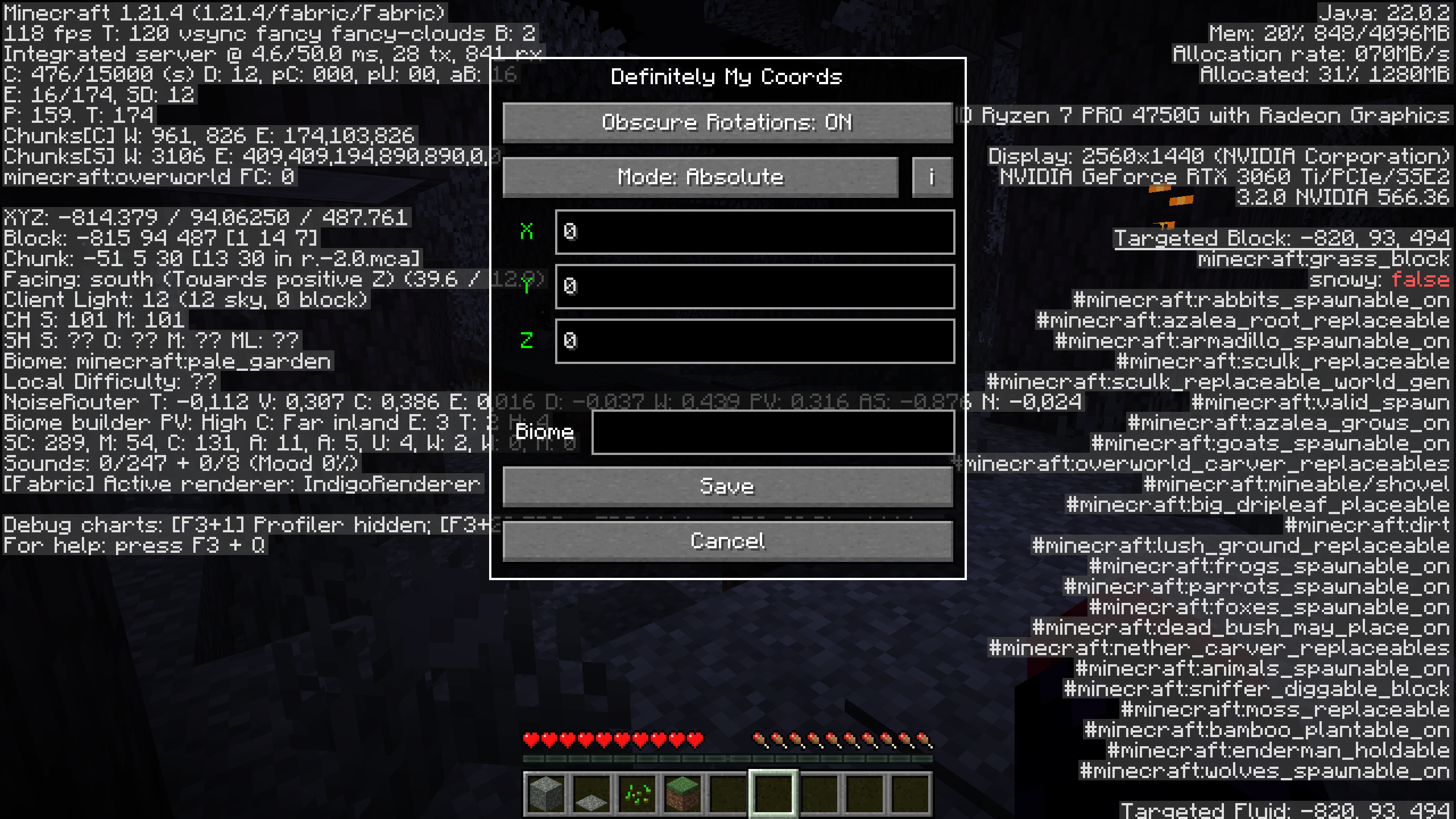
DefinitelyMyCoords helps you hide your coordinates on the F3 screen with 4 different modes.
Why do I want this mod?
If you're a streamer or share your screen with somebody,
this mod could save you from leaking your coordinates.
While still being able to use F3 to measure distances,
check the direction you are facing, etc.
Usage
To open the mods settings, press the F6 key or your configured key.
You can configure the settings key in the keybindings menu.
Compatibility
A non-exhaustive list of compatible mods.
These mods are neither made by me nor affiliated with me.
- BetterF3 (requested by @Omena0)
- Xaero's World Map
- Xaero's Minimap (requested by @kittenvr)
- Xaero's Minimap (Fair-Play)
- Sodium Extra
- Litematica (requested by @NanoBunTV)
You want me to add compatibility for another mod? Create an issue
Modes
Vanilla
Doesn't modify your position at all.
Relative
TLDR: Changes your coords
The coordinates you enter are relative to your current positions. That means if you are standing at 100 60 -30 and enter -10 5 20 your current coordinates will be -10 5 20 and 0 0 0 will have turned into -110 -55 50.
Absolute
TLDR: Changes 0 0 0
The coordinates you enter are relative to 0 0 0. In this case, if you are standing at 100 60 -30 and enter -10 5 20 your current coordinates will turn into 90 65 -10 and 0 0 0 will be -10 5 20.
Custom
This mode sets your coordinates upon opening F3 to 0 0 0.
Biome Spoofing
On
To enable biome spoofing, enter a valid biome id into the text widget.
Off
To disable biome spoofing, simply leave the text empty.
Block Rotations
Obscure Rotations
If enabled, offset block rotations, flower positions, etc. by the same amount as blocks.
Note: This feature doesn't play well with Mode: Custom
Available Versions
How to Install DefinitelyMyCoords on Your Server
Order Server
Order a Minecraft Java server with at least 3 GB RAM (4 GB recommended).
Set fabric Loader
In the panel under "Egg", select the fabric loader and matching Minecraft version (1.21.4).
Install Mod
Open the mod browser in the dashboard and search for "DefinitelyMyCoords". Click "Install" – done! Alternatively, upload the .jar via SFTP to the /mods folder.
Compatibility
Mod Loaders
Minecraft Versions
1.21.4, 1.21.3, 1.21.2 (+11 more)
Server-side
✗ UnsupportedRecommended RAM
4 GB(min. 3 GB)Frequently Asked Questions
DefinitelyMyCoords server crashes on startup – what to do?
Most common cause: wrong fabric version or insufficient RAM. Check the server log (latest.log) for "OutOfMemoryError" or "Mixin" errors. With Mado Hosting: ensure at least 3 GB RAM is allocated and the loader matches the mod version (1.21.4). You can switch loaders with one click in the panel.
Is DefinitelyMyCoords compatible with fabric?
DefinitelyMyCoords officially supports fabric for Minecraft 1.21.4, 1.21.3, 1.21.2. The Mado dashboard automatically detects incompatible loader combinations.
Server lagging with DefinitelyMyCoords – how to optimize performance?
Recommended RAM: 4 GB (per 8 players). Use /spark profiler to check if DefinitelyMyCoords consumes the most tick time. Common fixes: reduce server view-distance to 8-10, install "performant" or "starlight" as supplementary mods on Forge. With Mado Hosting, your server runs on NVMe SSDs with dedicated CPU cores for minimal latency.
Similar Mods




![[ETF] Entity Texture Features](https://cdn.modrinth.com/data/BVzZfTc1/af683d206d50b05258d865b0d6e4aa2f2cee12f2_96.webp)
![[EMF] Entity Model Features](https://cdn.modrinth.com/data/4I1XuqiY/6e5bbd0d06b1741bfdab6c0cfab6de8fdaf0064c_96.webp)
Rent Modded Server
Install DefinitelyMyCoords with just one click on your server.