
Deploy & Destroy
A simple mod that adds some useful tools and a few building blocks.
Screenshots
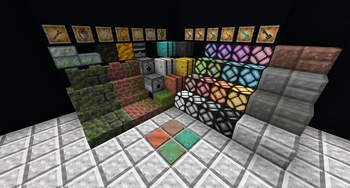
About this Mod
A collection of some useful tools, building blocks, and gameplay changes
Deployer
Places blocks from its inventory.
Destroyer
Breaks blocks and ejects their drops from its rear face.
Detector
Emits a constant redstone signal when facing any opaque block
Copper Pressure Plates
Only activated by players. Oxidize like other copper blocks. Can be waxed to halt oxidation progress.
Upgradable Barrels
Copper, Iron, Gold, Diamond, and Netherite barrel tiers, each with additional storage. Upgrade with crafting recipes or in-place with associated upgrade items.
Colored Redstone Lamps
A lamp for each dye color. Craft with dye or right-click with dye to change color.
New Building Blocks
- Cracked and mossy brick variants, including stairs, slabs, and walls
- Mossy cobbled deepslate, including stairs, slabs, and walls
- Mossy deepslate bricks, including stairs, slabs, and walls
- Netherrack stairs, slabs, and walls
- Cut andesite, diorite, granite, and tuff, including slabs
- Grass bundles
- Charcoal blocks
Blazing Coal
New fuel, crafted from blaze powder and coal. Smelts 4x as many items as coal.
Nether Star Slab
Nether star slab
Wrench
Right click on an orientable block to make it face toward you, or right click while sneaking to make it face away from you.
Can be used by dispensers to make blocks face the same direction as the dispenser.
In-World Sticky Piston Crafting
Right click a piston with a slime ball to convert it into a sticky piston.
Scrape a sticky piston with an axe to convert it to a normal piston.
Additional Useful Dispenser Behaviors
Dispensers can now:
- Scrape logs with axes
- Remove wax from waxed copper blocks with axes
- Lower copper oxidation levels with axes
- Empty/fill cauldrons with water, lava, and powdered snow
- Retrieve mushroom stew/suspicious stew from mooshrooms with bowls
- Feed flowers to brown mooshrooms to change their stew effects
- Cure villagers with golden apples
Bucketable Striders
Striders can be picked with lava buckets.
Additional Wandering Trader Trades
Glow berries have been added as a common trade.
Sponges, wrenches, tadpole buckets, strider buckets, sniffer eggs, and mycelium have been added as rare trades.
Shear Vines To Stop Growth
Vines will no longer grow after being sheared
Loyalty Tridents Return From Void
Tridents with the loyalty enchantment will return to the player when thrown into the void.
Deepslate Generators
Cobblestone and stone generators below y0 will now generate their respective deepslate variants.
Deepslate Dungeons
Dungeons generated below y0 use cobbled deepslate and mossy cobbled deepslate instead of their cobblestone counterparts.
Husk, Stray, and Bogged Dungeons
Dungeons may rarely generate with a husk, stray, or bogged spawner.
Additional Farmable Materials
- Sand piles, dropped from husks, can be crafted into sand blocks
- Ice shards, dropped from strays, can be crafted into ice blocks
- Moss balls, dropped from bogged, can be crafted into moss blocks
- Quartz chunks, smelted from ghast tears, can be crafted into nether quartz
Available Versions
How to Install Deploy & Destroy on Your Server
Order Server
Order a Minecraft Java server with at least 3 GB RAM (4 GB recommended).
Set fabric Loader
In the panel under "Egg", select the fabric loader and matching Minecraft version (1.21.3).
Install Mod
Open the mod browser in the dashboard and search for "Deploy & Destroy". Click "Install" – done! Alternatively, upload the .jar via SFTP to the /mods folder.
Compatibility
Mod Loaders
Minecraft Versions
1.21.3, 1.21.2, 1.21.1
Server-side
✓ RequiredRecommended RAM
4 GB(min. 3 GB)Frequently Asked Questions
Deploy & Destroy server crashes on startup – what to do?
Most common cause: wrong fabric version or insufficient RAM. Check the server log (latest.log) for "OutOfMemoryError" or "Mixin" errors. With Mado Hosting: ensure at least 3 GB RAM is allocated and the loader matches the mod version (1.21.3). You can switch loaders with one click in the panel.
Is Deploy & Destroy compatible with fabric?
Deploy & Destroy officially supports fabric for Minecraft 1.21.3, 1.21.2, 1.21.1. The Mado dashboard automatically detects incompatible loader combinations.
Server lagging with Deploy & Destroy – how to optimize performance?
Recommended RAM: 4 GB (per 8 players). Use /spark profiler to check if Deploy & Destroy consumes the most tick time. Common fixes: reduce server view-distance to 8-10, install "performant" or "starlight" as supplementary mods on Forge. With Mado Hosting, your server runs on NVMe SSDs with dedicated CPU cores for minimal latency.
Similar Mods




Rent Modded Server
Install Deploy & Destroy with just one click on your server.