
DevTools
A utility mod, that enables you to select different parts of your world and see information about them and debug them.
Screenshots

About this Mod
DevTools, the World Inspector
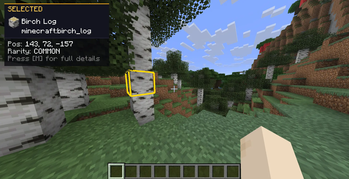
DevTools is a client-side Fabric mod for versions through 26.x-1.14.x that adds a powerful Inspect mode to your game. By freezing your movement and unlocking your cursor, you can point at blocks, fluids, dropped items, and entities to read rich, debug-style data directly on your screen.
It features customizable layouts, deep NBT-style data dumps, and clipboard copying.
Requirements & Versioning
| Requirement | Version / Constraint | Notes |
|---|---|---|
| Minecraft | 26.x-1.14.x |
Compatible with 26.x/1.21.x/1.20.x/1.19.x/1.18.x/1.17.x/1.16.x/1.15.x/1.14.x releases. |
| Mod Loader | Fabric >=0.18.6 |
Client-side only. Safe to leave in your mods folder when joining servers. |
| Fabric API | * (Any version, but the latest is reccomended) |
Required for core mod functions. |
Quick Start
- Install Fabric, then drop DevTools and the Fabric API mod into your
modsfolder. - Launch the game and enter a world.
- Press F6 (default) to toggle Inspect mode.
- Move your mouse over blocks or creatures, and Left-Click to select them.
- Press M to expand detailed data for your selected target.
- Head to Options → DevTools… to tweak colours, toggle data lines, or change the layout.
How Inspect Mode Works
When you turn Inspect mode on, the game adjusts your interactions so you can focus on the environment data.
| Feature | Behaviour |
|---|---|
| Movement | You stay completely still. Movement is suppressed so you do not accidentally walk away from your inspection point. |
| Mouse Freedom | Your cursor is unlocked. Vanilla left-click does not punch blocks or attack; it is used exclusively for selecting targets. |
| Smart Raycasting | The mod picks targets based on camera + cursor. You can target blocks, flowing fluids, item entities on the ground, XP orbs, and mobs. |
| World Outlines | A thin outline shows what you are hovering over. A thicker, brighter outline shows what you have selected. |
| Scrolling | Use your mouse wheel over the info panel to scroll through long text. |
Keybinds
All keys can be remapped under Controls → DevTools. The info panel always displays the actual names of the keys you have currently bound.
| Action | Default Key | Description |
|---|---|---|
| Toggle Inspect | F6 |
Turns Inspect mode on and off. |
| Select Target | Left Mouse |
Locks the HUD onto the hovered block/entity. |
| More Info | M |
Toggles the detailed NBT/data dump. |
| Free Player | Hold L-Alt |
Restores movement and camera while keeping Inspect on. |
| Copy Value | Hold L-Ctrl |
Click any line in the HUD to copy its value to your clipboard. |
Free Camera (Alt Mode)
If you hold Left Alt, you temporarily get your movement and camera controls back. Raycast updates are frozen, so the outlines stay fixed to your last targets, and the HUD becomes transparent so you can see the world.
Menu Suspensions
Opening any fullscreen menu (for example the Pause or Inventory screen) suspends and freezes raycasting and its updates, so you won't mess up your selection.
The Info Panel (HUD)
The HUD is designed to provide immediate summary data, with the option to expand into detailed categories.
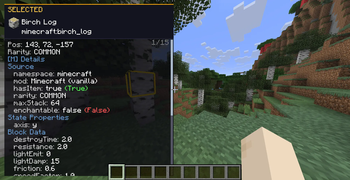
- Header: Shows if you are HOVERING or have a target SELECTED. Includes the icon of the selected block/entity, display name, and registry ID. Rarity colours automatically match vanilla Minecraft tiers (common, uncommon, rare, epic).
- Summary: Quick facts like coordinates, HP for living entities, or drop info for items.
- Detailed Info ("More Info"): Hitting
Mopens a categorized text dump. Default category order:Source,Item Form,State Properties,Block Data,BlockEntity,Environment,Type,Identity,State,Living,Equipment,Effects,Mob,Raw NBT. - Boolean Styling:
true/falselines are coloured distinctly for quick scanning. - Copy Feedback: Successfully copying a line flashes a quick "copied" message.
Settings Menu
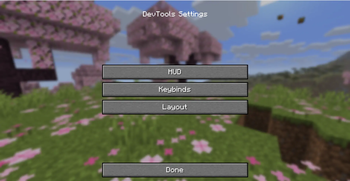
Options → DevTools… opens the settings menu. The button is placed under the FOV slider, in the middle.
| Button | Opens |
|---|---|
| HUD | Submenu for Colours and Preferences |
| Keybinds | Vanilla Key Bindings screen |
| Layout | Panel corner positioning and category ordering |
Technical stuff
Configuration File (devtools.properties)
Location: .minecraft/config/devtools.properties
| Key | Type | Purpose |
|---|---|---|
tutorialSeen |
true / false |
Tutorial already shown / skipped forever |
hud.color.<name> |
8 hex digits AARRGGBB |
HUD colour overrides (see table below) |
pref.<key> |
true / false |
Per-line / per-section HUD preference |
layout.position |
TOP_LEFT, TOP_RIGHT, BOTTOM_LEFT, BOTTOM_RIGHT |
Inspector panel corner |
layout.categoryOrder |
Comma-separated names | Custom More info category order |
HUD Colours Screen
Each line has a colour square, a hex code field, a copy button, and a reset button. Clicking the square opens a colour picker with Hue, Saturation, and Brightness sliders.
HUD Colour Keys (hud.color.*)
| Config suffix | UI label | Role |
|---|---|---|
bg |
Background | Panel fill |
borderTop |
Border (top) | Top accent line |
headerBg |
Header background | Header band |
header |
Header label | “HOVERING” / “SELECTED” text |
category |
Category label | Section titles in dumps |
key |
Property key | Text before : |
value |
Property value | Text after : |
dim |
Dim text | Hints / secondary lines |
scrollbar |
Scrollbar track | Scroll gutter |
scrollThumb |
Scrollbar thumb | Scroll handle |
boolTrue |
True value | Boolean badge / styling |
boolFalse |
False value | Boolean badge / styling |
(Note: Item rarity colours are strictly tied to vanilla and are not configurable here).
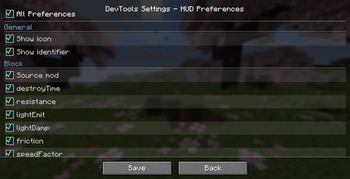
HUD Preferences Screen
You can toggle exactly which lines show up. The top row, All Preferences, sets every other box on or off together.
General Preferences
| Key | Label |
|---|---|
pref.showIcon |
Show icon |
pref.showId |
Show identifier |
Block-related Preferences
| Key | Label |
|---|---|
pref.block.source |
Source mod |
pref.block.destroyTime |
destroyTime |
pref.block.resistance |
resistance |
pref.block.lightEmit |
lightEmit |
pref.block.lightDamp |
lightDamp |
pref.block.friction |
friction |
pref.block.speedFactor |
speedFactor |
pref.block.jumpFactor |
jumpFactor |
pref.block.isSolid |
isSolid |
pref.block.isAir |
isAir |
pref.block.liquid |
liquid |
pref.block.blocksMotion |
blocksMotion |
pref.block.canOcclude |
canOcclude |
pref.block.redstone |
redstone |
pref.block.randomTick |
randomTick |
pref.block.ignitedByLava |
ignitedByLava |
pref.block.stateProps |
State properties |
pref.block.blockEntity |
Block entity NBT |
pref.block.environment |
Environment (biome/light) |
Entity-related Preferences
| Key | Label |
|---|---|
pref.entity.source |
Source mod |
pref.entity.category |
category |
pref.entity.dimensions |
dimensions |
pref.entity.fireImmune |
fireImmune |
pref.entity.uuid |
UUID |
pref.entity.customName |
customName |
pref.entity.tags |
tags |
pref.entity.onGround |
onGround |
pref.entity.invulnerable |
invulnerable |
pref.entity.silent |
silent |
pref.entity.glowing |
glowing |
pref.entity.noGravity |
noGravity |
pref.entity.frozen |
frozen |
pref.entity.inWater |
inWater |
pref.entity.onFire |
onFire |
pref.entity.HP |
HP |
pref.entity.armor |
armor |
pref.entity.isBaby |
isBaby |
pref.entity.effects |
Active effects |
pref.entity.equipment |
Equipment |
pref.entity.noAI |
noAI |
pref.entity.persistent |
persistent |
pref.entity.leftHanded |
leftHanded |
pref.entity.target |
target |
pref.entity.owner |
owner |
pref.entity.rawNbt |
Raw NBT |
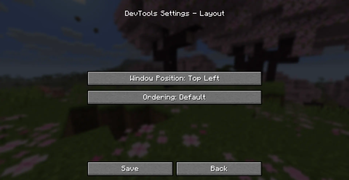
Layout Screen
| Control | Cycles through |
|---|---|
| Window position | Top Left → Top Right → Bottom Left → Bottom Right |
| Ordering | Default, then “ |
Remember to press Save on the Colours, Preferences, and Layout screens to keep your changes.
Technical stuff again, sorry
Project Metadata & Links
| Mod ID | devtools |
| Authors | Beef and Capybarabeef Studios under Miljö AB |
| Source Code | GitHub Repository |
| Issue Tracker | GitHub Issues |
License
DevTools is released under the MIT License. The complete legal text is available in the LICENSE file at the repository root.
Available Versions
How to Install DevTools on Your Server
Order Server
Order a Minecraft Java server with at least 3 GB RAM (4 GB recommended).
Set fabric Loader
In the panel under "Egg", select the fabric loader and matching Minecraft version (26.1.2).
Install Mod
Open the mod browser in the dashboard and search for "DevTools". Click "Install" – done! Alternatively, upload the .jar via SFTP to the /mods folder.
Compatibility
Mod Loaders
Minecraft Versions
26.1.2, 26.1.1, 26.1 (+43 more)
Server-side
✗ UnsupportedRecommended RAM
4 GB(min. 3 GB)Frequently Asked Questions
DevTools server crashes on startup – what to do?
Most common cause: wrong fabric version or insufficient RAM. Check the server log (latest.log) for "OutOfMemoryError" or "Mixin" errors. With Mado Hosting: ensure at least 3 GB RAM is allocated and the loader matches the mod version (26.1.2). You can switch loaders with one click in the panel.
Is DevTools compatible with fabric?
DevTools officially supports fabric for Minecraft 26.1.2, 26.1.1, 26.1. The Mado dashboard automatically detects incompatible loader combinations.
Server lagging with DevTools – how to optimize performance?
Recommended RAM: 4 GB (per 8 players). Use /spark profiler to check if DevTools consumes the most tick time. Common fixes: reduce server view-distance to 8-10, install "performant" or "starlight" as supplementary mods on Forge. With Mado Hosting, your server runs on NVMe SSDs with dedicated CPU cores for minimal latency.
Similar Mods




Rent Modded Server
Install DevTools with just one click on your server.