
Diagonal Corners
Tired of seeing corners in blocks like glass panels and iron bars? Well, this is the mod for you!
Screenshots
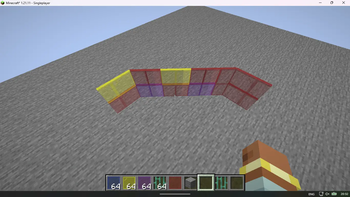
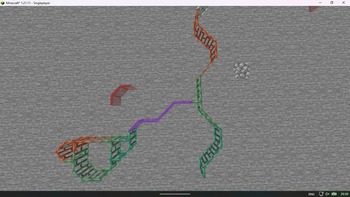
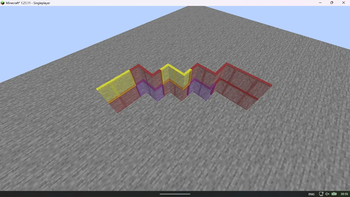
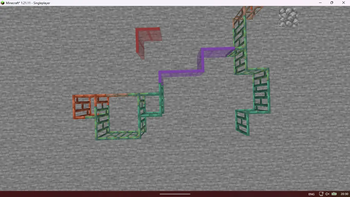
About this Mod
Diagonal Corners
"Finally, smooth and elegant corners."
📖 Description
Diagonal Corners is a lightweight client-side only mod for Minecraft 1.19.2+ that greatly improves the visual appearance of glass, iron bars, and copper bars.
In vanilla Minecraft, placing three of these blocks in an L-shape creates ugly, blocky corners. This mod removes those sharp corners and replaces them with clean, smooth diagonal connections, giving your builds a much more polished and modern look.
Ideal for windows, greenhouses, towers, railings, modern buildings, and any structure where visual cleanliness matters.
🌟 Features
- Smooth Diagonal Corners: Automatically converts L-shaped corners into elegant diagonals for glass, iron bars, and copper bars.
- Client-side Only: Works perfectly on any server — other players don’t need the mod.
- Very Lightweight: Minimal performance impact as it only changes rendering.
- Resource Pack Friendly: Works great with any texture pack.
- No Configuration Needed: Install and it just works.
⚙️ Compatibility
Minecraft Version:
- Optimized for 1.19.2+
Mod Loaders:
- Fabric: ✅ Supported
- NeoForge: ✅ Supported
📦 Installation
- Download the latest version from Modrinth or CurseForge.
- Install Fabric/NeoForge for Minecraft 1.19.2+.
- Place the
.jarfile into yourmodsfolder. - Launch the game and enjoy cleaner builds!
💡 Why Use This Mod?
Vanilla corner connections for glass and bars often break immersion and make detailed builds look clunky. Diagonal Corners fixes this small but very noticeable detail, making your creations look significantly more professional and satisfying.
Whether you're building a medieval castle with stained glass or a modern skyscraper with huge windows, this mod will instantly elevate the quality of your builds.
📄 License
This mod is licensed under the MIT License.
❤️ Acknowledgments
Created for builders who care about the little details.
Thank you for using Diagonal Corners!
Available Versions
How to Install Diagonal Corners on Your Server
Order Server
Order a Minecraft Java server with at least 3 GB RAM (4 GB recommended).
Set fabric Loader
In the panel under "Egg", select the fabric loader and matching Minecraft version (26.1.2).
Install Mod
Open the mod browser in the dashboard and search for "Diagonal Corners". Click "Install" – done! Alternatively, upload the .jar via SFTP to the /mods folder.
Compatibility
Mod Loaders
Minecraft Versions
26.1.2, 26.1.1, 26.1 (+7 more)
Server-side
✗ UnsupportedRecommended RAM
4 GB(min. 3 GB)Frequently Asked Questions
Diagonal Corners server crashes on startup – what to do?
Most common cause: wrong fabric version or insufficient RAM. Check the server log (latest.log) for "OutOfMemoryError" or "Mixin" errors. With Mado Hosting: ensure at least 3 GB RAM is allocated and the loader matches the mod version (26.1.2). You can switch loaders with one click in the panel.
Is Diagonal Corners compatible with fabric and neoforge?
Diagonal Corners officially supports fabric, neoforge for Minecraft 26.1.2, 26.1.1, 26.1. The Mado dashboard automatically detects incompatible loader combinations.
Server lagging with Diagonal Corners – how to optimize performance?
Recommended RAM: 4 GB (per 8 players). Use /spark profiler to check if Diagonal Corners consumes the most tick time. Common fixes: reduce server view-distance to 8-10, install "performant" or "starlight" as supplementary mods on Forge. With Mado Hosting, your server runs on NVMe SSDs with dedicated CPU cores for minimal latency.
Similar Mods

![[ETF] Entity Texture Features](https://cdn.modrinth.com/data/BVzZfTc1/af683d206d50b05258d865b0d6e4aa2f2cee12f2_96.webp)
![[EMF] Entity Model Features](https://cdn.modrinth.com/data/4I1XuqiY/6e5bbd0d06b1741bfdab6c0cfab6de8fdaf0064c_96.webp)



Rent Modded Server
Install Diagonal Corners with just one click on your server.