
Diagonal Leaves
Alters leaves' distance check's logic, allowing diagonal connections, too.
About this Mod
Diagonal Leaves
This mod is a utility for terrain mod-makers or map-makers which allows leaves to connect diagonally, preventing decay in scenarios like this without leaves being persistent: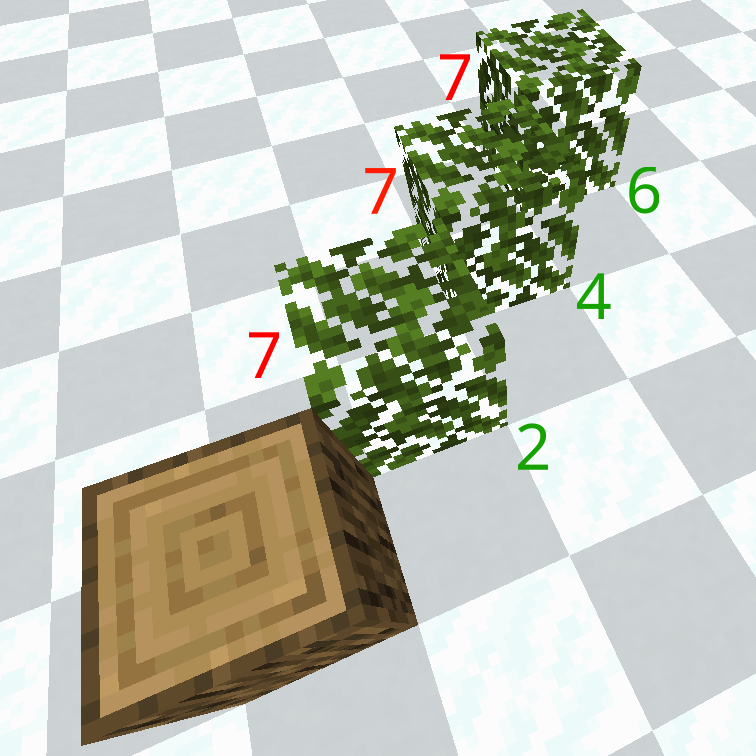
In vanilla (shown with red) the leaves never find any neighbours, so their distance is seven, while with the mod (shown in green) the distance is checked and increments by one for each axis-offset, meaning face connections increase distance by one, edge connections by two and corner connections by three.
Ok, cool but why, though?
Vanilla minecraft can be very annoying when it comes to creating naturally generating custom trees which stray from the vanilla style and more towards an airier, more realistic style.
Since vanilla only checks and propagates distance checks to leaves that are only face-adjacent, edge/vertex-adjacent leaves will be left out, which means they will decay unless set as persistent, but that means leaving the player with the task of manually cleaning them up.
This mod fixes this, although at the expense of making the loop run on all the 26 blocks surrounding the leaves instead of just the 6 face-adjacent ones.
Compatibility
All mods which implement leaves using the LeavesBlock class and logs based on the RotatedPillarBlock class properly tagged as "minecraft:logs" should work out of the box.
NOTE: This mod changes vanilla behaviour significantly. It may cause performance hits, and some of your builds (like leafstone) may break! You have been warned.
Available Versions
How to Install Diagonal Leaves on Your Server
Order Server
Order a Minecraft Java server with at least 3 GB RAM (4 GB recommended).
Set fabric Loader
In the panel under "Egg", select the fabric loader and matching Minecraft version (1.21.1).
Install Mod
Open the mod browser in the dashboard and search for "Diagonal Leaves". Click "Install" – done! Alternatively, upload the .jar via SFTP to the /mods folder.
Compatibility
Mod Loaders
Minecraft Versions
1.21.1
Server-side
✓ RequiredRecommended RAM
4 GB(min. 3 GB)Frequently Asked Questions
Diagonal Leaves server crashes on startup – what to do?
Most common cause: wrong fabric version or insufficient RAM. Check the server log (latest.log) for "OutOfMemoryError" or "Mixin" errors. With Mado Hosting: ensure at least 3 GB RAM is allocated and the loader matches the mod version (1.21.1). You can switch loaders with one click in the panel.
Is Diagonal Leaves compatible with fabric and neoforge?
Diagonal Leaves officially supports fabric, neoforge for Minecraft 1.21.1. The Mado dashboard automatically detects incompatible loader combinations.
Server lagging with Diagonal Leaves – how to optimize performance?
Recommended RAM: 4 GB (per 8 players). Use /spark profiler to check if Diagonal Leaves consumes the most tick time. Common fixes: reduce server view-distance to 8-10, install "performant" or "starlight" as supplementary mods on Forge. With Mado Hosting, your server runs on NVMe SSDs with dedicated CPU cores for minimal latency.
Similar Mods

![[ETF] Entity Texture Features](https://cdn.modrinth.com/data/BVzZfTc1/af683d206d50b05258d865b0d6e4aa2f2cee12f2_96.webp)
![[EMF] Entity Model Features](https://cdn.modrinth.com/data/4I1XuqiY/6e5bbd0d06b1741bfdab6c0cfab6de8fdaf0064c_96.webp)



Rent Modded Server
Install Diagonal Leaves with just one click on your server.