
DialogueUtils
A Pixelmon side mod that allows you to easily create helpful menus using Pixelmon's Dialogue, Choice Dialogue, and Input Dialogue screens
Screenshots

About this Mod
DIALOGUEUTILS 1.2.0
This mod does not modify Pixelmon or its behavior.
For Support, contact @infidelrick on Discord
Dialogue Utils is a server-side mod using the PixelmonAPI for generating dialogues, choice menus, input screens, and notice overlays in-game.
FEATURES
- Simple Dialogues: Display basic text-based dialogues
- Choice Dialogues: Provide players with multiple options to choose from
- Input Dialogues: Allow players to input custom text with commands
- Notice System: Display various types of overlays including text, Pokémon, and items
- PlaceholderAPI Integration: Support for PlaceholderAPI in all dialogue and notice text
COMMANDS
SIMPLE DIALOGUE: /dutil simple <player> <title> <message>
Description: Display a simple dialogue box to the player.
Permissions Required: dialogueutil.simple
Example:
/dutil simple PlayerName "&eSafari Zone" &eGood Luck {player} &aCatch what you can before your timer runs out. Add more time with &e/safari buy #
CHOICE DIALOGUE: /dutil choice <player> <configId>
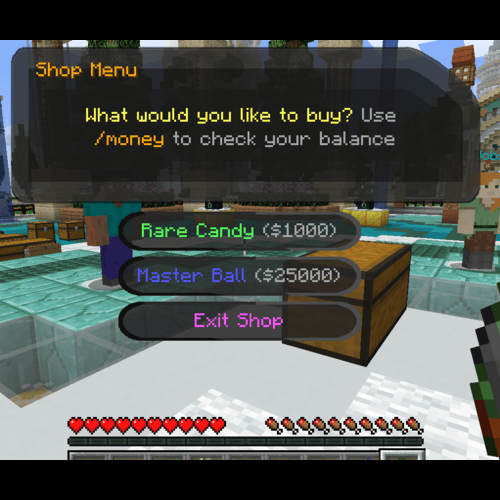
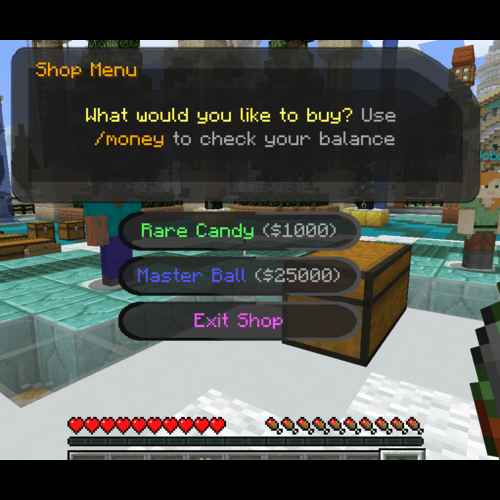
Description: Send a choice menu to a player using a pre-configured dialogue in dialogues.yml. Choices can be configured to run commands, have pokedollar costs, and/or permission requirements.
Permissions Required: dialogueutil.choice
Example:
/dutil choice PlayerName shop
INPUT DIALOGUE: /dutil input player|console escape|stay <targetPlayer> <title> <message> <command>
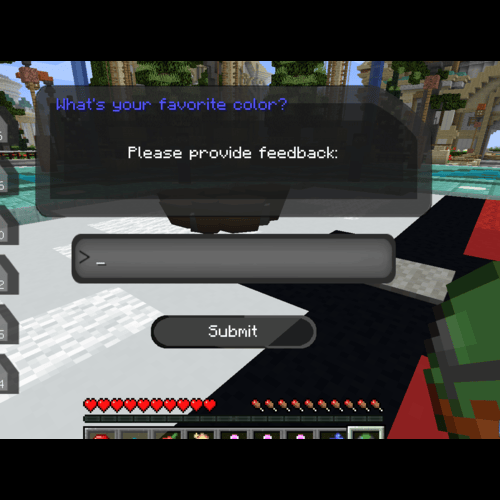
Description: Create an input dialogue for the target player, allowing them to input text.
Options:
player|console: Execute the command as the player or the consoleescape|stay: Determine whether the menu closes when "Escape" is pressedtitle & message: Put in quotes if more than 1 wordcommand: Can use {player} and {input} for placeholders
Permissions Required:dialogueutil.input.playerordialogueutil.input.console
Example:
/dutil input player escape Player123 "&9What's your favorite color?" "Please provide feedback:" msg {player} {input} is a good choice!
NOTICE COMMANDS
The notice system allows you to display overlays with various types of content.
TEXT NOTICE: /dnotice direct text <player> <duration> <lines>
Description: Display a text-based notice overlay
Permissions Required: dialogueutil.notice.text
Example:
/dnotice direct text PlayerName 10 "&6Welcome!\n&eEnjoy your stay"
POKEMON NOTICE: /dnotice direct pokemon <player> <layout> <duration> <pokemon> <use3d> <lines>
Description: Display a notice with a Pokémon sprite or 3D model
Permissions Required: dialogueutil.notice.pokemon
Example:
/dnotice direct pokemon PlayerName LEFT_AND_RIGHT 10 "pikachu growth:ginormous" true "&6Special Pikachu!\n&eCheck it out"
ITEM NOTICE: /dnotice direct item <player> <layout> <duration> <lines> <itemWithNbt>
Description: Display a notice with an item
Permissions Required: dialogueutil.notice.item
Example:
/dnotice direct item PlayerName LEFT_AND_RIGHT 10 "&6Master Ball\n&eUltimate catching power" "pixelmon:poke_ball{PokeBallID:\"master_ball\"}"
NOTICE FROM CONFIG: /dnotice config <player> <configId>
Description: Display a pre-configured notice from notices.yml
Permissions Required: dialogueutil.notice.config
Example:
/dnotice config PlayerName welcome
OTHER NOTICE COMMANDS:
/dnotice hide- Hide the current notice/dnotice list- List available notice configurations/dnotice reload- Reload notice configurations/dnotice help- Show notice command help
RELOAD COMMANDS
/dutil reload- Reload dialogue configurations/dnotice reload- Reload notice configurations
CONFIGURATION FILES
config.yml
Controls general settings and default messages.
# Enable/Disable Debug messages
debug: false
messages:
  noMoney:
    title: "§cNot Enough Money"
    message: "§cYou need {price} to select this option!"
  noPermission:
    title: "§cPermission Error"
    message: "§cYou don't have permission: {permission}"
dialogues.yml
Define configurations for choice menus.
dialogues:
  shop:
    title: "&6Shop Menu"
    message: "&eWhat would you like to buy? &7Use &6/money &7to check your balance"
    choices:
      - text: "&aRare Candy &7($1000)"
        commands:
          - "[console]broadcast {player} got some candy"
          - "[console]give {player} pixelmon:rare_candy 1"
        price: 1000
        permission: "shop.rare_candy"
        failureTitle: "&cNo Permission"
        failureMessage: "&cYou need the &6shop.rare_candy &cpermission!"
notices.yml
Configure different types of notices.
notices:
  welcome:
    type: text
    duration: 10
    lines:
      - "&6&lWelcome to the server!"
      - "&eThank you for joining us"
      - "&aEnjoy your stay"

  professor_pikachu:
    type: pokemon
    layout: LEFT_AND_RIGHT
    duration: 12
    pokemon: "pikachu growth:ginormous form:phd"
    use3d: true
    lines:
      - "&6&lBalance:"
      - "&e%vault_eco_balance%"

  master_ball:
    type: item
    layout: LEFT_AND_RIGHT
    duration: 8
    item: "pixelmon:poke_ball"
    nbt: "{PokeBallID:\"master_ball\"}"
    name: "&dMaster Ball"
    lines:
      - "&6&lMaster Ball"
      - "&eThe ultimate Pokeball"
PERMISSIONS
Dialogue Permissions
dialogueutil.simple- Use simple dialoguesdialogueutil.choice- Use choice dialoguesdialogueutil.input.player- Use input dialogues as playerdialogueutil.input.console- Use input dialogues as consoledialogueutil.admin- Access administrative commands
Notice Permissions
dialogueutil.notice.text- Use text noticesdialogueutil.notice.pokemon- Use Pokémon noticesdialogueutil.notice.item- Use item noticesdialogueutil.notice.config- Use configured noticesdialogueutil.notice.admin- Access notice admin commands
DEPENDENCIES
- NeoForge: 21.1.172 or later
- Minecraft: 1.21.1
- Pixelmon: 9.3.16 or later
- PlaceholderAPI (Optional) - For placeholder support
- LuckPerms (Optional) - Give command access to non-op players
FEATURES & NOTES
- Color codes with & are supported in all text
- PlaceholderAPI placeholders are supported in all text (%placeholder%)
- Multiple notice layouts available: LEFT_AND_RIGHT, LEFT, RIGHT
- NBT data support for item notices
- Command execution after notice display
- Configurable duration for all notices
- 3D model support for Pokémon notices
Available Versions
How to Install DialogueUtils on Your Server
Order Server
Order a Minecraft Java server with at least 3 GB RAM (4 GB recommended).
Set forge Loader
In the panel under "Egg", select the forge loader and matching Minecraft version (1.21.1).
Install Mod
Open the mod browser in the dashboard and search for "DialogueUtils". Click "Install" – done! Alternatively, upload the .jar via SFTP to the /mods folder.
Compatibility
Mod Loaders
Minecraft Versions
1.21.1, 1.16.5
Server-side
✓ RequiredRecommended RAM
4 GB(min. 3 GB)Frequently Asked Questions
DialogueUtils server crashes on startup – what to do?
Most common cause: wrong forge version or insufficient RAM. Check the server log (latest.log) for "OutOfMemoryError" or "Mixin" errors. With Mado Hosting: ensure at least 3 GB RAM is allocated and the loader matches the mod version (1.21.1). You can switch loaders with one click in the panel.
Is DialogueUtils compatible with forge and neoforge?
DialogueUtils officially supports forge, neoforge for Minecraft 1.21.1, 1.16.5. The Mado dashboard automatically detects incompatible loader combinations.
Server lagging with DialogueUtils – how to optimize performance?
Recommended RAM: 4 GB (per 8 players). Use /spark profiler to check if DialogueUtils consumes the most tick time. Common fixes: reduce server view-distance to 8-10, install "performant" or "starlight" as supplementary mods on Forge. With Mado Hosting, your server runs on NVMe SSDs with dedicated CPU cores for minimal latency.
Similar Mods




![[ETF] Entity Texture Features](https://cdn.modrinth.com/data/BVzZfTc1/af683d206d50b05258d865b0d6e4aa2f2cee12f2_96.webp)
![[EMF] Entity Model Features](https://cdn.modrinth.com/data/4I1XuqiY/6e5bbd0d06b1741bfdab6c0cfab6de8fdaf0064c_96.webp)
Rent Modded Server
Install DialogueUtils with just one click on your server.