
Digga's Nextbots
This mods adds Nextbots to your world! Be careful
Screenshots
About this Mod
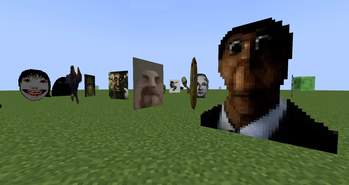
The Digga's Nextbots mod adds new creatures called Nextbots! These 2D PNG creatures are from the game Garry's Mod and will hunt the player. Despite their funny looks and strange noises, these creatures should not be underestimated. Nextbots are very fast, dangerous and almost invincible. They can track you down without even seeing you and some even from far away. They are immune to any kind of damage except to player damage. Can you escape them or will you just be another victim of the Nextbots?
Updates continue on Curseforge
- A mod made by Diggazuspat and Zcoper
- Mod created with MCreator!
- Requires Geckolib
● Visit our Discord Servers!
Diggazuspat: https://discord.gg/fWQ3rXPhgw
Zcoper: https://discord.gg/akP56NtmVQ
● Important FaQ
Spoiler
► [OLD] What is my console spaming?
Most mobs use special spawning conditions, which means that these mobs can only appear under certain conditions. If the spawning conditions work, this spam is created in the console.
► [OLD] Why are Mobs not spawning?
Spawning Conditions determine which conditions must be met in order to spawn certain mobs. Some mobs only spawn above Y level 60. Some below. Most mobs can only spawn in the overworld than in other dimensions.
► Why are features missing in different versions?
It is recommended to play the newest versions of higher minecraft versions.
Not all features of MCreator available or the same in different versions.
For example: Version 1.19.2 doesn't have the feature of shield, better structure generation or custom villagers, but Version 1.20.1 does have them.
► How can I disable Nextbots breaking blocks?
Nextbots breaking blocks can be disabled if you set the gamerule "mobGriefing" to false.
► How can I add Custom Nextbots?
It is indeed possible to create your own nextbots, if you know how to make a ressource pack for mods, and change the texture and sounds of present nextbots.
► How can I disable Nextbots?
You can disable the natural spawning of Nextbots by changing the gamerule "doNextbotSpawn" to false
► Where does the Nextbots spawn?
Nextbots can spawn anywhere in the overworld like a normal monster when the gamerule "doNextbotSpawn" is set to true.
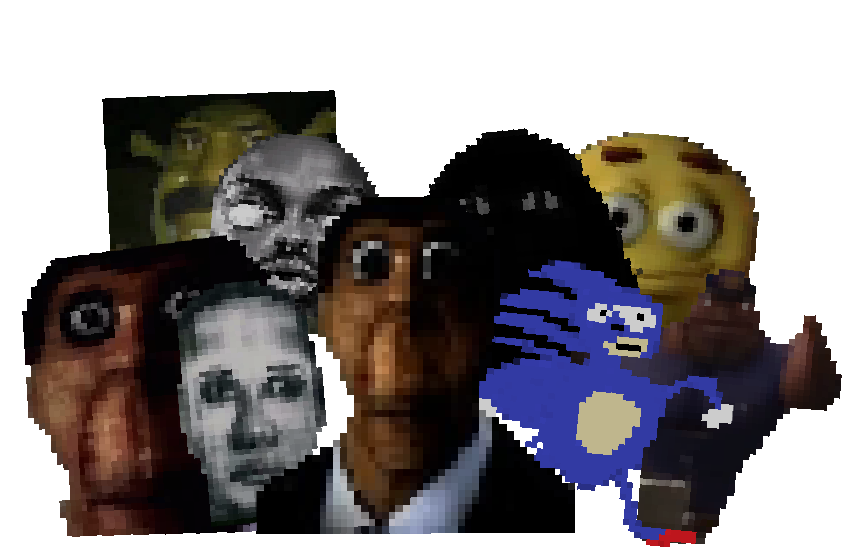
Nextbots are new creatures from the game Garry's Mod. They are 2D PNGs with funny looks and strange sounds, but they are fast and dangerous. Nextbots spawn in the overworld and there are different variants such as Obunga, Selene Delgado Lopez, Sanic, Wise Mystical Tree and many more! If a player is within 50 blocks of a Nextbot, it will immediately track them down, so they can see you even through walls. Obunga Watches and Angry Munci can do this even at much further distances. So they'll already be hunting you without you knowing. They are fast, fit through small hallways, kill instantly when attacking, are immune to almost all types of damage except player damage, and have a lot of health. They can also break shields, not sink on powder snow and are also fast in the water. To make them even more dangerous, Nextbots can also jump high and destroy blocks such as glass, wood, doors or leaves. If you want to make Nextbots disappear, use the new item “Configurater” and right-click a Nextbot with it. They should despawn, but this item is only available in Creative mode or through cheats.
- Config File not inculed.
- You are all allowed to use this mod in your modpacks!
- Do not port my mods without permission!
Available Versions
How to Install Digga's Nextbots on Your Server
Order Server
Order a Minecraft Java server with at least 3 GB RAM (4 GB recommended).
Set forge Loader
In the panel under "Egg", select the forge loader and matching Minecraft version (1.20.1).
Install Mod
Open the mod browser in the dashboard and search for "Digga's Nextbots". Click "Install" – done! Alternatively, upload the .jar via SFTP to the /mods folder.
Compatibility
Mod Loaders
Minecraft Versions
1.20.1, 1.19.4, 1.19.2
Server-side
✓ RequiredRecommended RAM
4 GB(min. 3 GB)Frequently Asked Questions
Digga's Nextbots server crashes on startup – what to do?
Most common cause: wrong forge version or insufficient RAM. Check the server log (latest.log) for "OutOfMemoryError" or "Mixin" errors. With Mado Hosting: ensure at least 3 GB RAM is allocated and the loader matches the mod version (1.20.1). You can switch loaders with one click in the panel.
Is Digga's Nextbots compatible with forge?
Digga's Nextbots officially supports forge for Minecraft 1.20.1, 1.19.4, 1.19.2. The Mado dashboard automatically detects incompatible loader combinations.
Server lagging with Digga's Nextbots – how to optimize performance?
Recommended RAM: 4 GB (per 8 players). Use /spark profiler to check if Digga's Nextbots consumes the most tick time. Common fixes: reduce server view-distance to 8-10, install "performant" or "starlight" as supplementary mods on Forge. With Mado Hosting, your server runs on NVMe SSDs with dedicated CPU cores for minimal latency.
Similar Mods
![[EMF] Entity Model Features](https://cdn.modrinth.com/data/4I1XuqiY/6e5bbd0d06b1741bfdab6c0cfab6de8fdaf0064c_96.webp)


Rent Modded Server
Install Digga's Nextbots with just one click on your server.