
Dimension Entity Blocker
Prevent custom entities from entering custom worlds, fully configurable. 阻止自定义实体进入自定义世界,完全可配置化
Screenshots
About this Mod
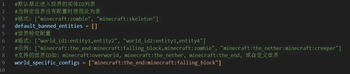
Custom entities can be prevented from entering custom worlds through simple configuration.
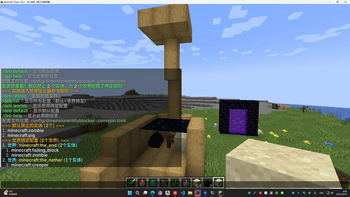
For example, adding falling block can prevent sand and dragon eggs from entering end from other worlds, thus effectively preventing the use of end portal to duplicate sand and dragon eggs.
Of course, you can add minecraft:player to prevent players from entering a particular world.
Command Help
/deb reload - Reload configuration file
/deb list - show all configurations (default + world specific)
/deb worlds - displays world specific configurations
/deb default - displays the default configuration
/deb help - displays this help message
Configuration file location: config/dimensionentityblocker-common.toml
Screenshots


可以通过简单的配置,阻止自定义实体进入自定义世界
比如给末地添加下坠的方块,可以防止沙子、龙蛋从其他世界进入末地,从而有效避免利用末地传送门刷沙子和龙蛋
当然你可以添加 minecraft:player 来阻止玩家进入某世界
命令帮助
/deb reload - 重载配置文件
/deb list - 显示所有配置(默认+世界特定)
/deb worlds - 显示世界特定配置
/deb default - 显示默认配置
/deb help - 显示此帮助信息
配置文件位置: config/dimensionentityblocker-common.toml
Available Versions
How to Install Dimension Entity Blocker on Your Server
Order Server
Order a Minecraft Java server with at least 3 GB RAM (4 GB recommended).
Set forge Loader
In the panel under "Egg", select the forge loader and matching Minecraft version (1.20.1).
Install Mod
Open the mod browser in the dashboard and search for "Dimension Entity Blocker". Click "Install" – done! Alternatively, upload the .jar via SFTP to the /mods folder.
Compatibility
Mod Loaders
Minecraft Versions
1.20.1
Server-side
✓ RequiredRecommended RAM
4 GB(min. 3 GB)Frequently Asked Questions
Dimension Entity Blocker server crashes on startup – what to do?
Most common cause: wrong forge version or insufficient RAM. Check the server log (latest.log) for "OutOfMemoryError" or "Mixin" errors. With Mado Hosting: ensure at least 3 GB RAM is allocated and the loader matches the mod version (1.20.1). You can switch loaders with one click in the panel.
Is Dimension Entity Blocker compatible with forge?
Dimension Entity Blocker officially supports forge for Minecraft 1.20.1. The Mado dashboard automatically detects incompatible loader combinations.
Server lagging with Dimension Entity Blocker – how to optimize performance?
Recommended RAM: 4 GB (per 8 players). Use /spark profiler to check if Dimension Entity Blocker consumes the most tick time. Common fixes: reduce server view-distance to 8-10, install "performant" or "starlight" as supplementary mods on Forge. With Mado Hosting, your server runs on NVMe SSDs with dedicated CPU cores for minimal latency.
Similar Mods




Rent Modded Server
Install Dimension Entity Blocker with just one click on your server.