
Disable Christmas Chests
Customize your Christmas experience!
Screenshots
About this Mod
Disable Christmas Chests
2025 versions are up with a bunch of new functionality!

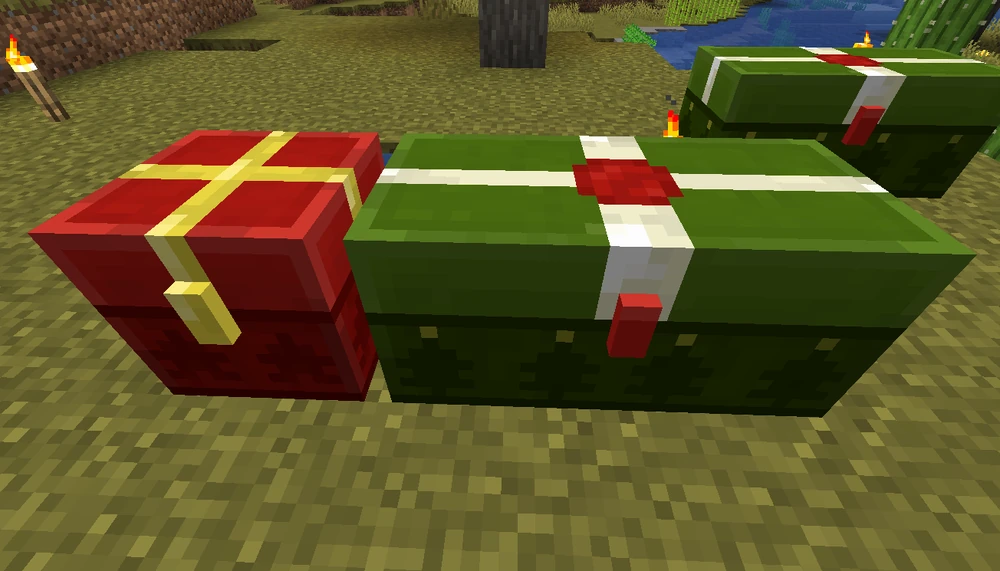
Client-side Fabric and NeoForge mod that prevents Mojang's Christmas chest textures from replacing the normal and trapped chest textures (Dec 24–26). Safe to leave installed all year; outside the holiday window nothing changes.
What it does
- Keeps all chest variants to their regular texture during the seasonal event.
- Client-only; servers do not need the mod.
- Default keybind
Glets you flip the festive textures on/off at runtime.
Configuration (new)
A config file is created on first launch at config/disable_christmas_chests.properties.
christmasEnabled=true: master switch; set tofalseto permanently suppress all festive textures regardless of date or keybind.christmasMode=DISABLE(default):Gdisables the Christmas textures while the event is active (Dec 24–26). Outside that window there are no seasonal textures to suppress.christmasMode=TOGGLE:Gbecomes a year-round toggle so you can enable the Christmas look whenever you want—handy for content creators or if you like the festive vibe in July.showRegularChestPresents=true: controls whether normal chests ever swap to presents when Christmas textures are currently enabled.showTrappedChestPresents=true: lets you hide the seasonal textures specifically for trapped chests while keeping other chests festive.showCopperChestPresents=true: same idea for copper chests (including its variants) so you can enable or disable their seasonal models independently; only present on Minecraft 1.21.9+ (The Copper Age update) where copper chests exist.
When you change the config file, just toggle the functionality on again by pressing the keybing once or twice.
You can rebind the hotkey in the controls menu if G conflicts with your setup.
Missing a version?
Open an issue with the Minecraft version you need: issue tracker.
Why a mod?
When Minecraft applies the Christmas textures, trapped chests look identical to normal chests. This mod keeps the original textures so you can still tell them apart (and so resource packs that remove the Christmas textures remain meaningful).
For contributing, please see CONTRIBUTING.md.
Available Versions
How to Install Disable Christmas Chests on Your Server
Order Server
Order a Minecraft Java server with at least 3 GB RAM (4 GB recommended).
Set fabric Loader
In the panel under "Egg", select the fabric loader and matching Minecraft version (1.21.11).
Install Mod
Open the mod browser in the dashboard and search for "Disable Christmas Chests". Click "Install" – done! Alternatively, upload the .jar via SFTP to the /mods folder.
Compatibility
Mod Loaders
Minecraft Versions
1.21.11, 1.21.10, 1.21.9 (+13 more)
Server-side
✗ UnsupportedRecommended RAM
4 GB(min. 3 GB)Frequently Asked Questions
Disable Christmas Chests server crashes on startup – what to do?
Most common cause: wrong fabric version or insufficient RAM. Check the server log (latest.log) for "OutOfMemoryError" or "Mixin" errors. With Mado Hosting: ensure at least 3 GB RAM is allocated and the loader matches the mod version (1.21.11). You can switch loaders with one click in the panel.
Is Disable Christmas Chests compatible with fabric and forge and neoforge and quilt?
Disable Christmas Chests officially supports fabric, forge, neoforge, quilt for Minecraft 1.21.11, 1.21.10, 1.21.9. Note: Forge and Fabric mods are NOT cross-compatible – pick one loader and stick with it. The Mado dashboard automatically detects incompatible loader combinations.
Server lagging with Disable Christmas Chests – how to optimize performance?
Recommended RAM: 4 GB (per 8 players). Use /spark profiler to check if Disable Christmas Chests consumes the most tick time. Common fixes: reduce server view-distance to 8-10, install "performant" or "starlight" as supplementary mods on Forge. With Mado Hosting, your server runs on NVMe SSDs with dedicated CPU cores for minimal latency.
Similar Mods

![[ETF] Entity Texture Features](https://cdn.modrinth.com/data/BVzZfTc1/af683d206d50b05258d865b0d6e4aa2f2cee12f2_96.webp)
![[EMF] Entity Model Features](https://cdn.modrinth.com/data/4I1XuqiY/6e5bbd0d06b1741bfdab6c0cfab6de8fdaf0064c_96.webp)



Rent Modded Server
Install Disable Christmas Chests with just one click on your server.